img not found!
3PL Logistics Company: How to Find the Right Fulfillment Partner

3PL Logistics Company: How to Find the Right Fulfillment Partner

What if outsourcing fulfillment gave you more visibility, not less? A 3pl logistics company can connect warehousing, inventory management, order fulfillment, shipping, and returns so each step works as part of one operation. If orders regularly pull your team away from core work or it’s difficult to see what inventory is available, the right partner can bring structure to the workflow while keeping you informed.

It’s reasonable to ask what you would hand off, what you would still oversee, and how the pieces fit together. A third-party logistics partner can handle agreed physical fulfillment tasks, while systems and regular communication help you follow orders and inventory. Silicon Valley Direct’s Remote Control system gives clients access to order and inventory information, order tracking, and order histories.

This guide explains what a 3PL does, how its services connect, and which operational pressures can make outsourcing worth considering. You’ll also learn what to assess in a provider’s operating model and what to prepare for a useful planning discussion, from order patterns and inventory needs to the visibility and control your team expects.

Key Takeaways

  • A 3pl logistics company handles agreed logistics activities while your business retains ownership of its products and customer relationships.
  • Map how inventory moves from receiving through shipping and reporting to identify where connected operations could help.
  • Compare in-house fulfillment and outsourcing by responsibility, staffing, visibility, flexibility, and process ownership.
  • Prepare product details, inventory records, order patterns, packaging needs, returns processes, and reporting priorities for a productive planning discussion.
  • Silicon Valley Direct brings fulfillment, warehousing, inventory management, shipping, and returns together with tools for operational visibility.

What Does a 3PL Logistics Company Do for a Business?

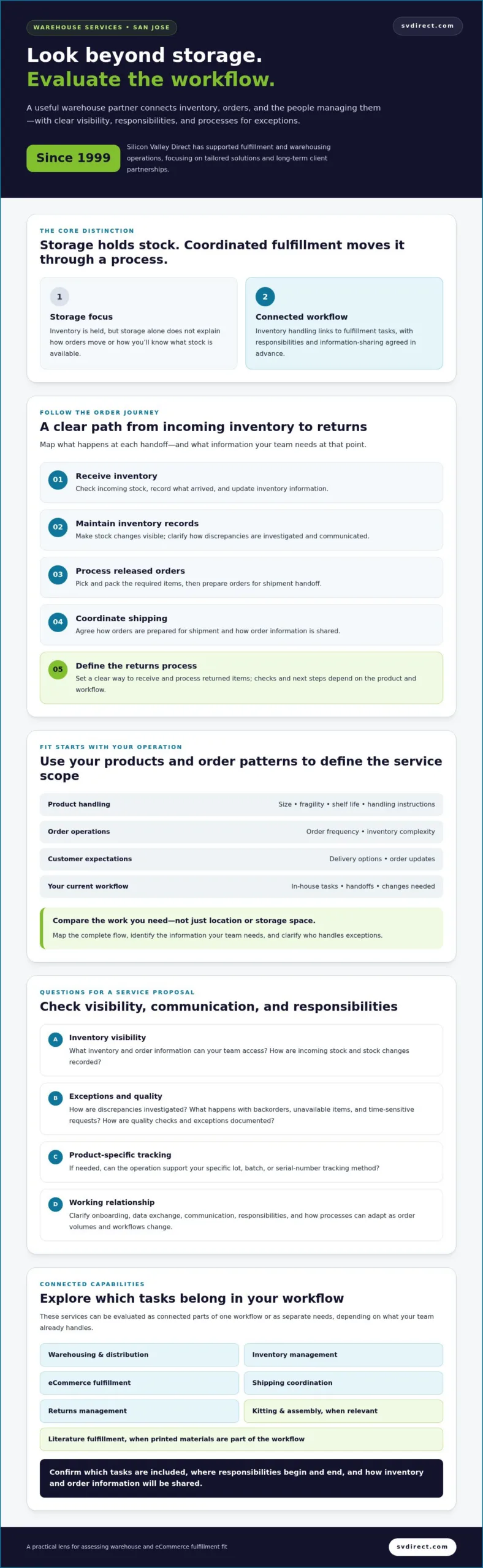
A third-party logistics (3PL) company performs logistics activities for another business. These activities can include storing products, maintaining inventory records, fulfilling orders, coordinating shipments, and managing returns. The product seller generally continues to own its merchandise and manage its customer relationships, while the 3PL carries out the operational tasks assigned to it.

This division lets a business delegate parts of fulfillment without handing over decisions about its products, brand, or customer experience. The scope depends on the business’s needs and the agreed operating model. A overview of third-party logistics explains the term more broadly. For an eCommerce business, the practical value often comes from connecting everyday inventory and order tasks.

Which logistics activities can a 3PL manage?

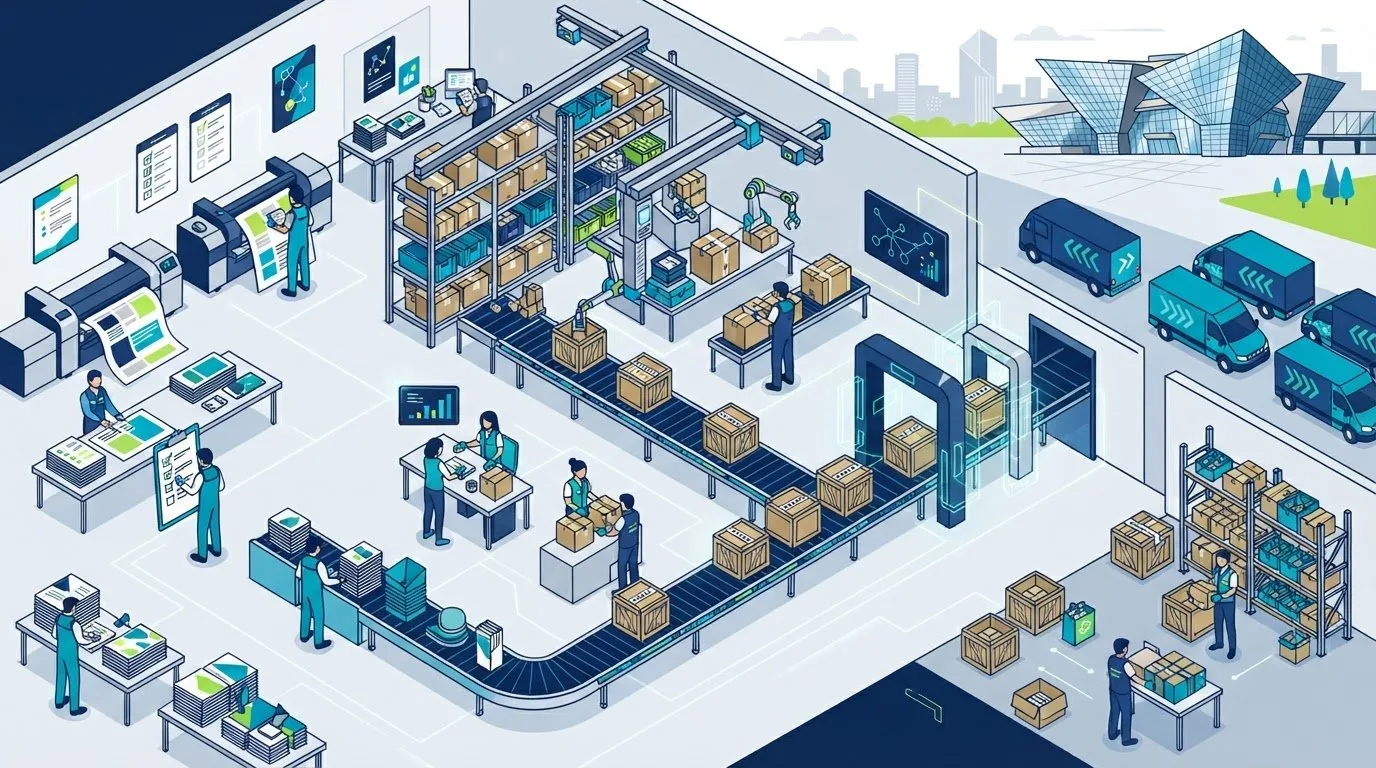
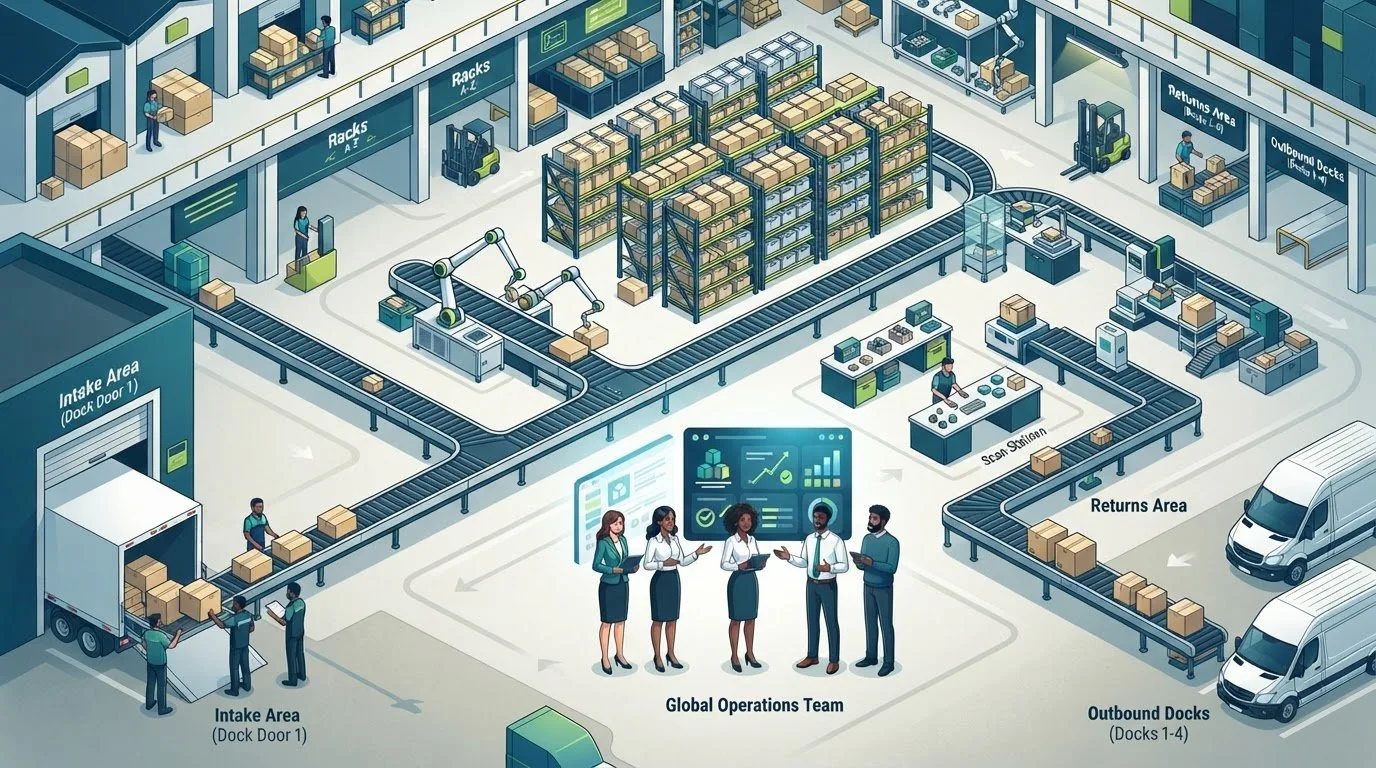
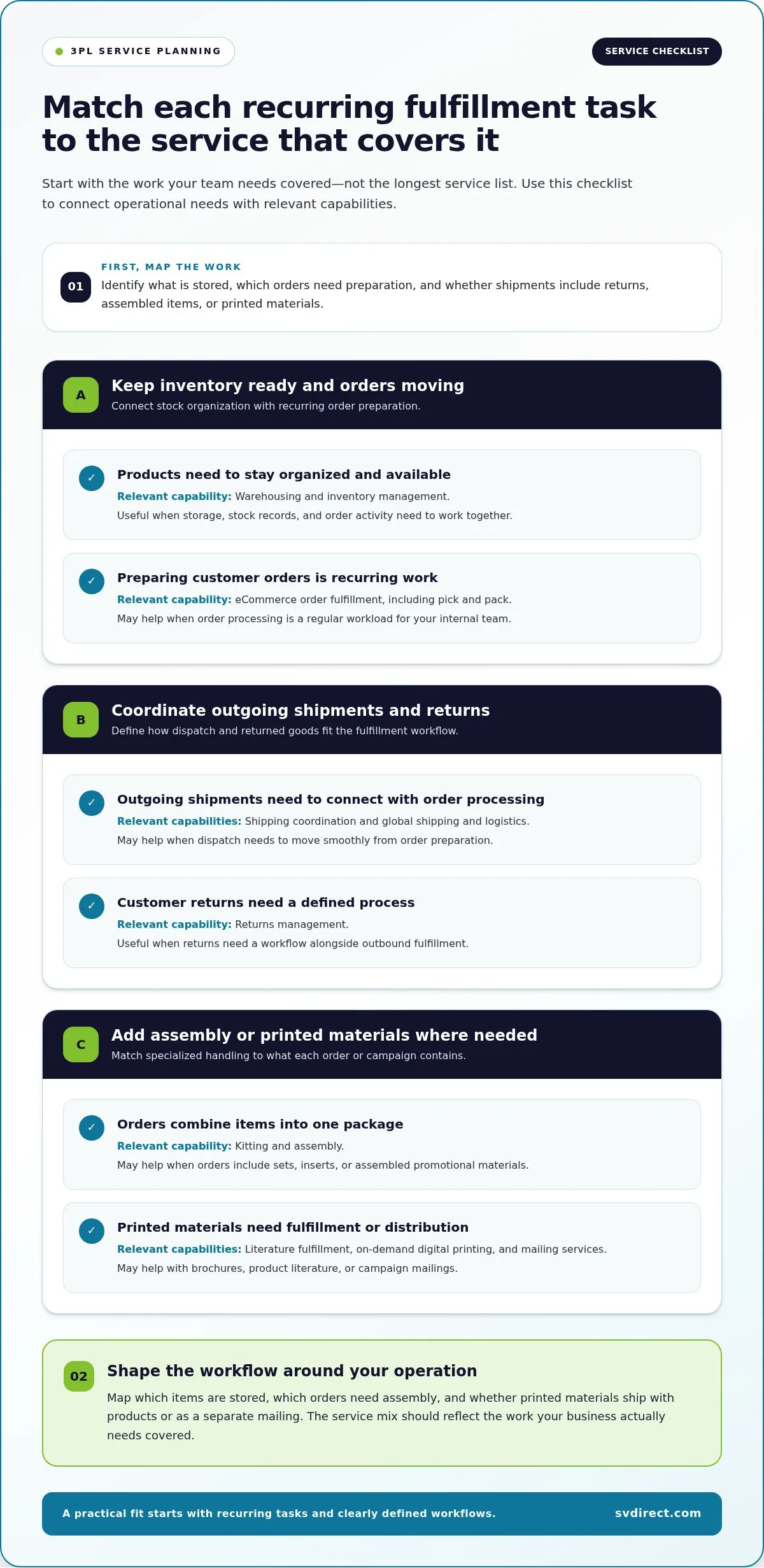
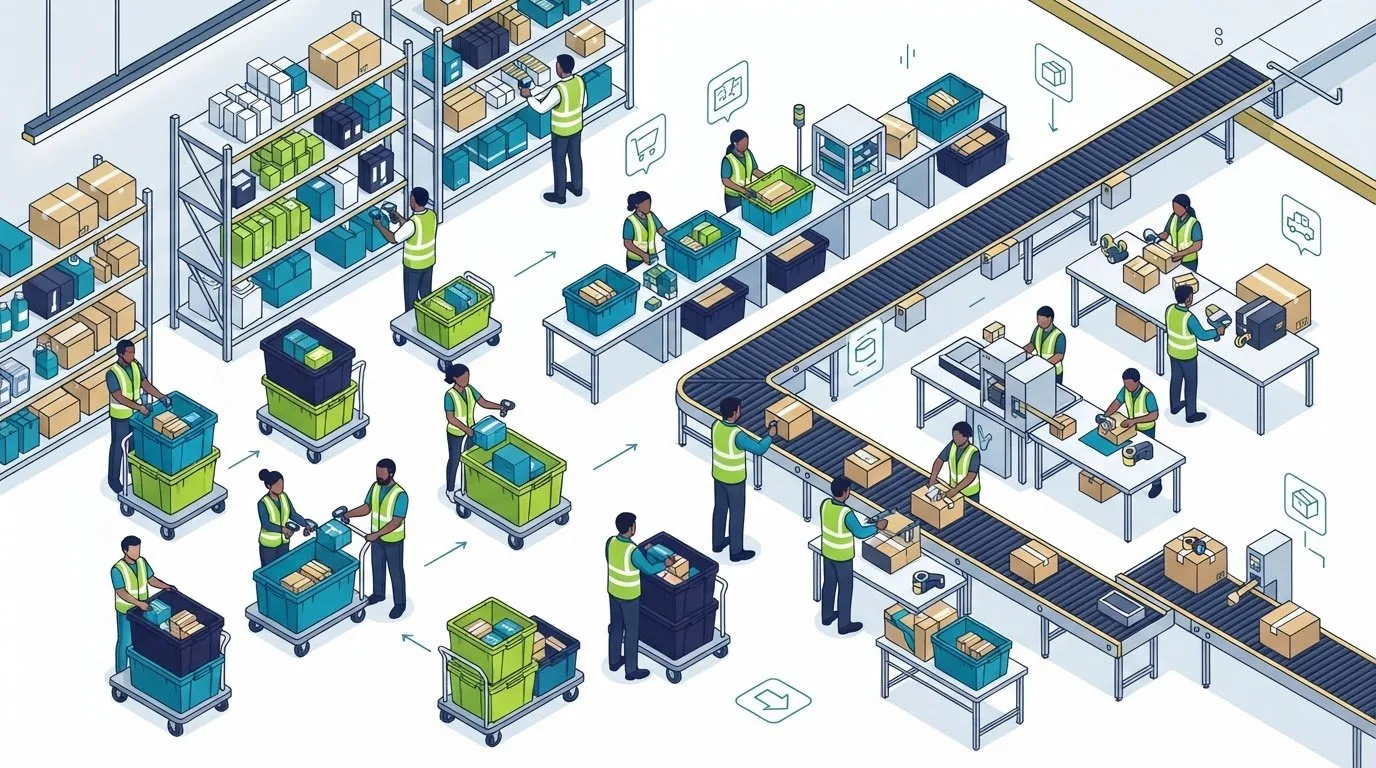
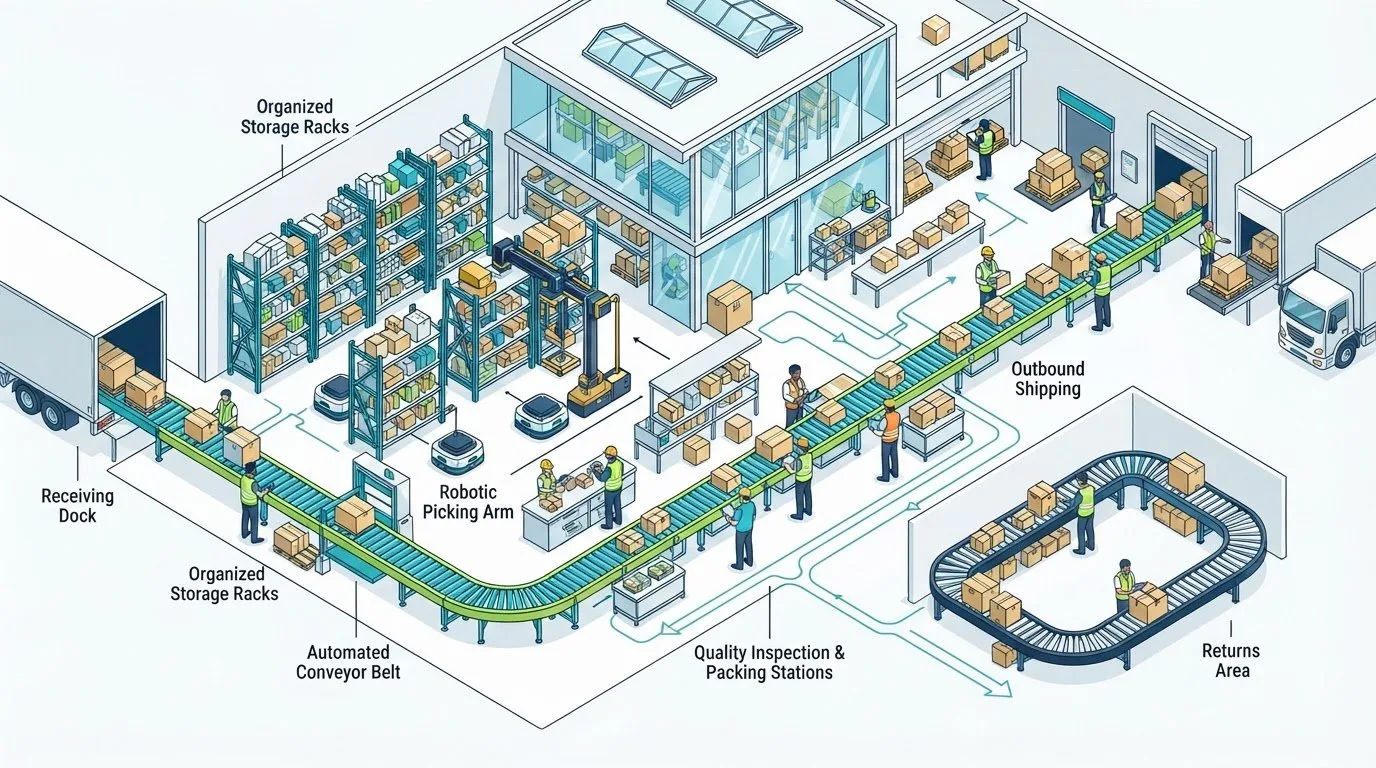
A 3PL can manage a connected sequence of work, from receiving stock to handling returns. Warehousing provides space for products, inventory management records what is available, fulfillment prepares orders, and shipping coordination moves them toward customers. Returns management handles products that come back into the operation.

  • Receive: Inventory arrives at the facility and is checked in.
  • Record: Product quantities and relevant stock details are added to inventory records.
  • Process: An order is received and matched to available inventory.
  • Pack: Products are prepared for shipment according to the agreed process.
  • Ship: The shipment is coordinated for delivery and its details recorded.
  • Report: Order and inventory information helps the business follow activity and identify what needs attention.

These steps rely on accurate handoffs. When an order comes in, inventory records help show whether the product is available. After the order is packed and shipped, its status can be updated so the business can follow its progress. Businesses can define responsibilities around their workflows instead of assuming every operation needs the same set of services. Silicon Valley Direct brings related logistics activities together through its 3PL fulfillment services.

How does a 3PL relationship differ from handling fulfillment in-house?

With in-house fulfillment, the business organizes its own people, facility, inventory processes, and daily order work. That gives the company direct control over operational details, but it also means staff time and management attention go toward keeping those processes running. When order volumes, inventory levels, or service needs change, the business may need to adjust its internal setup.

With outsourcing, the 3PL performs the responsibilities defined in the operating arrangement. The business still sets priorities for its products and customer experience and stays involved through agreed processes and information sharing. Outsourcing physical workflows doesn’t mean giving up oversight. It changes who handles specific tasks while the seller retains direction over its merchandise and customer relationships.

The practical distinction is where daily execution happens. In-house fulfillment keeps it within the company; a 3PL arrangement assigns selected logistics work to an external operating partner. Start by identifying which tasks to delegate and which decisions to retain, then define how information and exceptions will be handled.

How a 3PL Logistics Company Connects Inventory, Orders, and Shipping

A smooth fulfillment workflow depends on each operational step using accurate information from the one before it. A 3pl logistics company coordinates inventory and order activity so the team handling stock can prepare the right items and the business can follow what is happening. The Association for Supply Chain Management’s Understanding 3PL Logistics also describes the broader role of a 3PL in managing logistics activities.

Where inventory management fits into a 3PL workflow

Inventory management begins when products arrive and their quantities are recorded. These records become the reference point for checking availability as orders come in. Regular inventory checks help identify differences between recorded quantities and physical stock. Replenishment visibility helps a business plan when to send more products into the operation. Serial number tracking can also help identify individual products when that level of tracking is needed.

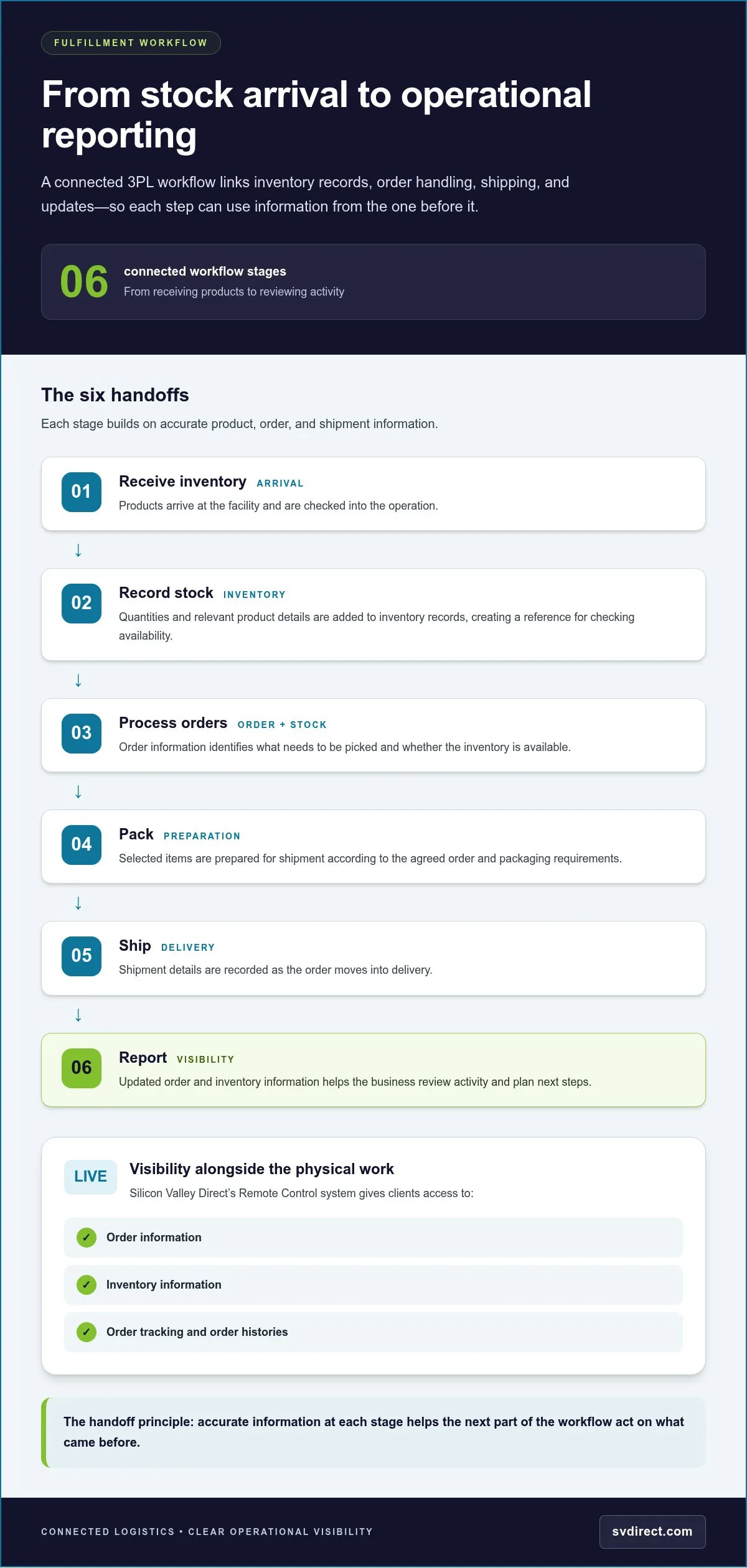
A connected workflow typically follows these steps:

  1. Receive inventory: Products arrive and are checked into the operation.
  2. Record stock: Quantities and relevant product details are added to inventory records.
  3. Process orders: Order information identifies what needs to be picked and whether stock is available.
  4. Pack: Selected items are prepared according to the agreed order and packaging requirements.
  5. Ship: Shipment details are recorded as the order moves into delivery.
  6. Report: Updated order and inventory information helps the business review activity and plan next steps.

Integrated 3PL fulfillment services connect these tasks across inventory and order operations. An order management system organizes customer-order information, while warehouse operations handle the physical work of locating, picking, packing, and preparing products. These systems have different roles. Sharing timely information helps keep them aligned.

How order data and reporting support operational visibility

Order data can show where an order is in the workflow, while shipment details indicate that it has moved into delivery. Inventory views add context, showing whether products are available, committed to orders, or due for replenishment. Operational visibility connects order status with inventory information, helping a business follow fulfillment activity and make informed decisions about stock.

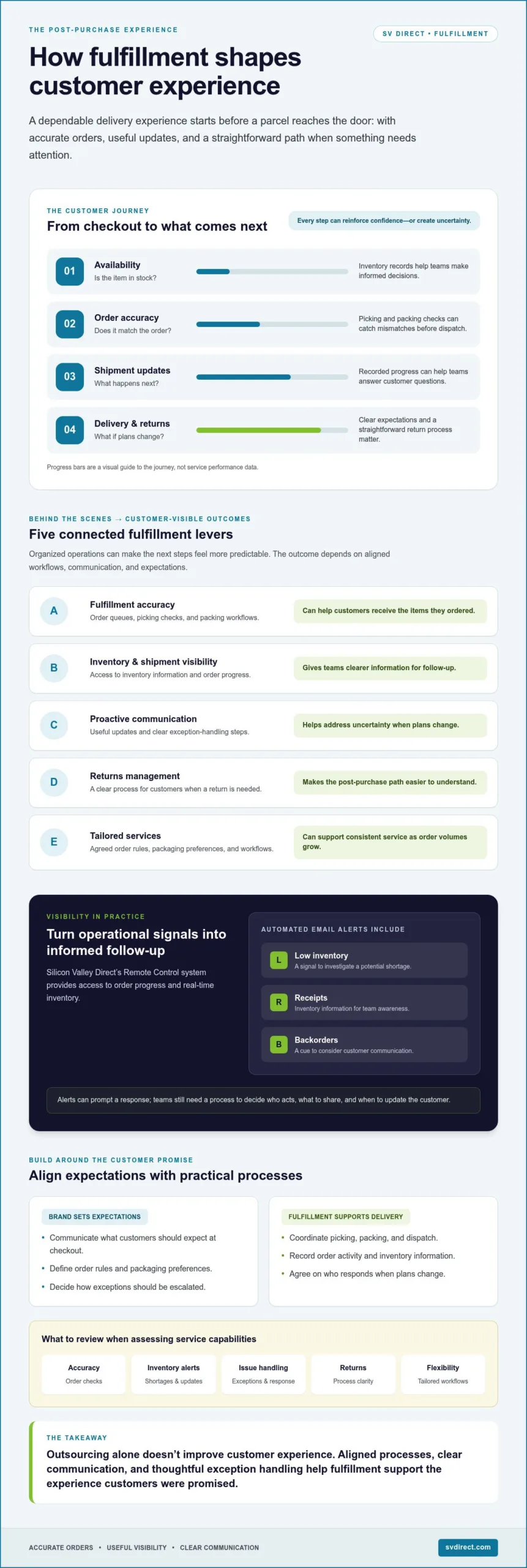
Silicon Valley Direct’s Remote Control is an online system for order and inventory visibility. It provides 24/7 access to order and inventory information, including order tracking and order histories, and can generate more than 120 standard reports. These tools help clients stay informed as fulfillment work moves through its operational steps.

To discuss how your order and inventory workflows could fit into a fulfillment plan, review Silicon Valley Direct’s fulfillment options.

3PL Logistics Company or In-House Fulfillment: How the Operating Models Compare

Choosing between in-house fulfillment and a 3pl logistics company isn’t simply a question of who packs each order. It’s a decision about where daily responsibilities sit, how your team stays informed, and how much operational capacity you want to manage directly. Outsourcing tasks doesn’t mean surrendering business decisions. You can define the work a logistics partner handles while retaining direction over your products, customer experience, and priorities.

Area In-house fulfillment 3PL operating model
Operational responsibility Your team manages receiving, storage, picking, packing, and shipping coordination. The 3PL handles the tasks assigned in the operating arrangement.
Staffing You schedule and support the people doing fulfillment work. The 3PL’s operations team performs the agreed logistics activities.
Visibility Your team accesses the records and updates used internally. Agreed reporting and communication keep you informed about activity.
Flexibility Changes depend on your available space, staff, and processes. The scope can be shaped around your operational needs and agreed responsibilities.
Process ownership Your business designs and maintains the fulfillment workflow. You set expectations and retain business decisions while the 3PL executes assigned steps.

When keeping fulfillment in-house may fit

Handling orders internally can make sense when you have suitable space, experienced staff, and workflows that remain manageable alongside other priorities. Your team can make direct adjustments to storage, packing, and daily order handling. That control comes with responsibility: you also need to coordinate staff coverage, maintain processes, keep inventory records current, and address operational issues as they arise. There’s no universal order-volume threshold for deciding when that balance should change.

When outsourcing logistics may be worth considering

Consider outsourcing when fulfillment regularly takes time away from product development, customer service, or other core work, or when inventory and order tasks have become difficult to coordinate. Bringing warehousing, fulfillment, inventory visibility, and shipping coordination into one agreed workflow can connect related operational steps. The right scope depends on what your business needs to delegate and what it wants to retain.

Visibility is part of the operating model, not an afterthought. Agree on which order and inventory information your team needs, how updates will be shared, and who handles questions or exceptions. This structure lets you monitor fulfillment without managing every physical task. Silicon Valley Direct takes a flexible, client-specific approach to fulfillment operations, aligning services with each client’s needs and maintaining communication throughout the working relationship.

Before deciding, map the time your team spends on fulfillment and identify which responsibilities need to stay under your direct control. Compare that workload with the oversight you expect from an outsourced arrangement. The goal is a workable division of responsibilities, with clear ownership of decisions and reliable visibility into operations.
3PL Logistics Company: How to Find the Right Fulfillment Partner

How to Prepare Your Business for a 3PL Logistics Company

A well-prepared handoff starts with a clear picture of how fulfillment works today. Before working with a 3pl logistics company, map how products move from arrival through storage, order processing, shipping, and returns. Note who handles each step, what information they use, and where delays or questions tend to arise. This gives both teams a practical starting point for defining responsibilities.

Accurate product identifiers, inventory records, and order details help a 3PL match incoming stock to the right products, process orders consistently, and keep operational records aligned. Gather the information your team already relies on, then separate confirmed requirements from decisions that still need to be made.

What operational information should you organize first?

Collect the working details behind your fulfillment process, not just a product list. Include how orders arrive, how staff recognize each item, and what customers expect when an order is packed or returned. A clear record helps surface gaps early and prevents assumptions from becoming process requirements.

  • Product data: Product names, identifiers, and other details your team uses to distinguish items.
  • Inventory records: Current quantities, storage notes, and the method used to track changes.
  • Order patterns: Order sources, common order combinations, and predictable changes in demand.
  • Packaging needs: Materials, instructions, or presentation requirements for different products or orders.
  • Current procedures: Steps for receiving, order handling, quality checks, and returns.

Mark each item as confirmed, under discussion, or undecided. For example, your team may have an established returns procedure but still need to decide what information it wants reported when returned goods arrive. This distinction focuses planning discussions on real decisions instead of treating every assumption as settled.

How to set expectations for communication and oversight

Decide what your team needs to see to stay confident in day-to-day operations. Identify the order, inventory, and shipment updates that matter most, then agree on how often they should be reviewed and how questions or exceptions will be raised. Assign a primary contact on your side, with a backup, so operational questions reach someone who can provide context and make or route decisions.

Set expectations for reporting cadence and quality-check responsibilities. Clarify which issues need prompt attention, who should receive an escalation, and what information will help resolve it. These details keep communication practical and give both teams a shared understanding of oversight. Silicon Valley Direct’s online order management tools support order and inventory visibility, helping clients follow activity as fulfillment progresses.

With the workflow mapped and information organized, you can discuss a handoff based on your products, order patterns, packaging, returns, and reporting priorities.

How Silicon Valley Direct Works as a 3PL Logistics Company

Silicon Valley Direct brings eCommerce fulfillment, warehousing, inventory management, shipping coordination, and returns management into a connected operating relationship. The goal is to align physical work with the order and inventory information clients need to oversee their business. Founded in 1999, the company combines logistics experience with a tailored approach to each client’s operation.

A connected fulfillment workflow with client visibility

Fulfillment involves more than moving a package. Inventory must be received and managed, orders prepared, shipments coordinated, and returns handled in a process that reflects the client’s products and requirements. Silicon Valley Direct works as an extension of the client’s team, coordinating these activities, keeping communication open, and applying quality checks as work moves through the operation.

Remote Control supports online visibility. Clients can use it to place orders, track their progress, review inventory, and access order histories and reporting. These views help teams follow activity across fulfillment and stock management, supporting their own planning and customer-service decisions.

Every working relationship has its own operational context. A business managing a steady catalog may focus on stock visibility and order status, while another may need closer coordination around returns or special handling. Silicon Valley Direct shapes the operating approach around each client’s needs rather than treating every fulfillment workflow as identical. Client testimonials share examples of service experiences described by businesses that work with the company.

Flexible support for complex fulfillment needs

Some programs require more than standard pick, pack, and ship tasks. Silicon Valley Direct also provides kitting and assembly, literature fulfillment, and on-demand digital printing. These services support workflows where materials need to be assembled, printed, or fulfilled alongside product orders. The right combination depends on how the client’s operation is structured and which steps it wants handled.

Clear communication connects the details. Clients and the operations team can align on product requirements, order priorities, quality checks, reporting, and how to raise questions when circumstances change. Proactive communication gives both teams a way to discuss issues and coordinate next steps. The relationship is designed to keep clients involved, with operational support tailored to the work rather than a one-size-fits-all arrangement.

Choosing a 3pl logistics company means deciding how its people, processes, and visibility tools will fit into your business. Silicon Valley Direct brings those elements together through coordinated fulfillment services, online order and inventory access, and direct communication. A conversation about your workflow can clarify which responsibilities to delegate and what oversight your team wants to retain.

Make Your Next Fulfillment Decision with Clarity

The next step doesn’t have to be a sweeping operational change. Identify the fulfillment tasks that take the most attention, the information your team needs to stay in control, and the responsibilities you want to keep in-house. That gives you a practical basis for deciding whether a 3pl logistics company fits your business and how an arrangement could support your priorities.

A useful planning conversation turns those priorities into a clear picture of the workflow, communication, and oversight your business needs. Silicon Valley Direct can discuss a tailored approach with you, based on the fulfillment work you want to delegate and the visibility your team expects.

A clear operating plan helps fulfillment support your next stage of growth while your team stays focused on its core work.

Frequently Asked Questions

Does a 3PL logistics company own the inventory it stores?

No. A 3PL generally stores and handles inventory on behalf of the business that owns the products. The seller typically retains ownership while the 3PL performs agreed tasks such as recording stock, preparing orders, and coordinating shipments. Define responsibilities and ownership terms in the business arrangement. For example, specify how inventory discrepancies, damaged goods, and returned items are recorded and communicated.

Is a 3PL the same as a 4PL?

No. A 3PL typically performs logistics activities such as warehousing, fulfillment, or shipping coordination. A 4PL is generally described as taking a broader coordinating role across a company’s supply chain, which may include managing relationships among multiple logistics providers. The terms can be used differently across the industry, so focus on the actual responsibilities in an operating arrangement rather than the label alone.

Can a 3PL support both B2B and eCommerce orders?

Yes. A 3PL can support business-to-business orders as well as direct-to-consumer eCommerce orders, depending on its services and the agreed workflow. Requirements may differ: a business shipment could involve a larger quantity going to one destination, while an online order may need individual-item picking and packing. Silicon Valley Direct provides eCommerce fulfillment and shipping coordination, with processes shaped around the order types involved.

Can a business keep control of its branding when using a 3PL?

Yes. Outsourcing fulfillment doesn’t mean giving up control of your brand. Your business can define the packaging, inserts, product presentation, and customer-facing instructions it wants followed, then align those requirements with the fulfillment process. For example, provide clear guidance on which materials go with particular products or order types. Agreeing on these details helps keep the brand experience consistent as orders are prepared.

What happens when a fulfillment error occurs?

A fulfillment error should be documented, investigated, and addressed through the process agreed with the logistics partner. Start by identifying the affected order and gathering details such as the item expected, the item received, and any shipment information. A designated contact can route the issue to the right team, coordinate a response, and help determine whether inventory records or work instructions need updating to reduce the chance of similar errors.

Can a small business use a 3PL logistics company?

Yes. A small business can use a 3PL when managing storage, orders, and shipping internally takes attention away from other priorities or becomes difficult to coordinate. The right arrangement depends on the work to delegate, the products involved, and the visibility the business needs. Silicon Valley Direct works with businesses of different sizes, so smaller companies can discuss a fulfillment approach aligned with their operational needs.
Inventory Accuracy Best Practices: A Practical Checklist for 2026

Inventory Accuracy Best Practices: A Practical Checklist for 2026

An order is ready to ship, but the system says there’s no stock in the pick location. The team checks another shelf, finds the item, and loses time tracing how the records fell out of sync. Inventory accuracy best practices help prevent these disruptions by connecting disciplined routines with clear, timely inventory visibility.

If system quantities don’t consistently match physical stock, you’re not alone in facing the challenge. Each discrepancy can affect order decisions, replenishment, and customer service. The answer isn’t simply to count more often. Teams need a repeatable way to spot differences, investigate what caused them, and correct the underlying process.

This practical checklist will help you build that routine, strengthen inventory controls, and reduce recurring errors. We’ll cover how to organize counts, review inventory transactions, handle exceptions, and use reports and alerts to guide follow-up. Accurate records and better visibility help your team make more confident decisions about orders and replenishment.

Key Takeaways

  • Use inventory accuracy best practices to establish clear records, shared responsibilities, and consistent routines for stock movements.
  • Record receiving, picking, packing, and returns promptly so inventory changes aren’t missed or misidentified.
  • Pair inventory software with disciplined processes. System visibility depends on reliable transaction data.
  • Use daily checks, scheduled counts, and management reviews to spot discrepancies and investigate recurring causes.
  • Review stock status, transaction history, and alerts to prioritize exceptions and support order and replenishment decisions.

Inventory Accuracy Best Practices Start with Clear Records and Definitions

Inventory accuracy means more than having the right total in a system. “Inventory accuracy is the agreement between recorded inventory details and verified stock on hand, including its identity, quantity, location, condition, and availability status.” This definition gives teams a practical standard for comparing system records with physical stock.

Clear definitions help everyone record stock consistently and make discrepancies easier to investigate. A mismatch might involve the count, item identity, storage location, or whether stock can be allocated to an order. These distinctions are central to inventory accuracy best practices, because a single “on hand” number can conceal differences between usable, reserved, damaged, or returned goods. The broader principles of inventory control also show why dependable records and consistent methods matter to daily operations.

Which inventory details need to match?

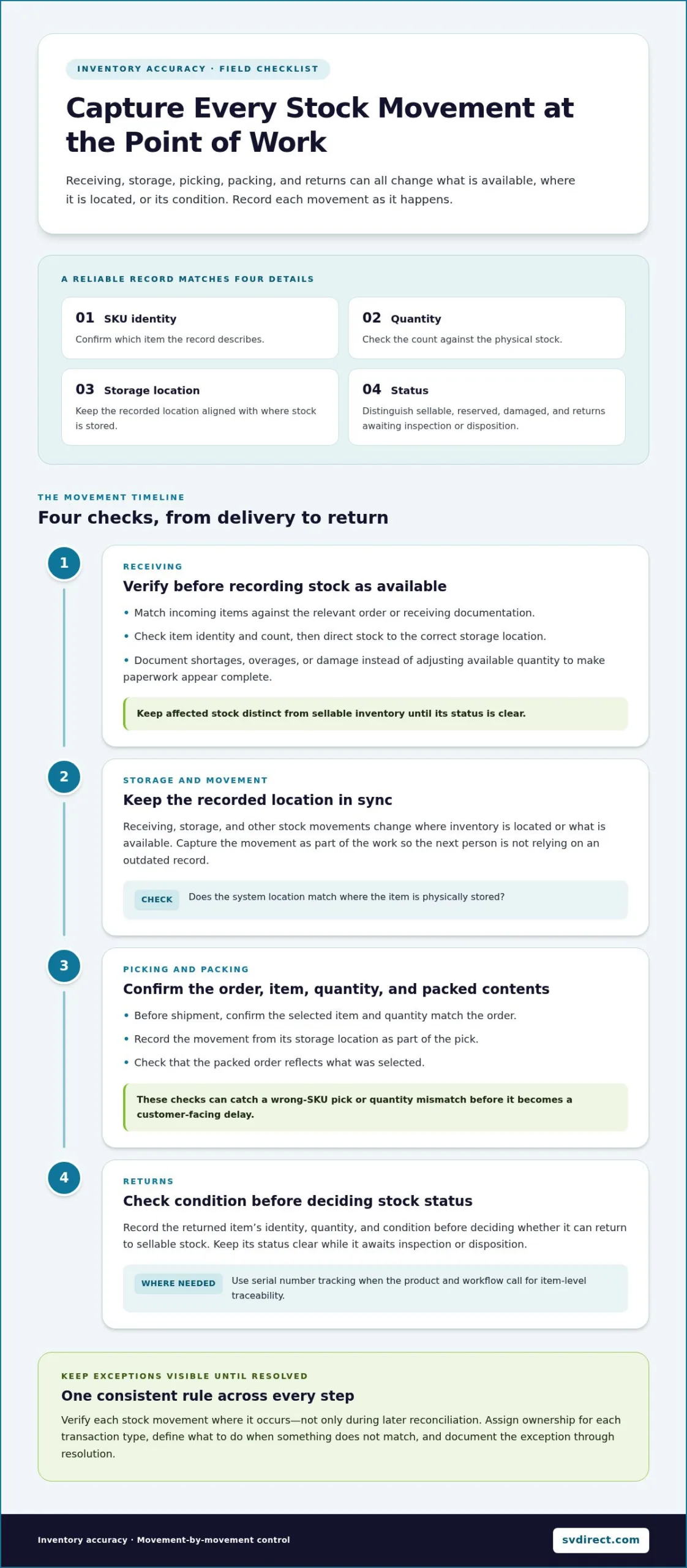
For each stock record, check four essentials: SKU identity, quantity, storage location, and status. Status should distinguish sellable goods from reserved stock, damaged items, and returns awaiting inspection or disposition. Otherwise, a system may show stock that exists physically but isn’t ready to fulfill an order.

For example, a shelf may hold ten units, and the system may also show ten. But if the units belong to SKU B and the record assigns them to SKU A, the quantity matches while the inventory record is still wrong. A consistent item-identification process helps prevent this mismatch from creating false availability.

How do inventory discrepancies affect fulfillment?

Incorrect availability can lead teams to accept orders for items they can’t locate or allocate. That can result in backorders, customer updates, and avoidable delays. If the system understates stock, teams may miss orders they could have fulfilled. Both situations make it harder to give customers reliable information.

Discrepancies can also distort replenishment decisions. An overstated quantity may postpone a needed reorder, while an understated quantity can prompt unnecessary replenishment. When records are unreliable, staff spend time checking shelves and tracing transactions instead of acting on clear information. Consistent definitions give teams a shared basis for investigating mismatches, planning replenishment, and making fulfillment decisions with greater confidence.

Inventory Accuracy Best Practices for Receiving, Picking, and Returns

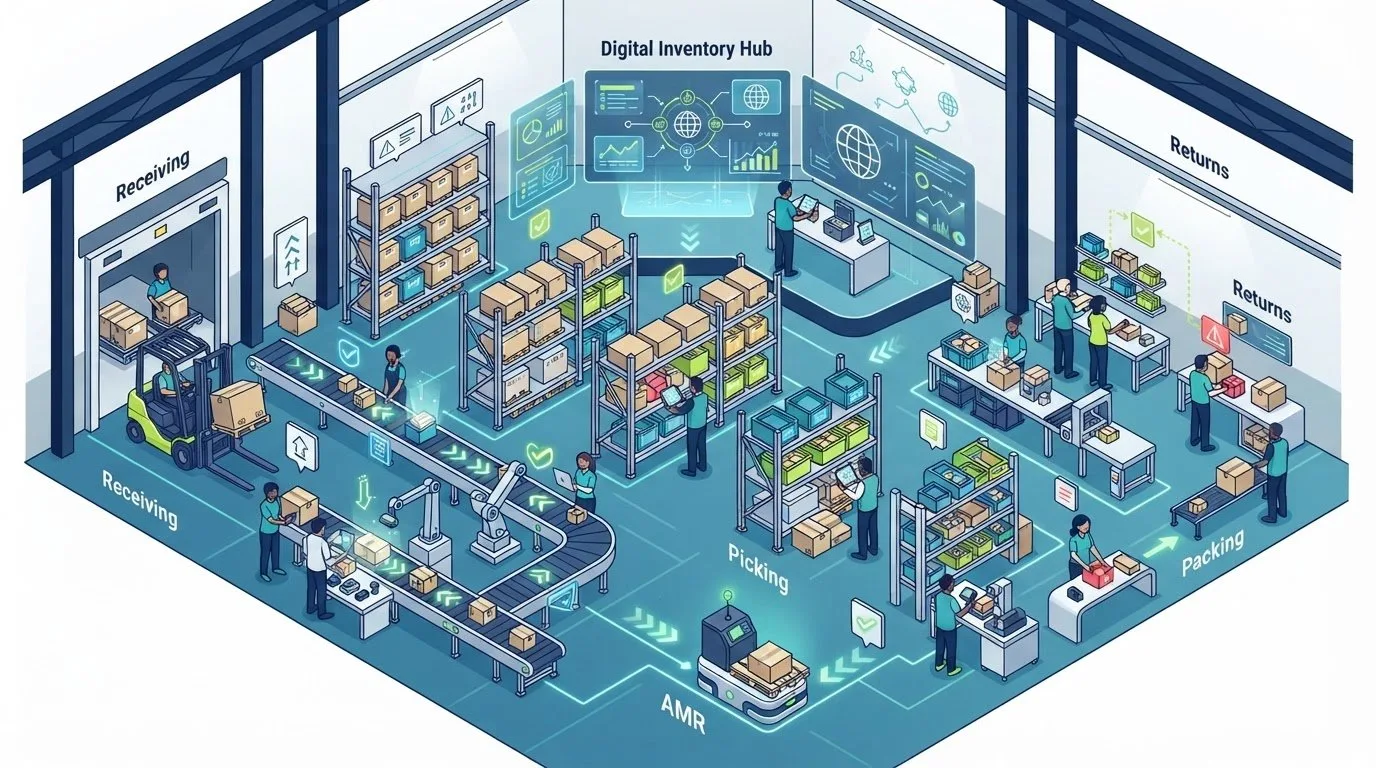
Inventory records stay dependable when teams capture stock movements as part of the work, rather than leaving the updates for later. Receiving, storage, picking, packing, and returns all change what’s available, where it’s located, or what condition it’s in. A missed or delayed update at any step can leave the next person working from an outdated record.

Verify each stock movement where it occurs, not only during later reconciliation. Assign ownership for recording each type of transaction, define what to do when something doesn’t match, and keep the exception visible until it’s resolved. The discussion in Inventory Accuracy: Essential, but Often Overlooked reinforces why routine inventory checks matter. Strong day-to-day controls also help prevent discrepancies from accumulating between reviews.

What checks improve receiving accuracy?

At receiving, match incoming items against the relevant order or receiving documentation. Verify the item identity and count before recording the stock as available, then direct it to the correct storage location. If a delivery contains a shortage, overage, or damaged item, record the exception rather than adjusting available quantity to make the paperwork appear complete.

Document the difference with enough detail for follow-up. This helps the team resolve the immediate issue and spot recurring process gaps. Keep affected stock distinct from sellable inventory until its status is clear.

How can picking, packing, and returns controls reduce errors?

Before shipment, confirm that the selected item and quantity match the order. Record the movement from its storage location as part of the pick, then check that the packed order reflects what was selected. These steps help catch a wrong-SKU pick or quantity mismatch before it becomes a customer-facing delay.

Returns need the same care. Record the item identity, quantity, and condition before deciding whether it can return to sellable stock. Where the product and workflow call for item-level traceability, serial number tracking can connect a specific unit to its inventory record.

These inventory accuracy best practices work best when exception handling is documented and ownership is clear from one step to the next. For teams coordinating inventory management and eCommerce fulfillment, discussing a tailored fulfillment workflow can be a practical next step toward consistent transaction controls.

Why Inventory Software Alone Cannot Guarantee Inventory Accuracy

Inventory software can show recorded stock, organize transaction history, and make exceptions easier to spot. But it can’t record a movement that staff never enter or correct an item identified under the wrong SKU. The system reflects the information it receives. Reliable visibility therefore depends on accurate inputs, clear ownership, and consistent work practices alongside the technology.

Barcode and RFID workflows can support faster identification and transaction capture, but they aren’t substitutes for process discipline. If an item has the wrong identifier, a scan is skipped, or a movement is recorded against the wrong location, the resulting data can still be inaccurate. Strong inventory accuracy best practices pair useful tools with staff training, documented steps, and a defined way to resolve exceptions.

What causes inventory records to drift from physical stock?

Common causes include delayed transaction entry, selecting the wrong item, entering an incorrect quantity, and putting stock in a different location from the one recorded. Returns may be recorded without their condition, damaged goods may remain listed as sellable, and transfers or manual adjustments may be missed or entered incorrectly.

Not every mismatch points to a system-wide problem. A one-time counting mistake may be isolated. Repeated errors around the same task, item, or location suggest a process gap, such as unclear instructions or a step that’s routinely skipped. The distinction matters: correcting a single record fixes the immediate count, while correcting the recurring cause helps prevent the next discrepancy.

How should teams investigate a discrepancy?

Start with evidence, not an immediate system adjustment. Recount the affected item at the recorded location, then check nearby or designated storage locations if it isn’t there. Compare the verified physical quantity with the system record before making a correction.

Next, review relevant recent activity, including receipts, picks, returns, transfers, and manual adjustments. Look for a missed transaction, wrong item or location, or a status change that wasn’t recorded. Then document the confirmed cause and corrective action. This creates a useful record for future reviews and helps managers distinguish an isolated error from a pattern.

  • Verify: Recount the stock and confirm its identity and location.
  • Trace: Review the transactions that could explain the difference.
  • Correct: Update the record only after confirming the cause.
  • Prevent: Record the process change or follow-up that addresses repeat errors.

With clear investigation ownership, teams can use system visibility to guide timely checks while keeping people accountable for validating what happened on the floor.

Inventory Accuracy Best Practices: A Practical Checklist for 2026

A Repeatable Inventory Accuracy Checklist for Daily and Periodic Reviews

A reliable review routine doesn’t depend on one large count or a single person remembering every adjustment. Combine daily transaction checks, scheduled counts, and management review so teams catch issues early, verify the facts, and learn from recurring discrepancies. Keep the steps consistent, and set the schedule around your operation’s inventory volume and priorities.

What belongs in a daily inventory accuracy routine?

Review receipts, shipments, returns, transfers, and adjustments to confirm that completed movements appear in the system of record. Then check low-stock, backorder, and other exception alerts. Assign an owner and next action to each unresolved item so an alert leads to a decision rather than sitting in an inbox.

At the end of the review, carry open exceptions forward with a clear status, the last action taken, and the person who owns the next step. This gives the next shift or review a useful starting point. Timely online order and inventory visibility can help teams see current records and follow up on exceptions.

How should teams organize cycle counts and follow-up?

Cycle counting means checking selected inventory on a recurring schedule instead of relying only on a full physical count. Set a cadence that fits the operation, then prioritize items based on practical risk factors such as fulfillment importance, movement, and discrepancy history. Avoid applying a single threshold to every product if different items create different operational concerns.

For each count, compare the verified quantity with the system record. If they differ, investigate before adjusting the record: confirm the item and location, then review relevant transactions. Document the confirmed cause and correction. If the same issue appears again, discuss it with the responsible team and update the relevant process, not just the quantity.

Use management review to look beyond individual variances. Check whether open exceptions are being resolved, whether particular items or process steps recur in discrepancy records, and whether teams are following the agreed routines. Keep the review focused on useful follow-up, with clear ownership for any process changes.

  • Daily: Check transaction updates, alerts, and unresolved exceptions.
  • On schedule: Count selected inventory and investigate variances before correction.
  • At review: Look for recurring causes and assign process improvements.

Count, compare, investigate, correct, document, and review. This sequence turns inventory accuracy best practices into a repeatable control. It helps teams make evidence-based corrections and strengthen the routine over time.

How Visibility and Managed Fulfillment Support Inventory Accuracy

Good inventory visibility helps teams move from noticing a mismatch to investigating it. Current stock information shows what the system records now, while order histories and reports can help trace activity around a discrepancy. Together, they give staff context for checking whether a receipt, order, or other transaction explains the difference. Visibility doesn’t replace physical verification, but it helps focus follow-up.

What should teams look for in inventory visibility?

Look for current inventory information, searchable order histories, and reports that help teams review activity and exceptions. Alerts can also prompt timely attention: low-inventory notices support replenishment follow-up, receipt alerts help staff confirm incoming stock is recorded, and backorder alerts can flag orders that need review.

Silicon Valley Direct’s Remote Control™ online system provides 24/7 access to real-time order and inventory information, order histories, and reports. It can generate over 120 standard reports, with automated email alerts for low inventory levels, receipts, and backorders. These capabilities give teams a clearer starting point for investigation and follow-up. Learn more about remote order management.

How can a fulfillment partner reinforce inventory controls?

Inventory management and fulfillment work best as coordinated operations. Consistent transaction routines help keep system records aligned as stock is received, stored, picked, and shipped. Clear exception handling and direct communication also help teams understand what needs attention instead of relying on a system alert alone.

Silicon Valley Direct provides inventory management and eCommerce fulfillment, supported by workflows tailored to operational needs. Product fulfillment can include serial number tracking when item-level traceability is relevant. The company combines online visibility with customer service to help teams follow inventory activity and manage exceptions.

For operations teams looking to align inventory controls with order fulfillment, a coordinated eCommerce fulfillment workflow can support more consistent transaction records. These practical inventory accuracy best practices connect visibility to accountable follow-up, helping teams make informed decisions about stock and orders.

Build Inventory Confidence Into Every Fulfillment Step

Inventory accuracy best practices start with clear records and consistent habits. Verify stock movements as they happen, distinguish sellable inventory from reserved or damaged goods, and give discrepancies a repeatable path from investigation to correction.

Daily transaction reviews and scheduled cycle counts help teams catch mismatches before they affect orders or replenishment. When a variance appears, check the physical stock and transaction history, document the cause, and address any process that could make the error recur. Software supports this work, but reliable records still depend on people following clear procedures.

Silicon Valley Direct’s Remote Control™ system provides 24/7 inventory visibility and order history access. Automated email alerts cover low inventory, receipts, and backorders, while more than 120 standard reports help teams review activity and exceptions. Clearer information gives your team a stronger starting point for timely follow-up.

With a steady routine and the right visibility, your team can make inventory decisions with greater confidence and keep fulfillment moving forward.

Frequently Asked Questions

What does inventory accuracy mean?

Inventory accuracy is how closely inventory records match the stock physically available. The match includes more than quantity: teams also need the correct item identity, storage location, and status. For example, a unit recorded under the wrong SKU is inaccurate even if the total count is right. Likewise, damaged or reserved stock shouldn’t appear as sellable inventory. Checking each detail gives teams a clearer basis for fulfillment and replenishment decisions.

How often should a business check inventory accuracy?

Set a schedule based on inventory risk, how actively items move, and patterns in past discrepancies. Cycle counts let teams verify selected items during regular operations, while periodic broader reviews provide a wider view of stock records. Items that are operationally important or have recurring mismatches may need closer attention. Review the schedule as activity and discrepancy trends change rather than relying on one universal frequency.

What causes inventory discrepancies?

Discrepancies can start during receiving, picking, returns, or transfers, particularly when an item or quantity is recorded incorrectly. Damage can also leave stock listed as sellable, while delayed data entry can make records lag behind physical movements. Misidentifying an item or placing it in an unrecorded location creates another mismatch. Before adjusting a record, recount and review relevant transactions to identify the cause. A correction without investigation may leave the underlying process problem in place.

Can inventory software improve inventory accuracy on its own?

Software improves visibility, organizes transaction records, and can alert teams to exceptions, but it can’t correct a movement that wasn’t entered or an item recorded under the wrong identity. Inventory accuracy best practices pair system tools with reliable source transactions, trained teams, clear ownership, and documented exception follow-up. For example, a barcode workflow only helps if the right item is identified and the scan is completed at the correct process step.

How do cycle counts improve inventory accuracy?

Cycle counts improve accuracy by checking selected items on a recurring schedule instead of relying only on a full physical count. Teams compare the verified quantity with the system record and investigate any variance before making a correction. Documenting what changed and why creates a useful record for future reviews. If counts reveal the same issue repeatedly, teams can review the related task or process and address the cause, not just the individual mismatch.

What should a team do when physical stock does not match the system?

Recount the item and verify its location before changing the system record. Then review relevant transaction history, including receipts, picks, returns, transfers, and adjustments, to find evidence of what happened. Investigate the likely cause, confirm the correct quantity and status, and follow the team’s authorization process for making a correction. Document the cause and action taken. This creates a clear record for follow-up and helps teams identify repeat discrepancies.

How can a fulfillment partner help maintain inventory accuracy?

A fulfillment partner can coordinate inventory management with order processing, apply consistent transaction routines, and give teams clearer information for investigating exceptions. Silicon Valley Direct’s Remote Control™ system provides 24/7 access to real-time inventory information and order histories. It can generate over 120 standard reports, and automated email alerts cover low inventory, receipts, and backorders. These tools support timely follow-up, while clear communication and consistent workflows help keep records useful for operational decisions.

International Ecommerce Fulfillment: A Practical Guide to Choosing the Right Solution

International Ecommerce Fulfillment: A Practical Guide to Choosing the Right Solution

What if the hardest part of serving international customers isn’t getting orders across borders, but keeping every step visible and coordinated? International ecommerce fulfillment connects order processing, inventory, shipping coordination, and returns in one operation. When responsibilities or updates are unclear, even a well-planned shipment can become difficult to manage.

Choosing a solution means weighing more than shipping options. You need an operating model that fits your products and order flows, along with clear communication and enough visibility to oversee day-to-day activity. Outsourcing doesn’t have to mean losing sight of your inventory or customer orders.

This guide explains centralized, distributed, and hybrid fulfillment models, then walks through workflows and capabilities to consider when comparing them. You’ll learn how to assess fit as your requirements change, from inventory management and returns to reporting and partner communication. Silicon Valley Direct’s Remote Control system provides 24/7 access to order activity, inventory, order histories, and more than 120 standard reports, supporting informed oversight while our team works alongside yours.

Key Takeaways

  • Distinguish fulfillment operations from international shipping so you can map responsibilities across each stage of an order.
  • Follow the flow from order data and inventory status through dispatch, tracking, and returns to see where clear information supports better decisions.
  • Compare centralized, distributed, and hybrid models against your inventory needs, operational complexity, and visibility requirements.
  • Assess international ecommerce fulfillment by looking at your order profile, products, workflows, reporting, communication, exception handling, and returns.
  • See how Silicon Valley Direct coordinates order processing, inventory, warehousing, and global shipping through workflows tailored to each client.

What International Ecommerce Fulfillment Covers, and Where Shipping Fits

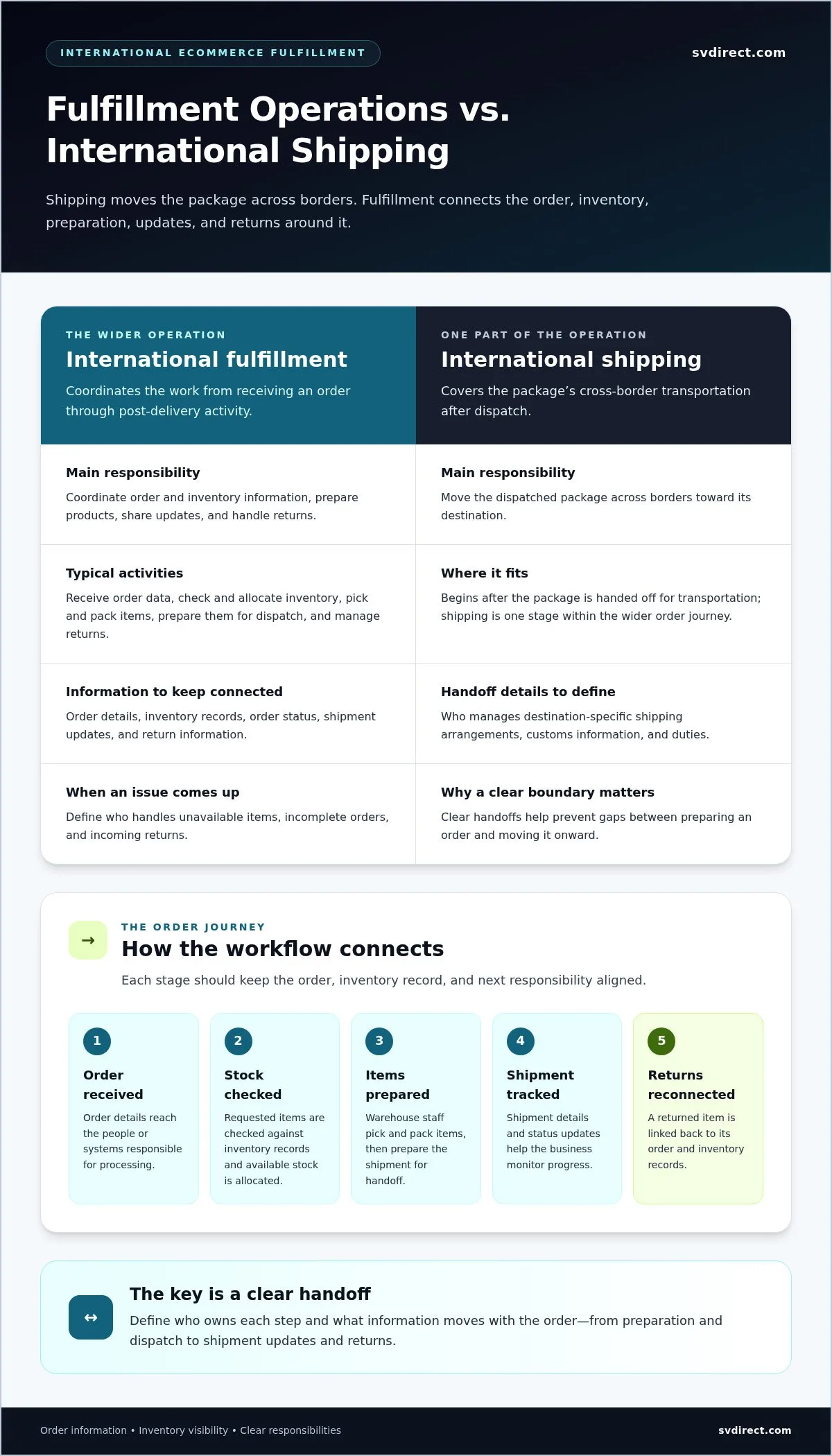
International ecommerce fulfillment is the coordinated work of receiving and processing customer orders, managing inventory, preparing products for dispatch, sharing shipment updates, and handling returns. International shipping is the cross-border transportation of the package. Shipping is one part of the wider operation. The order fulfillment process connects a purchase to its delivery and any activity that follows.

A useful distinction is responsibility. Fulfillment teams coordinate order and inventory information and may handle the physical work of picking and packing. Shipping covers the package’s movement after dispatch. The workflow should also define who manages destination-specific shipping arrangements, customs information, and duties. Clear handoffs help prevent gaps between preparing an order and moving it onward.

Which activities belong in an international fulfillment workflow?

The process starts when order data is received. The team checks and allocates inventory, picks and packs the items, then prepares them for dispatch. After handoff, tracking information and status updates help the business monitor progress and respond to customer questions. If a product comes back, the returns process should reconnect the physical item with its order and record its status according to the business’s procedures.

Some workflows include more than standard pick-and-pack. Kitting and assembly can bring multiple items together as one order, while a printed insert can be added during packing when the project calls for it. These are physical tasks. Software organizes order and inventory records; reports help teams review activity, and communication keeps people informed when an order needs attention. Define who owns each step, including what happens when an item is unavailable, an order is incomplete, or a return arrives.

When does international ecommerce fulfillment become a priority?

Consider a more structured workflow as cross-border orders become a regular part of sales, inventory becomes harder to oversee across channels, or internal teams have limited capacity to manage order preparation and follow-up. Frequent questions about order status or time spent resolving stock discrepancies can also indicate that the process needs clearer ownership and better information flow.

There isn’t one order-volume threshold that applies to every business. A smaller operation with varied products, kitting requirements, or returns may need defined processes sooner than a larger business with a simple, consistent order profile. Assess the work itself: how orders arrive, how stock is tracked, which tasks require hands-on handling, and what updates your team needs. This gives you a practical basis for deciding whether your international ecommerce fulfillment setup fits.

How International Ecommerce Fulfillment Connects Orders, Inventory, and Shipping

Reliable international ecommerce fulfillment depends on more than moving a parcel through a warehouse. Order data, stock records, physical handling, shipping updates, and return information need to stay connected. If an item is unavailable but the order still appears ready to pick, or a dispatch occurs without a clear status update, teams can lose time resolving avoidable confusion.

Inventory visibility and clear handoffs matter because every team needs to know what has happened, what happens next, and who is responsible for acting. That shared understanding helps people respond to stock changes, order exceptions, and customer questions without guesswork.

What should happen between order placement and dispatch?

Start with order intake: order details must reach the people or systems responsible for processing. Check the requested items against inventory records and allocate available stock. Warehouse staff can then pick the correct items, pack them according to the workflow, and prepare the shipment for handoff. Each step should update the order status and relevant inventory record.

Dispatch isn’t the end of the information flow. Shipment details and tracking updates give the business a way to follow progress, while exception notes can flag issues that need attention. If a customer returns an item, return handling should reconnect the physical product with its order and inventory records. The parties involved should define shipping arrangements and handoffs in advance. The aim is to keep responsibilities and updates clear without assuming a particular carrier outcome or dispatch timeline.

How do systems and people maintain operational visibility?

Systems organize order activity and inventory information so teams can review status and history. People apply judgment and communicate when a record needs attention, an exception arises, or the next action isn’t obvious. Reports provide a broader view of activity, helping teams oversee the workflow instead of checking each order in isolation.

Silicon Valley Direct’s Remote Control system provides 24/7 access to order activity, inventory, order histories, and more than 120 standard reports. This visibility supports day-to-day oversight while keeping people connected to the work. Explore Remote Order Management to learn more about the system.

Consider integration in practical terms: how order information reaches fulfillment operations, how inventory changes are reflected, and how shipment statuses return to the team. The right setup depends on the workflow. A clear process, useful records, and proactive communication help teams coordinate each handoff with confidence.

International Fulfillment Models Compared: Centralized, Distributed, and Hybrid

Choosing an inventory model means deciding where stock sits and how orders move through your operation. A centralized setup concentrates inventory and processes in one operation. A distributed model holds inventory in multiple locations. A hybrid approach combines elements of both. Each affects how teams allocate stock, coordinate work, and maintain visibility across international ecommerce fulfillment.

Model Inventory control Operational complexity Visibility needs May suit
Centralized Stock is managed through one primary operation. Fewer inventory locations to coordinate, with greater dependence on one setup. Clear order and stock records for the consolidated operation. Businesses prioritizing a consistent process and consolidated stock oversight.
Distributed Stock is held across multiple locations. More coordination is needed for allocation, replenishment, and consistent processes. Strong visibility across locations to understand stock levels and order status. Businesses whose demand patterns or priorities support placing inventory in more than one location.
Hybrid Some inventory or workflows remain centralized while others are distributed. Teams coordinate both shared and location-specific processes. Visibility must connect the different locations and workflows. Businesses that want to combine selected centralized and distributed approaches.

When can a centralized fulfillment setup make sense?

Centralization can suit businesses that want to coordinate stock and operating procedures through one primary setup. With inventory gathered in one place, teams can work from a more consolidated view of stock and order activity. This can be practical when the product range, demand patterns, and internal processes are straightforward to manage together.

There are trade-offs. Orders may require more shipping coordination depending on their destinations, and the operation depends more heavily on that one setup. Centralization isn’t automatically simpler if it creates other workflow pressures. Consider where orders are going, how stock is allocated, and how the team will respond if the primary operation encounters a disruption.

When might distributed or hybrid fulfillment fit better?

Distributed inventory may suit a business whose demand patterns or priorities favor holding stock in multiple locations. But each additional location adds coordination. Teams need consistent inventory records, clear allocation rules, and an agreed way to manage exceptions. Without shared visibility, it can be harder to understand which stock is available for each order.

A hybrid model offers a middle path. A business might centralize some inventory or processes while distributing selected stock or workflows. The right balance depends on demand, product needs, stock strategy, and business priorities, not a universal formula. For related context on transportation and cross-border operations, explore Silicon Valley Direct’s 3PL fulfillment services.

International Ecommerce Fulfillment: A Practical Guide to Choosing the Right Solution

How to Evaluate an International Ecommerce Fulfillment Solution

A useful evaluation starts with your actual operating needs, not a volume threshold or a feature checklist. Map the work your team handles now, identify where visibility or capacity is strained, and decide which responsibilities need to be shared. This makes it easier to compare solutions against the tasks you need done rather than relying on general claims.

Which operational requirements should shape your decision?

  1. Map your order profile. Consider order patterns, destinations, channel mix, and how often orders need special handling. The shape of the work matters as much as its volume.
  2. Review product requirements. Note packaging needs, kitting or assembly tasks, and whether specific items require serial-number tracking. These details affect handling steps and the information teams need to record.
  3. Define inventory oversight. Decide how your team needs to view stock status, review order histories, and receive reports. Clear inventory records help you understand what is available and make decisions when stock changes.
  4. Map workflows and ownership. Identify who handles order processing, dispatch updates, exceptions, and customer communication. Include returns so responsibility remains clear after delivery.
  5. Set expectations for quality and communication. Consider what checks apply to your products or assembly work, how issues should be escalated, and how often teams need operational updates.

Use this assessment to compare your requirements with the scope of 3PL fulfillment services and identify where a tailored workflow could support your operation.

How can you assess visibility, quality control, and communication?

Look for practical oversight: access to order tracking and histories, a way to review inventory, and reports that help your team monitor activity. Silicon Valley Direct’s Remote Control provides 24/7 access to order activity, inventory, and order histories, along with more than 120 standard reports. These records give teams an information base for daily oversight, while direct communication helps address exceptions that need human attention.

Quality processes should match the work. For applicable assembly projects, QC-Check provides a systematic inspection process as part of the workflow. Clarify how checks are recorded, how issues are communicated, and who takes the next step when work needs attention.

Silicon Valley Direct builds client-specific workflows, communicates proactively, and works as an extension of the client’s team. A tailored assessment connects your order profile, inventory needs, handling requirements, reporting, and returns in one practical operating plan.

How Silicon Valley Direct Supports International Ecommerce Fulfillment

International ecommerce fulfillment brings order processing, inventory, warehousing, and shipping coordination together. Silicon Valley Direct works with clients to shape these activities into a workflow that fits their products and internal processes. The aim is clear ownership at each step, supported by visibility into order and inventory activity and proactive communication from a team that works as an extension of yours.

What can a coordinated SVD workflow include?

A workflow can connect order fulfillment and inventory management with warehousing, global shipping coordination, and returns management. The right combination depends on the work involved. For example, kitting and assembly can prepare multiple items together as one order. Literature fulfillment or on-demand digital printing can support campaigns that need printed materials included with product orders.

Shipping is one part of the operation, so define how order preparation, inventory updates, and shipping coordination hand off to one another. Silicon Valley Direct also provides 3PL fulfillment services that connect fulfillment operations with warehousing and distribution. Clear responsibilities and communication help teams manage the workflow as one coordinated process.

Remote Control supports day-to-day oversight with 24/7 access to order activity, inventory, order histories, and more than 120 standard reports. This information helps clients follow activity and review the records behind operational decisions. It complements, rather than replaces, communication with the people handling the work.

What is a practical next step for your business?

Before discussing a workflow, gather a concise picture of your operation. Consider your order patterns, product and handling details, inventory needs, and any requirements for assembly, printed materials, or returns. Note how your current process assigns order updates and handles exceptions. These details help focus the conversation on your goals and the operational support you need.

Silicon Valley Direct can use that context to discuss a workflow tailored to your requirements, with order processing, inventory oversight, warehousing, shipping coordination, and communication considered together. To discuss your fulfillment needs, request a quote.

Build a Fulfillment Workflow Ready for What’s Next

The right international ecommerce fulfillment solution connects order processing, inventory, shipping coordination, and returns, with clear visibility across each handoff. Your operating model should fit your products, demand patterns, and team’s oversight needs. Centralized, distributed, and hybrid approaches each bring different coordination requirements, so start with your actual workflow.

Silicon Valley Direct has supported fulfillment operations since 1999. Remote Control provides 24/7 access to order and inventory information, order histories, and more than 120 standard reports. Customized workflows, proactive communication, and QC-Check help align operational oversight with the work your business needs done.

Bring your order patterns, product details, inventory needs, and process requirements into the conversation. These details help shape a workflow around your business goals and prepare for growth with greater clarity.

With a well-coordinated process and a responsive team alongside yours, serving international customers can feel more manageable.

Frequently Asked Questions

What is international ecommerce fulfillment?

International ecommerce fulfillment is the coordinated process of receiving customer orders, managing inventory, picking and packing products, arranging dispatch, sharing shipment updates, and handling returns for cross-border sales. Shipping is one part of this broader operation. Fulfillment also covers the inventory records, order workflows, and handoffs that support each shipment. A well-defined process clarifies which team handles each step, including how shipping details and other destination-specific responsibilities are managed.

How does international ecommerce fulfillment work?

It begins when a business’s order information reaches the fulfillment operation. The team checks the order details and inventory, allocates available stock, picks and packs the products, then prepares the shipment for handoff. Status and inventory records help teams follow progress and respond when an order needs attention. Tracking updates support post-dispatch oversight, while return handling reconnects a returned product with its order and inventory records.

Which international fulfillment model should an ecommerce business choose?

The right model depends on demand patterns, product needs, inventory strategy, and the level of coordination your team can support. A centralized model manages stock through one primary operation, while a distributed model holds inventory in multiple locations. A hybrid model combines selected elements of both. Compare how each option affects stock oversight, order allocation, and workflow visibility. Don’t choose based on a presumed universal threshold; assess the work your operation needs to handle.

What should I look for in an international ecommerce fulfillment provider?

Look for a clear approach to order processing, inventory management, warehousing, shipping coordination, and returns. Ask how order histories, inventory status, reporting, communication, and exceptions fit into the workflow, and how product-specific needs such as serial-number tracking or assembly are handled. Silicon Valley Direct builds customized workflows, communicates proactively, and uses QC-Check for systematic inspection during applicable assembly work. These practices help make responsibilities and oversight clear.

How are international ecommerce fulfillment fees determined?

Fees depend on the services and work involved in your fulfillment workflow. Factors may include the number of items in an order, packaging requirements, the inventory storage space used, shipping coordination, and project-based needs such as printing or kitting and assembly. The mix can differ from one operation to another. Share your order patterns, products, inventory needs, and process requirements to support a quote tailored to the work involved.

Can an international fulfillment provider manage returns and inventory visibility?

Yes. A fulfillment workflow can include returns management as well as processes for recording stock movements and reviewing inventory. Silicon Valley Direct’s Remote Control system provides 24/7 access to order activity, inventory, order histories, and more than 120 standard reports. This supports ongoing oversight of orders and stock information, while direct communication helps teams address issues that call for attention and keep responsibilities clear.

How can I integrate order data with a fulfillment operation?

Start by defining what information must pass between your ordering process and fulfillment operations, such as order details, product identifiers, quantities, and status updates. Agree how inventory changes and exceptions will be recorded, who owns each handoff, and how your team will review activity. The technical method depends on the systems and workflow involved. Remote Control offers access to order activity, histories, inventory information, and reporting for operational oversight.

Event Marketing Material Fulfillment: From Print to Post-Event

Event Marketing Material Fulfillment: From Print to Post-Event

What if every event packet arrived complete, on time, and accounted for after the last session? Event marketing material fulfillment can feel like a chain of separate deadlines, from approving print files to assembling kits, shipping them to event locations, and tracking what comes back. When teams coordinate each handoff independently, missing pieces, excess stock, and limited shipment visibility can add pressure just when event preparations should be coming together.

A coordinated workflow brings those moving parts into one process. Aligning print, variable-data production, kitting, shipping, and inventory management helps teams prepare materials and keep a clearer view of orders and stock. Silicon Valley Direct supports event and conference materials from packet assembly through shipment and the return of leftover inventory. Remote Control provides online visibility into orders, progress, and inventory.

This guide walks through the fulfillment workflow step by step, from planning print quantities and preparing materials to quality checks, packing, shipping, and post-event reconciliation. You’ll learn how clear coordination and timely updates can help your team get materials to the right place and keep inventory visible before and after the event.

Key Takeaways

  • See how event marketing material fulfillment connects preparation, assembly, delivery, and leftover inventory into one workflow.
  • Use a clear sequence for moving event materials from approved print files to packed shipments and post-event reconciliation.
  • Assess whether internal coordination fits your event’s scope, available team capacity, and number of material types.
  • Plan material versions, quantities, destinations, and return steps, with clear ownership for approvals and inventory updates.
  • Explore how printing, kitting, shipping, and inventory visibility can work together to support event materials from start to finish.

What Event Marketing Material Fulfillment Covers Before, During, and After an Event

Event marketing material fulfillment is the coordinated process of preparing, assembling, distributing, and reconciling materials used at an event. Printing produces the pieces. Fulfillment manages where they go, how they’re grouped, whether stock is available, and what happens to reusable items afterward. The activities are connected, but they address different parts of the job.

The workflow spans the full event lifecycle. Before the event, teams organize approved materials, quantities, packets, and destinations. During the event, materials need to be available where they’re expected. Afterward, teams can count leftover stock and return reusable items to inventory. This operational layer supports the broader planning and coordination involved in Event management.

Which materials belong in an event fulfillment plan?

Include every item that needs to be produced, packed, sent, or tracked. A plan may cover printed collateral such as brochures and data sheets, presentation materials, promotional items, and assembled event packets. If pieces need to be combined in a particular way, list the contents and assembly instructions so each packet is prepared consistently.

Variable data printing can tailor pieces for different audiences, sessions, or presentations. Keep versions distinct in the plan so the correct materials are grouped and distributed to the right destination. Also separate reusable inventory, such as display pieces intended for future events, from event-specific items. That distinction makes post-event counts more useful: teams can identify what should return to stock and what was prepared for a particular event.

Why treat the event as a fulfillment workflow?

Print approval, assembly, packing, and shipping often involve different tasks and handoffs. Without a shared view of what’s ready, what’s packed, and where it’s going, teams may spend time chasing updates or resolving mismatched quantities. Clear ownership helps each stage move forward, while inventory visibility shows what’s available and what has been allocated.

Event material fulfillment is the coordinated movement of event materials from preparation and assembly to delivery and post-event inventory tracking.

This definition puts the focus beyond production alone. A useful workflow connects materials to their destinations, keeps responsibilities visible, and accounts for reusable stock after the event. The result is a more controlled process, with fewer gaps between preparing materials and managing them through their return.

How Event Material Fulfillment Moves from Print Files to Event Delivery

A coordinated event marketing material fulfillment workflow connects print production with the practical steps that get materials assembled and to the event location. Bringing these activities into one process helps teams reduce handoffs, keep project details together, and spot gaps before materials are packed.

Use this sequence to organize the work:

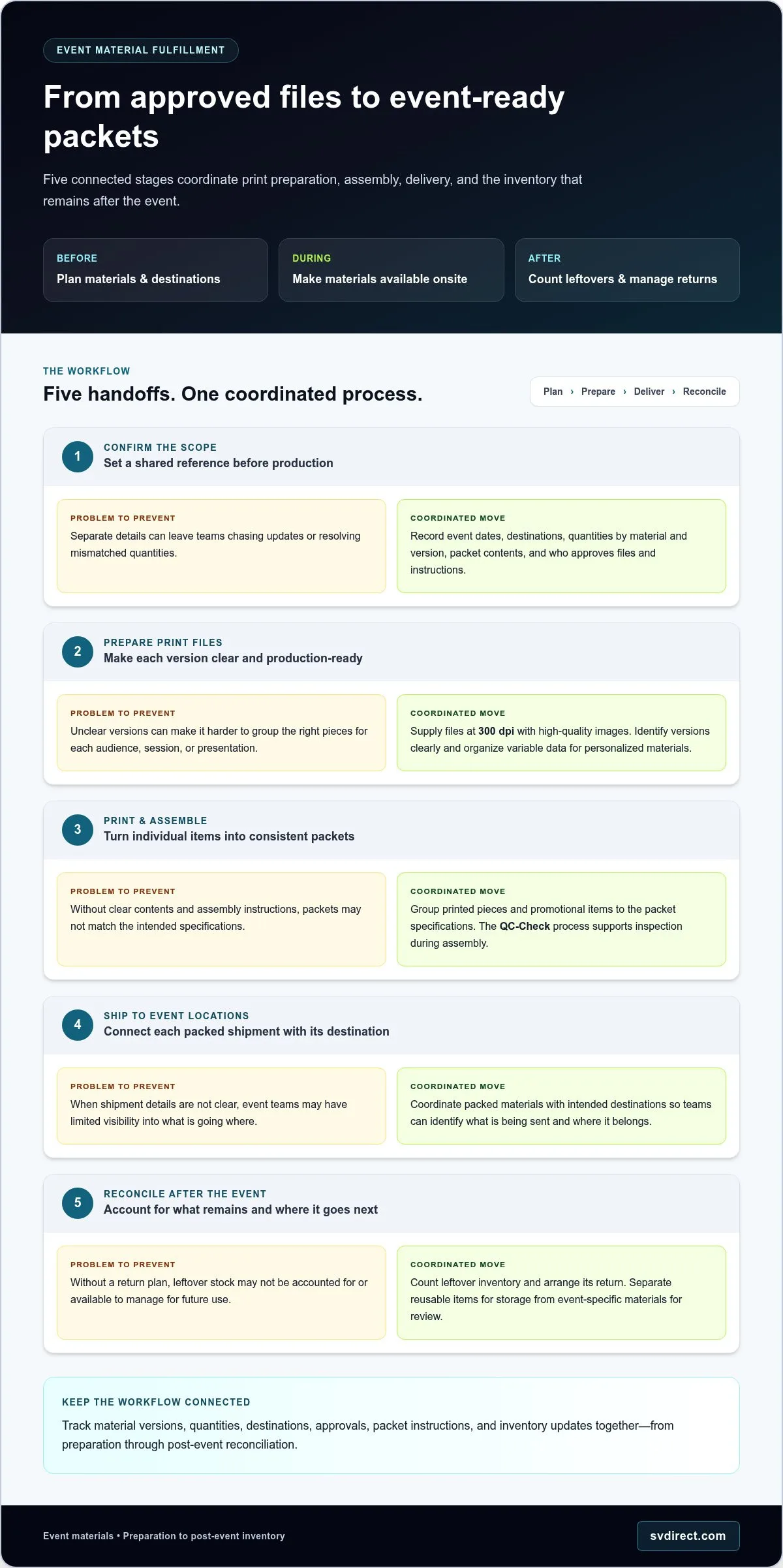
  1. Confirm the scope. Record event dates, destinations, material quantities, versions, and packet contents. Identify who approves files and assembly instructions.
  2. Prepare print files. SVD requests files at 300 dpi with high-quality images for optimal print results. Confirm that each version is clearly identified. Variable data files can support personalized event mailings or presentation materials tailored to different audiences.
  3. Print and assemble. Once materials are ready, group them according to the packet specifications. SVD’s systematic QC-Check process supports inspection during assembly, helping the team review packets against instructions.
  4. Ship to event locations. Coordinate packed materials with their intended destinations so event teams can identify what is being sent and where it belongs.
  5. Reconcile after the event. Account for leftover inventory and arrange its return for the next step, whether that means storing reusable items or reviewing event-specific materials.

What should teams prepare before production and assembly?

Clear inputs give each stage a dependable reference. Gather the event schedule, delivery destinations, quantities by material and version, file approvals, and packet assembly instructions. For personalized pieces, organize variable data so each audience or presentation receives the intended content. Keeping these details together helps align print production with packing rather than treating them as separate projects.

How do assembly, shipment, and returns fit together?

Packet assembly turns individual printed pieces and promotional items into ready-to-distribute sets. Shipment moves those packets to event locations, while a return plan accounts for leftover inventory afterward. This connected approach helps teams understand what was prepared, where it went, and what remains available for future use. Learn more about event marketing strategy and how materials support audience engagement.

To plan printing, assembly, shipping, and returns around your event, discuss your event fulfillment workflow.

In-House Coordination or Event Marketing Material Fulfillment Support?

The right approach depends on the event’s moving parts and your team’s capacity. Coordinating internally can work well for a straightforward program. As the number of materials, versions, destinations, or assembly requirements grows, connecting print, packing, shipment, and inventory tasks takes more coordination. Use this comparison to assess your team’s capacity and where fulfillment support could help.

Consideration In-house coordination Fulfillment support
Workload Your team manages approvals, packing, shipment coordination, and follow-up alongside other responsibilities. Print, assembly, shipment, and inventory tasks can be coordinated as connected activities.
Inventory visibility Staff maintain and share stock updates using internal processes. Online access to orders and real-time inventory can make status easier to review.
Customization Internal staff organize versions and personalized pieces based on available tools and capacity. Printing and variable data can be coordinated with fulfillment requirements.
Quality checks Your team defines and performs checks against packet instructions. A systematic assembly inspection can support consistent review of assembled materials.
Event complexity Often manageable when materials and destinations are limited. Can help coordinate projects involving multiple locations, versions, or complex kits.

When can an internal process remain manageable?

An internal process may suit an event with a small set of materials, straightforward assembly, and a team that has room to handle preparation and distribution. Before deciding, account for staff time as well as the visible tasks. Who will approve each version, update inventory, coordinate handoffs, monitor event deadlines, and reconcile what remains? Even a simple project needs clear ownership.

What signals that coordinated fulfillment support may help?

Multiple event locations, changing material versions, personalized pieces, and kits with several components add coordination points. Support that brings printing, assembly, shipping, and inventory management together gives the team a shared process instead of separate tasks to track. Your team can retain oversight: Remote Control offers online visibility into orders, progress, order histories, and real-time inventory, along with reporting and automated inventory notifications.

Explore online order and inventory visibility to see how digital access can help keep event fulfillment status in view. Event marketing material fulfillment support can keep your team informed while the work moves through a connected process.

Event Marketing Material Fulfillment: From Print to Post-Event

How to Plan Event Materials, Inventory, and Post-Event Follow-Up

A practical plan turns event marketing material fulfillment into a sequence of decisions teams can track, update, and hand off. Start by defining the event scope, then document what each location needs, how materials will be assembled, and what should happen to remaining inventory. Assigning clear ownership early helps keep approvals, stock updates, and shipment details from becoming scattered across teams.

What information should an event materials plan capture?

Build a shared record for each event with the details needed to prepare, pack, and track its materials:

  • Event dates and destinations: Record the schedule and delivery location for each shipment.
  • Item descriptions and versions: Identify brochures, presentation pieces, promotional items, and any audience-specific or personalized versions.
  • Approved files and quantities: Keep the current approved files connected to the required quantity for each item and version.
  • Packing instructions: Specify which items belong in each packet and how reusable materials should be separated from event-specific pieces.
  • Ownership and updates: Name an internal contact for approvals, inventory updates, and shipment visibility, and agree on how project changes will be shared.

For materials that need replenishing close to an event, on-demand digital printing can support a just-in-time planning approach. Include file approval and production coordination in the plan so teams can align printed quantities with current event needs.

How should teams manage event leftovers and campaign follow-up?

Plan the return process before materials ship. Decide how the team will identify leftover stock, record what comes back, and review each item for storage, redistribution, or another next step. Reusable displays and general collateral may need different inventory handling than personalized pieces or materials created for one event. Clear counts and status updates make post-event decisions easier.

Assign an owner to close the loop: confirm returned quantities, update inventory records, and share the reconciliation with the teams planning future events. Inventory notifications can flag changes that need attention. Remote Control provides online visibility into orders and real-time inventory, alongside automated inventory notifications, so teams can monitor stock as plans evolve.

Event follow-up can extend beyond returned materials. Lead inquiry fulfillment can connect event activity with prospect follow-up, while direct mail marketing can support campaign materials sent after the event. Make the handoff clear by identifying who owns lead details and which follow-up materials are planned.

How Silicon Valley Direct Supports Event Marketing Material Fulfillment

Silicon Valley Direct coordinates event and conference materials across the work surrounding production. Support includes digital and variable-data printing, packet assembly, shipping to event locations, and returning leftover inventory. Kitting, mailing, and inventory management connect these activities, while lead inquiry fulfillment can help carry event activity into follow-up. Together, these services support a workflow from prepared materials to post-event decisions.

Each project can be shaped around its materials and handling needs. Variable data can tailor printed pieces for different audiences or presentations, while kitting and hand assembly bring specified items together in packets. After the event, returned inventory can be accounted for and managed as part of the next planning cycle.

What operational visibility can teams use?

Keeping fulfillment coordinated doesn’t mean losing sight of the work. Remote Control provides 24/7 access to order progress, order histories, and real-time inventory. Teams can review activity online and use over 120 standard reports to examine order and inventory information. Automated inventory notifications can also surface stock updates that need attention.

This visibility supports communication between the fulfillment process and your internal team. Staff can refer to shared order and inventory information as they coordinate event plans, rather than relying only on separate status updates. Online access helps preserve involvement and oversight while fulfillment tasks are underway.

How does SVD build quality and flexibility into the workflow?

Assembly instructions give the team a defined reference for putting packets together. SVD’s systematic QC-Check process supports inspection during assembly, helping staff review completed work against project requirements.

Clear communication helps teams manage project-specific needs, including material versions, packet contents, and destination details. As requirements change, keeping the relevant people informed helps maintain alignment across printing, assembly, shipping, and inventory. Silicon Valley Direct, founded in 1999, serves businesses of varied sizes and approaches fulfillment as a flexible operational partnership, with coordination supporting the systems and processes behind each project.

Bring print, assembly, shipping, and inventory planning together for your next event. Request a free quote for event fulfillment.

Bring Event Materials Together with Confidence

Effective event marketing material fulfillment connects more than print production. It aligns approved materials, assembly instructions, shipment details, and inventory tracking in one workflow. Clear ownership at each stage helps teams manage versions and quantities, while a post-event plan keeps leftover materials accounted for and ready for their next step.

Visibility matters, too. Remote Control provides 24/7 access to order progress and history, real-time inventory, reporting, and automated alerts. A systematic QC-Check process supports assembly inspection. Together, these practices help your team stay informed and involved as event materials move through fulfillment.

Founded in 1999, Silicon Valley Direct brings an established operational foundation to event support. Printing, packet assembly, shipping to event locations, and leftover inventory returns can be coordinated around your project’s needs.

With a clear workflow and fulfillment support, your team can prepare for the event and close the loop afterward with greater confidence.

Frequently Asked Questions

What is event marketing material fulfillment?

Event marketing material fulfillment coordinates the preparation, assembly, distribution, and post-event handling of materials used at conferences, trade shows, and other events. It can cover brochures, data sheets, presentation materials, promotional items, and assembled packets. A coordinated workflow connects print readiness and packing instructions with inventory visibility, shipping, and leftover returns, helping teams manage materials from preparation through post-event reconciliation.

What materials can be included in event fulfillment?

An event fulfillment plan can include brochures, data sheets, presentation pieces, press kits, promotional items, and assembled event packets. The right mix depends on the event and campaign. List each item with its version, quantity, destination, and handling needs so the team can prepare and distribute it accurately. Variable data printing can also personalize copies with different text or images for distinct audiences or presentations.

How does event material fulfillment work?

The process starts by defining event requirements, approved files, quantities, destinations, and assembly instructions. Materials are then printed or prepared, assembled and inspected, and shipped to the event location. After the event, the team can account for leftover inventory and arrange its return. Clear ownership and order visibility help marketing and operations teams follow progress and coordinate handoffs across each stage.

Can event materials be personalized for different attendees or audiences?

Yes. Variable data digital printing can place different copy or images on individual sheets within a print run, supporting personalized mailings or presentation materials for different audiences. Before production, organize the source data and artwork, then review the intended versions and quantities. For optimal print results, Silicon Valley Direct requests files with high-quality images at 300 dpi. Clear version details help connect personalized pieces to the right event materials.

How can a team track event fulfillment inventory and orders?

Remote Control gives teams 24/7 access to place orders, track progress, review order histories, and check real-time inventory. It can generate over 120 standard reports and send automated alerts for low inventory, inventory receipts, and backorders. These tools help teams monitor fulfillment activity, spot inventory changes, and share timely updates as event plans or material needs change.

What happens to leftover event materials after a conference?

Leftover materials can be identified and returned after an event so the team can review quantities and decide what to do next. Plan for returns before materials ship, and distinguish reusable inventory from event-specific or personalized pieces. Silicon Valley Direct’s event and conference support includes returning leftover inventory, connecting post-event handling to the original fulfillment workflow and helping teams account for materials after the event.

How should we prepare files for event marketing materials?

Before production, confirm the approved file version, intended audience, required quantity, and any personalization details. Keep artwork and variable data organized by material or version, and include clear assembly and destination instructions with the production files. Silicon Valley Direct requests files containing high-quality images at 300 dpi for optimal results. Reviewing the materials and instructions together helps teams align print preparation with packing needs.

How to Choose a 3PL Fulfillment Partner: A Practical Buying Guide

How to Choose a 3PL Fulfillment Partner: A Practical Buying Guide

Choosing a 3PL is less about finding the longest service list and more about finding a partner whose processes fit your business. If you’re researching 3pl sunnyvale options, questions about service scope, inventory visibility, order accuracy, and communication can make the decision feel difficult. A dependable fulfillment relationship should give you more control over daily operations, not add another layer of guesswork.

Expect clear information about orders and inventory, reliable workflows, and communication that helps your team address issues early. The right partner should also adapt as your needs change, whether you’re managing eCommerce orders, coordinating shipping, or adding kitting and returns to the workflow.

This guide offers a practical framework for assessing operational fit, fulfillment capabilities, technology, and communication. You’ll learn how tools such as Remote Control support access to order progress and inventory, and why customized workflows and direct service matter alongside systems. The goal is a confident decision and a 3PL that works as an extension of your team.

Key Takeaways

  • Start by mapping the fulfillment work you need covered, from storage and order processing to returns, kitting, or literature fulfillment.
  • Assess how a 3PL provides day-to-day visibility into order progress, inventory, and shipment activity.
  • Define your order types, packaging needs, product variations, and communication preferences to build a practical workflow.
  • For a 3pl sunnyvale decision, look beyond the service list and consider how well a partner’s capabilities fit your operation as it changes.
  • Look for a fulfillment relationship that combines dependable processes, useful technology, and responsive communication.

Why a 3PL Fulfillment Partner Can Make Operations Easier to Manage

Managing fulfillment in-house gives your team direct control over inventory and order handling. It also makes your business responsible for the space, staffing, packing, shipping coordination, and returns processes behind every shipment. A Third-party logistics (3PL) partner can take on agreed parts of that workload, freeing your team to focus on other priorities.

The right arrangement depends on your products, order patterns, and current workflow. Storage can help when inventory needs more space or organization. Pick-and-pack support can ease recurring order-processing demands, while shipping coordination and returns management can connect more steps of the customer experience. For a business considering 3pl sunnyvale fulfillment services, the practical question is which ongoing pressures would benefit from a shared operating model.

Which fulfillment pressures signal it may be time to outsource?

Look for recurring friction, not just one unusually busy week. Does fulfillment regularly pull staff away from customer service, product development, or sales? Is storage limiting how inventory is organized? Does order processing compete with other essential work? These patterns may point to an ongoing operational need. A short-lived spike, on the other hand, may call for a different response than a workload that returns week after week.

Review the work itself: where orders slow down, which tasks require the most attention, and how often inventory or staffing constraints disrupt the routine. This will help you determine whether you need storage, pick and pack, shipping coordination, returns support, or a combination of services.

What should a business expect from a 3PL relationship?

A useful relationship starts with shared expectations for accurate handling, dependable order processing, and clear communication. Your team brings knowledge of your products, customer commitments, and business priorities. Fulfillment staff carry out the agreed workflow and coordinate with your team as needs evolve. Defined processes make it easier to know who owns each step and how exceptions are handled.

A generic process may not suit every product or order type. Silicon Valley Direct develops customized workflows and emphasizes proactive communication, with its team working as an extension of your business. Its eCommerce fulfillment and warehousing services connect storage, order handling, and distribution. The best fit is a practical arrangement that reflects how your business operates today and can adapt as requirements change.

Which 3PL Services Should Your Fulfillment Operation Actually Need?

A 3pl sunnyvale search can surface a long menu of capabilities, but a longer list doesn’t automatically mean a better fit. Start with the work your team needs covered, then match each recurring task to a service. This keeps the scope clear and avoids building a workflow around services your business won’t use.

Operational need Relevant capability When it may help
Keep products organized and available Warehousing and inventory management When storage, stock records, and order activity need to work together.
Prepare customer orders eCommerce order fulfillment, including pick and pack When order processing is a recurring workload for the internal team.
Coordinate outgoing shipments Shipping coordination and global shipping and logistics When dispatch needs to connect smoothly with order processing.
Handle goods returned by customers Returns management When returns need a defined workflow alongside outbound fulfillment.
Combine multiple items into one package Kitting and assembly When orders include sets, inserts, or assembled promotional materials.
Distribute printed materials Literature fulfillment, on-demand digital printing, and mailing services When brochures, product literature, or campaign mailings support the customer journey.

How do storage, inventory, and order processing work together?

Inventory records connect what’s on hand with what orders require. That visibility supports stock reviews and replenishment planning, while order histories help teams understand activity over time. Silicon Valley Direct’s Remote Control system provides access to orders, progress, histories, and inventory. Explore remote order management to see how the system supports oversight. For broader context on key considerations when choosing a 3PL, the U.S. Chamber of Commerce discusses how fulfillment needs and partner capabilities should align.

When can kitting, printing, or mailing add value?

These capabilities can connect physical materials to the fulfillment workflow. For example, a promotional package might combine a product with printed literature, while a campaign may pair printed pieces with mailing and distribution. Coordinating related work can reduce handoffs between separate processes. The right service mix depends on what each order contains and how materials need to reach the intended recipient.

Map the flow before defining the scope: which items are stored, which orders need assembly, and whether printed materials ship with products or as a separate mailing. This helps shape a workflow around your operation rather than a generic service bundle.

How to Evaluate 3PL Visibility, Accuracy, and Communication

Fulfillment visibility means knowing what’s happening to orders, inventory, and shipments well enough to make timely decisions. For a 3pl sunnyvale operation, that means looking beyond a dashboard. Useful information should help your team understand progress, spot exceptions, and coordinate next steps with fulfillment staff. Use these checks to assess whether technology and communication support day-to-day control.

What should an order and inventory management system show?

Use this sequence to evaluate the information and processes that support fulfillment:

  • Order access: Check whether your team can see order status and history, including where each order sits in the workflow.
  • Inventory visibility: Look for current stock information and activity records, such as inventory receipts, to support replenishment decisions.
  • Reporting: Consider whether reports help you review order and inventory patterns, rather than simply displaying isolated figures.
  • Exception handling: Understand how low inventory or backorders are surfaced and communicated. Automated notifications can flag these events, while clear follow-up helps teams respond.
  • Quality control: Review the process checks used for relevant tasks, including assembly, and how staff communicate about discrepancies.

Silicon Valley Direct’s Remote Control system provides 24/7 access to order progress, histories, and inventory, and can generate more than 120 standard reports. Explore Remote Control order management for more details. Reporting is most useful when it connects operational activity to decisions your team needs to make. The Association for Supply Chain Management outlines the role of 3PL in supply chain management, including how fulfillment fits into broader supply chain operations.

How can a 3PL reduce preventable fulfillment errors?

Accuracy depends on clear workflows and repeatable checks, not promises that mistakes can never happen. Silicon Valley Direct uses a systematic QC-Check process during assembly. Documented steps can help teams catch issues as work moves through the process, while proactive communication can flag potential conflicts early enough for teams to coordinate a response.

Consider how information moves between your team and fulfillment staff, too. When an order detail, inventory concern, or project change needs attention, clear ownership and timely communication help prevent confusion from carrying into later steps. A practical evaluation should account for both system visibility and the human coordination behind it.

Once you’ve mapped the visibility and control your operation needs, request a free quote for fulfillment support to discuss a service scope tailored to your workflow.

How to Choose a 3PL Fulfillment Partner: A Practical Buying Guide

How to Match a 3PL Operating Model to Your Business

A suitable fulfillment model starts with the details of your operation, not a preset bundle of services. Before defining a workflow, map how orders arrive, what each product needs, how items should be packed, and how your team prefers to coordinate. This helps create a service mix that accounts for both routine orders and exceptions.

Order patterns can shift during seasonal peaks, and product variations may call for different packaging or assembly steps. Some items may also need special handling or item-level identification. These differences can affect how inventory is organized, how orders are processed, and whether kitting, returns management, or domestic and international shipping coordination belongs in the workflow.

Which operational details should you map before a fulfillment transition?

Document the information fulfillment staff will need to handle work consistently. A practical starting list includes:

  • Order sources: Where orders originate and whether requirements differ by channel.
  • Product identifiers: The names, SKUs, variations, or other identifiers used to distinguish items.
  • Packaging needs: How products should be packed, including inserts or assembled components.
  • Inventory locations: How stock is organized and where teams need visibility.
  • Recurring exceptions: Common order changes, backorders, returns, or other situations that need a defined response.

Serial number tracking may matter for products that need item-level traceability. If so, document where that information is captured and how it should connect to order and inventory records. Agree on responsibilities, reporting needs, and escalation preferences as well. Clear documentation gives both teams a shared reference when the workflow gets busy.

How should a business assess service and communication fit?

Consider how fulfillment updates fit your team’s normal operating rhythm. Staff who manage daily orders may need access to current activity, while managers may rely on reports to review broader patterns. Define who needs visibility, what information helps them act, and how questions or potential issues should be raised.

Direct communication and proactive issue handling can support a steady working relationship, especially as order volumes, products, or priorities change. Silicon Valley Direct builds customized workflows around client needs and combines system access with communication from its team. Read client fulfillment testimonials for examples of client experiences. For businesses evaluating 3pl sunnyvale services, fit comes down to whether the agreed process reflects real operating requirements and leaves room to coordinate as those requirements evolve.

What Working With Silicon Valley Direct Can Look Like

A fulfillment partnership brings together the practical work of moving orders and the communication that keeps your team informed. Silicon Valley Direct has operated since 1999, combining eCommerce fulfillment, inventory management, shipping coordination, returns management, and kitting with technology and direct client service. The service mix can be tailored to your workflow, with printing and mailing included when they support your customer or marketing needs.

For a business assessing 3pl sunnyvale options, the key is how capabilities work together. An order may draw on stored inventory, pick and pack, shipping coordination, and later returns handling. A campaign may pair printed literature with kitting and mailing. Connecting related tasks through a coordinated workflow helps your internal team work with fulfillment staff as an extension of its operation.

How does Remote Control support day-to-day fulfillment visibility?

Remote Control provides 24/7 access to orders, order progress, histories, and inventory. It can also generate more than 120 standard reports, giving teams information to review activity and support operational decisions. For example, inventory visibility helps a team understand stock levels, while order progress and histories provide context for fulfillment activity. These features support oversight, and direct communication remains important when needs change or issues require coordination.

Learn more about 3PL fulfillment services and how warehousing, order handling, inventory management, and related capabilities can fit into a tailored workflow.

What can a tailored fulfillment partnership bring together?

A well-defined workflow begins with understanding how your operation runs. Silicon Valley Direct works with clients to shape processes around their requirements, communicate proactively, and maintain accountability across agreed responsibilities. Depending on the use case, eCommerce fulfillment can connect with inventory management, returns, kitting and assembly, on-demand digital printing, or mailing. The goal is a workable service mix, not a generic package.

Bring your order patterns, product needs, and communication preferences into the conversation. That gives both teams a clear basis for coordinating fulfillment as business requirements change.

To discuss your fulfillment requirements, explore 3PL fulfillment services.

Choose a Fulfillment Partnership Built Around Your Operation

A confident 3PL decision starts with a clear view of your actual workflow. Match the services you need to your products and order patterns, then assess how inventory visibility, reporting, quality checks, and direct communication will support daily control. For a 3pl sunnyvale decision, operational fit matters as much as the capabilities on offer.

Silicon Valley Direct has supported fulfillment operations since 1999. Its Remote Control system provides 24/7 access to order progress, histories, and inventory, with more than 120 standard reports available. Combined with customized workflows and proactive communication, these tools help your team stay informed while fulfillment staff work as an extension of your operation.

Start a conversation about the fulfillment approach that fits your needs.

With a clear scope and a responsive working relationship, you can move forward with greater confidence as your business evolves.

Frequently Asked Questions

What does a 3PL do for an eCommerce business?

A third-party logistics provider can manage agreed parts of an eCommerce operation, such as warehousing, inventory management, order processing, shipping coordination, and returns. This reduces the fulfillment work handled by an internal team. The right scope depends on your products and workflow. For example, a business may use storage and order fulfillment support while keeping customer service and sales in-house.

How do I choose the right 3PL for my business?

Choose a 3PL by matching its operating capabilities to your order patterns, products, and team’s needs. Define what you need help with, then consider how the workflow will handle inventory visibility, packaging, exceptions, reporting, and communication. For a 3pl sunnyvale operation, as with any fulfillment arrangement, a strong fit means the service scope supports day-to-day work and can adapt as requirements change.

What services can a 3PL provide besides pick and pack?

A 3PL may provide warehousing, inventory management, shipping coordination, returns management, kitting and assembly, and literature fulfillment. Depending on the business need, services may also include on-demand digital printing and mailing. These capabilities can connect related tasks, such as storing brochures, assembling them into a promotional kit, and preparing the materials for distribution. The useful service mix depends on your products and fulfillment workflow.

How can I track inventory and orders with a 3PL?

Use an order and inventory management system that shows order progress, order histories, and current inventory information. Silicon Valley Direct’s Remote Control system provides 24/7 access to orders, progress, histories, and inventory. It can also generate more than 120 standard reports, with email notifications for low inventory, inventory receipts, and backorders. These tools help teams review activity and coordinate decisions with fulfillment staff.

How much does eCommerce fulfillment with a 3PL cost?

eCommerce fulfillment costs depend on the scope and requirements of the operation, so there isn’t one price that fits every business. Factors can include the services involved, the number of items in orders, packaging requirements, and the inventory space used. To understand the cost for your workflow, outline the products, order patterns, and services you need, then request a quote based on that scope.

Can a 3PL handle custom kitting and printed materials?

Yes. Silicon Valley Direct provides kitting and assembly, on-demand digital printing, literature fulfillment, and mailing services. These capabilities can support workflows such as assembling printed brochures with promotional items or preparing literature for distribution. Assembly work uses a systematic QC-Check process. Clear project requirements, including the items, packaging instructions, and how materials should be fulfilled, help teams coordinate each step.

Batch Picking and Packing: How to Build a Faster, More Accurate Fulfillment Workflow

Batch Picking and Packing: How to Build a Faster, More Accurate Fulfillment Workflow

Batch picking and packing can help a warehouse fulfill several orders in one trip instead of sending pickers back to the same locations for each order. The approach is most useful when orders share products or pick locations, and when the time saved during picking outweighs the work of separating and checking items afterward.

That trade-off matters. A larger batch may mean fewer trips, but without clear order tracking, products can end up in the wrong tote or shipment. Batching isn’t automatically the right fit for every operation: order volume, SKU mix, warehouse layout, and packing processes all affect whether it makes sense.

This guide explains how batch picking works and how it compares with single-order, zone, wave, and cluster picking. You’ll learn which order patterns may suit batching, what to assess before changing your workflow, and how to build checks into picking, sorting, packing, and shipment handoffs. The goal is to improve throughput while keeping each order accurate at every stage.

Key Takeaways

  • Use batch picking and packing when your order patterns make fewer warehouse trips worth the added sorting and verification work.
  • Compare single, batch, zone, wave, and cluster picking by how orders are grouped, picked, and separated before packing.
  • Review order history and test a controlled workflow before expanding batching across your operation.
  • Define clear item identification, order separation, exception handling, and packing checks to keep each shipment accurate.
  • If you’re evaluating a fulfillment partner, ask how they manage inventory visibility, quality checks, exceptions, and changes to your workflow.

What Are Batch Picking and Packing, and How Do They Work Together?

Batch picking is collecting items for several customer orders during one coordinated picking task, rather than completing one order at a time. It combines the warehouse trip, not the orders themselves. Each item must stay connected to the order it belongs to, so the workflow needs a reliable way to identify its destination before, during, and after picking.

Batch picking and packing are connected stages, but they solve different problems. Picking gathers the ordered products; packing verifies and prepares each individual order for shipment. Fewer trips may save movement through the warehouse, while clear order separation and checks help prevent items from being assigned to the wrong shipment.

What happens during a batch-picking task?

Orders with overlapping products or nearby pick locations can be grouped into a shared pick list. A picker follows the list and collects the combined quantities from the relevant inventory locations. For example, if several orders each include the same product, the picker can collect the total quantity in one pass instead of returning to that location for every order.

The combined quantity still needs an order-level destination. A pick list, scan, tote, or another defined identification method can show which order needs each item. The specific control depends on the operation, but the principle is the same: every collected item needs an assigned destination. For a broader overview of order picking strategies, see how batch picking fits alongside other approaches.

Where does packing fit after batch picking?

After collection, picked products move to an order-separation point. Staff or system prompts match each item to its destination order, then verify that the order has the correct products and quantities. Each order is packed, protected for handling, labeled, and prepared for shipment only after that check.

Batching doesn’t remove these checks. It shifts the work: the picker gathers products across multiple orders, while the next stage restores a clear, verified order-by-order structure. If separation or verification is rushed, a correctly picked item can still end up in the wrong parcel.

Packing also differs from kitting. Packing prepares an order for shipment; kitting and assembly bring specified components together as a set or complete an assembly task. When both activities are part of a workflow, define where the kit is assembled and how the finished set is verified before it enters an order.

How Batch Picking and Packing Move from Order Release to Shipment

A controlled workflow keeps each item connected to its order as work moves between people and stations. A typical sequence is to review orders, create a batch, pick and identify items, sort by order, verify quantities, pack and label parcels, then hand shipments off with the required order and shipment records.

How should orders be grouped before picking?

Batch criteria should reflect actual order history, not a universal order count. Review which products and quantities orders share, their priorities, required shipment timing, and whether grouping them fits the facility’s layout and staffing. Grouping can make picking more coordinated, but the right rules depend on the operation.

Test potential grouping rules against real order data. A group that looks efficient on paper may create extra sorting or delay a priority order. Adjust the criteria based on what the test reveals before adopting them more broadly.

What checks protect accuracy during sorting and packing?

Use a defined identifier at each handoff, such as an order reference on a pick record, a clearly assigned container, or a system prompt where available. Tools vary by operation, so confirm what is in place rather than assuming a particular scanning or software capability.

  1. Review orders. Confirm the released orders, item details, quantities, priorities, and shipment requirements. Flag incomplete or unclear information before grouping.
  2. Create the batch. Apply documented grouping criteria and preserve each order’s identifier in the shared pick instructions. Keep priority or timing conflicts out of a batch if they could disrupt the planned workflow.
  3. Pick and record. Collect the required quantities from inventory locations. Record each item against its destination order as the operation’s process requires. If an item is unavailable or the count doesn’t match, flag the exception and follow the established process to investigate, update the order status, or request a decision before proceeding.
  4. Sort and reconcile. Separate collected items into individual orders. Compare each order’s items and quantities with its pick record or system prompt, and resolve discrepancies before packing.
  5. Pack and hand off. Protect the verified items, label each parcel with the correct shipment information, then confirm at handoff that the parcel and shipment record correspond to the same order.

These handoffs make batch picking and packing a connected process, not a single picking task. If you outsource fulfillment, ask how the provider handles order identification, exceptions, verification, and shipment records before relying on its workflow.

Batch Picking vs. Single, Zone, Wave, and Cluster Picking

Picking methods differ in what they group: orders, warehouse areas, or work windows. That choice affects picker movement, how items reach packing, and how much sorting or coordination is needed. The order picking methods an operation considers should reflect its order patterns, layout, and ability to maintain clear order-level controls. No method is universally best.

Method Who picks and how work is grouped Sorting, coordination, and packing implications
Single-order A picker completes one order before starting another. Items remain associated with one order during picking, so little multi-order sorting is needed. Each order is checked and packed separately.
Batch A picker collects items for several orders in a coordinated task, often grouping orders with shared products or nearby locations. Collected items must be separated and reconciled by order before packing. Clear identification and verification at sorting are essential.
Zone Pickers work in assigned warehouse areas. Orders may pass between zones or be consolidated after area-level picks. Coordination is needed between zones, followed by order-level consolidation and checks before packing.
Wave Orders are released for picking in planned groups or time windows. A wave can coordinate work alongside other picking approaches. Teams must track wave status and ensure picked orders reach packing in the right sequence, with final checks for each order.
Cluster A picker handles multiple orders together while placing items into separate, identified containers as they pick. Order separation happens during picking, which can reduce later sorting. Each container still needs order-level verification before packing.

When is batch picking a stronger fit than single-order picking?

Repeated SKUs across orders can make batching worth evaluating: a picker may collect shared items in one pass instead of revisiting the same locations for each order. The trade-off is added sorting and reconciliation. If orders rarely overlap, or separating them creates more work than the combined trip saves, single-order picking may be simpler. Assess both travel and packing-stage effort.

How do zone, wave, and cluster methods change the workflow?

Zone picking groups work by warehouse area; batch picking groups orders. Wave picking organizes when work is released and can be combined with other methods. Cluster picking keeps several orders separate in individual containers as items are collected, unlike a batch flow that typically requires sorting afterward. Definitions and implementations can vary, so compare the actual handoffs each process requires.

Choose a method by reviewing order history, SKU overlap, warehouse layout, and the controls available at picking, sorting, and packing. For batch picking and packing, the best fit is the method whose full workflow is manageable, not simply the one that reduces picker travel.

Batch Picking and Packing: How to Build a Faster, More Accurate Fulfillment Workflow

How to Set Up Batch Picking and Packing Without Losing Control

Start with your order history, then test a small, controlled workflow before expanding. Review how often orders share SKUs, the quantities they require, and where exceptions recur. This helps determine whether grouping orders is likely to reduce travel without adding more sorting, verification, or packing work.

Document the process before the test begins. Pickers and packing staff need consistent rules for which orders can be grouped, how items stay identified, where orders are separated, and who resolves problems. Keep the test narrow enough to observe each handoff, then adjust the process when issues surface.

Which data and process controls should teams review?

Look for patterns in order frequency, shared SKUs, item quantities, and recurring exceptions such as shortages or unclear instructions. Check that inventory records match the pick instructions and that any updates made during the workflow reach the people handling the order.

Assign responsibility for resolving shortages, substitutions, and order questions. Staff should know when to pause an affected order, who can authorize a change, and how to record the decision so packing uses the correct instructions. Don’t let an exception carry forward to the next station without being addressed.

How can systems and quality checks support the workflow?

Order-management or warehouse systems may show order status, item details, and inventory information to help teams coordinate work. Confirm what information is available, how often it updates, and whether it remains visible through picking and packing. Silicon Valley Direct’s Remote Control system provides order-progress and real-time inventory visibility. Prospective clients should confirm the features and workflow fit they need.

Use quality checks at defined handoffs. For example, reconcile picked items to the order record during separation, then check each order’s products and quantities before closing the parcel. These are process controls to establish and verify for your operation, not assumptions about a particular provider’s batch-picking setup.

  • Record picking accuracy and investigate mismatches between picks and order records.
  • Track packing errors, including incorrect items or quantities, and note where they were found.
  • Log exceptions by type, resolution, and any effect on the order.
  • Measure order completion time across the workflow, from release through shipment preparation.

Review speed measures alongside picking accuracy, packing errors, and exception trends so a faster workflow doesn’t hide added rework. Compare the test results with your existing process before changing batch rules or expanding the test.

Explore Remote Order Management

When to Consider a Fulfillment Partner for Batch Picking and Packing

Outside support may be worth considering when order growth strains your team’s capacity, orders require more complex handling, or picking, packing, and inventory coordination are becoming harder to manage together. A partner should fit your actual order profile and controls, not just promise a faster process. Before making a change, confirm how its workflow would handle your products, order patterns, and exceptions.

What should you ask a fulfillment provider?

Ask for a clear walkthrough of the process from order release through shipment. The details matter at every handoff, particularly when several orders are picked together.

  • How are orders grouped, and how does each picked item stay associated with the correct order?
  • Where and how are batch items separated, reconciled, and checked before parcels are prepared for shipment?
  • What order-status and inventory information can clients access, and how current is it?
  • How are shortages, exceptions, and unclear instructions communicated, and who coordinates their resolution?
  • How can the workflow adapt if order patterns, handling needs, or priorities change?

Look for specific answers about process ownership, visibility, and quality checks. Ask what information you’ll receive and how you and the provider will resolve issues together. Customer testimonials can offer context about other clients’ working relationships, but they don’t replace confirming that the proposed workflow fits your operation.

How can a partner provide visibility and quality oversight?

Silicon Valley Direct provides eCommerce order fulfillment, inventory management, and warehousing and distribution. Its eCommerce fulfillment services may suit teams assessing outside support for coordinating these needs. The company’s Remote Control system provides order-progress and real-time inventory visibility. Confirm the current features and how they would support your specific process.

Silicon Valley Direct also describes a systematic QC-Check process for assembly work. That is useful context when discussing quality oversight, but it isn’t proof of a particular batch-picking control. Ask how checks apply to your proposed workflow, including item identification, order separation, packing verification, and communication when something doesn’t match.

Choosing a fulfillment partner is a collaborative decision. Review the workflow, visibility, and exception process together before transitioning work.

Build a Fulfillment Workflow You Can Trust

Batch picking and packing can reduce repeated warehouse travel, but the right method depends on your order patterns and the controls that keep items tied to the correct shipment. Test grouping rules against real order history, then assess picking accuracy, packing errors, exceptions, and completion time together. A stronger process balances throughput with reliable order checks.

If your team needs support coordinating fulfillment and inventory, evaluate a partner’s workflow, visibility, quality checks, and approach to exceptions before making a decision. Silicon Valley Direct provides fulfillment services and offers Remote Control for order and inventory visibility. The company also describes a systematic QC-Check process for assembly work. Confirm how its current services and systems fit your requirements.

With clear expectations and the right operational fit, you can build a workflow that supports growth while keeping every order carefully accounted for.

Frequently Asked Questions

What is batch picking in a warehouse?

Batch picking is a method for collecting items for multiple orders during one coordinated picking task. Instead of completing each order separately, a picker follows a grouped list and gathers the required quantities from shared inventory locations. Each item still needs to remain identifiable by its destination order. After picking, items must be separated, checked against each order, packed, and prepared for shipment.

How does batch picking differ from cluster picking?

Batch picking groups orders for a coordinated picking task, while cluster picking commonly keeps orders separated in distinct containers as the picker moves through the warehouse. This can shift some sorting work earlier in the process. Terminology and workflows vary, so compare how each method manages picker movement, item identification, order separation, and packing checks before choosing an approach.

Is batch picking faster than single-order picking?

It can reduce repeated trips when multiple orders need items from the same locations, but it doesn’t guarantee a faster end-to-end workflow. Sorting, checking, and packing can add work after the picking route. Review your order patterns and measure the full process, including completion time, picking accuracy, and packing errors. Compare complete workflows, not picking speed alone.

How many orders should be included in a batch?

There’s no universal batch size that suits every warehouse. Suitable grouping depends on order contents, item locations, available equipment, priorities, and how the team separates orders. Start with a controlled test using actual order data. Adjust the batch rules based on picking accuracy, workload, exceptions, and how smoothly orders move to packing. Avoid expanding the batch until the process remains manageable at each handoff.

What are the main challenges of batch picking and packing?

Common challenges include assigning each picked item to the correct order, handling shortages, managing mixed quantities, and preventing mistakes during packing. Batching can reduce repeated travel while shifting effort to sorting and verification. Clear grouping rules, visible order identification, a defined process for exceptions, and order-level checks before parcels are closed help manage these risks. Track accuracy and completion time to spot workflow problems.

What technology is used for batch picking?

Depending on the operation, an order-management or warehouse-management system may group orders, provide pick instructions, and update order status or inventory information. Labels, scanners, and other identification tools may also support item tracking and order separation. Technology varies between facilities, so confirm which systems and equipment are available, how information is updated, and how workers handle exceptions when the system or inventory record doesn’t match.

Can a 3PL handle batch picking and packing for an eCommerce business?

A third-party logistics provider may support eCommerce fulfillment that includes order processing, inventory management, picking, and packing. Specific batch workflows differ, so ask how the provider groups orders, tracks and separates items, verifies parcels, and communicates shortages or other exceptions. Silicon Valley Direct provides eCommerce order fulfillment and inventory management. Confirm directly whether its current workflow supports your batch-picking requirements and what inventory visibility is available.

ECommerce Warehouse Services: A 2026 Buying Guide

ECommerce Warehouse Services: A 2026 Buying Guide

When searching for ecommerce warehouse services san jose, it’s easy to focus on storage capacity and overlook the operational details that shape the customer experience. The right partner is not simply a place to hold inventory. It should give you useful visibility into stock and orders, with clear workflows for receiving, fulfillment, and exceptions.

You also need to know how closely a provider’s processes fit your business and how your teams will communicate. Product requirements, order patterns, and the tasks you plan to keep in-house all affect what a workable arrangement looks like.

This guide explains how to assess warehousing and end-to-end eCommerce fulfillment, what to ask about inventory and order visibility, and how to compare operational fit. You’ll find practical next steps for reviewing services and discussing your workflows with a potential partner. Silicon Valley Direct has supported fulfillment and warehousing operations since 1999, with a focus on tailored solutions and long-term client partnerships.

Ecommerce Warehouse Services San Jose: What to Compare

Use the search phrase as a starting point, then compare providers based on the work you need done, not just location or storage space. Map how inventory will move from receiving to order processing, identify what information your team needs, and clarify who handles exceptions. These details make it easier to assess whether a proposed service fits your business.

Key Takeaways

  • Distinguish storage from coordinated fulfillment by mapping the full flow from receiving inventory to processing orders and preparing shipments.
  • Use your products, order patterns, inventory complexity, and customer expectations to identify the operational capabilities you need.
  • When comparing ecommerce warehouse services san jose, review how each proposed workflow handles visibility, communication, quality checks, and exceptions.
  • Ask about onboarding, data exchange, responsibilities, and how processes can adapt as order volumes and workflows change.
  • Explore how warehousing, inventory management, fulfillment, shipping, and returns can work together, and confirm what order and inventory information you can access.

What eCommerce Warehouse Services Include Beyond Storage

A warehouse holds inventory, while eCommerce warehouse services can coordinate what happens before and after products reach a shelf. The work may include receiving stock, maintaining inventory records, processing released orders, preparing shipments, and managing returns. Together, these steps connect physical inventory with the orders customers place.

That distinction matters when comparing providers. Storage alone doesn’t explain how orders move through an operation or how you’ll know what stock is available. A coordinated workflow links inventory handling to fulfillment tasks, with responsibilities and information-sharing agreed in advance. The right scope depends on your products, order patterns, and existing processes.

How warehousing connects to eCommerce order fulfillment

The journey starts when inventory arrives. A receiving process records what came in and updates stock information. When an order is released for processing, the required items are picked, packed, and prepared for shipment handoff. Accurate inventory records help teams understand what’s available, what has been committed to orders, and when records may need review.

This sequence is part of the broader order fulfillment process, which connects inventory location and handling with the delivery of an order. The journey may continue after dispatch: returns management can provide a defined way to receive and process returned items. The appropriate checks and next steps depend on the product and the business’s workflow.

Which fulfillment tasks may sit alongside storage

Alongside warehousing and distribution, a provider may offer inventory management, eCommerce order fulfillment, shipping coordination, and returns management. These capabilities can be evaluated as connected parts of one workflow or as separate needs, depending on what your team already handles. Ask where responsibilities begin and end, and how order and inventory information will be shared.

Kitting and assembly may be relevant when products need to be grouped or prepared together. Literature fulfillment can fit workflows that include printed materials. Neither task is necessary for every business. The right scope depends on your product mix and how orders are assembled.

Silicon Valley Direct provides warehousing and distribution, inventory management, eCommerce fulfillment, shipping coordination, and returns management. To review its broader eCommerce fulfillment services, consider how those capabilities could align with your order journey. Ask which tasks are included and how the workflow would reflect your requirements, rather than assuming a standard package will fit.

How to Evaluate eCommerce Warehouse Services for Operational Fit

Start with your operating requirements, not a generic service list. Product size, fragility, shelf life, handling instructions, order frequency, and inventory complexity can all shape how stock should be received, stored, picked, packed, and shipped. Customer expectations matter too. Consider the delivery options and order updates your business needs to support.

Map the workflow from receiving through returns. Note which steps your team performs today, where handoffs happen, and what needs to change. For cross-border orders, clarify who handles relevant responsibilities and consult appropriate authoritative guidance for your situation. Let your products and established processes determine the service scope, rather than assumptions about what every warehouse operation includes.

Questions to ask about inventory control and order handling

Ask how incoming inventory is checked and recorded, how stock changes appear in inventory records, and how discrepancies are investigated and communicated. Clarify the process for backorders, unavailable items, and time-sensitive requests. If your products require lot, batch, or serial-number tracking, ask whether the provider can support the specific method your operation needs.

If kitting or assembly is part of your workflow, ask what quality checks take place and how exceptions are documented. Request a clear explanation of the process and each team’s responsibilities, rather than relying on a general assurance of accuracy.

How to assess visibility and communication

Request a walkthrough of the order statuses, inventory views, and reports you would actually use. Ask when information updates, which automated notifications are available, and how staff escalate exceptions that need your attention. A dashboard can help, but clear escalation steps and access to knowledgeable people also matter when an order or inventory record needs investigation.

Silicon Valley Direct describes its Remote Control system as providing online access to order and inventory information. The system offers 24/7 access to place orders, track progress, view order histories, check inventory, and generate more than 120 standard reports. Ask which views, reports, and notifications are relevant to your workflow. As you compare providers, focus on whether the available information supports your decisions.

Bring your product details, order patterns, inventory needs, and questions about exceptions to the conversation. Discuss your fulfillment requirements to explore an approach based on how your business operates.

Compare In-House Warehousing With a Coordinated 3PL Workflow

Keeping fulfillment in-house gives your team direct responsibility for inventory and daily order handling. Working with a third-party logistics provider (3PL) shifts agreed tasks to an outside operation while your business retains oversight of its requirements and decisions. Neither model is right for every business. Compare who owns each task, how information flows, and whether the arrangement can accommodate your products and order patterns.

Control: In-house teams manage warehouse activity directly. With a 3PL, control is shared according to the agreed scope, so clarify which decisions remain yours.

Staffing: In-house fulfillment requires your business to organize the people responsible for warehouse and order tasks. A 3PL performs the contracted work through its own operation. Confirm how day-to-day communication and accountability are handled.

Processes: An in-house model relies on processes your team creates and maintains. A coordinated 3PL workflow needs agreed procedures for receiving, inventory updates, order processing, shipping coordination, and exceptions.

Visibility: In-house teams can work directly with the records and tools they manage. In a 3PL arrangement, ask what order and inventory information you can access and how often it updates.

Adaptability: Assess either model against changes in order volume, product mix, and workflow. Discuss how process changes are identified, approved, and put into practice.

What to consider when keeping fulfillment in-house

In-house fulfillment keeps the operation close to your team, but your business remains responsible for its moving parts. Map who oversees inventory records, receives and puts away stock, picks and packs orders, coordinates shipments, handles returns, and investigates discrepancies. Then consider how staffing and process ownership work during order peaks or when key team members are unavailable. Don’t assume this model costs more or less. Assess it using your own operational requirements and business-specific data.

What to consider when working with a 3PL

A 3PL may coordinate warehousing with order processing and related fulfillment tasks, but the scope should be explicit. Check how your order data will be shared, how the workflow fits existing systems and procedures, and who handles exceptions such as missing inventory or incomplete order information. Agree on responsibilities for inventory decisions, customer updates, returns, and process changes before work begins.

Silicon Valley Direct provides warehousing and distribution, inventory management, eCommerce order fulfillment, shipping coordination, and returns management. Its 3PL fulfillment services can be considered as part of a coordinated workflow. Compare the proposed responsibilities with the tasks your team wants to retain, then choose the model that fits your operating needs.

ECommerce Warehouse Services: A 2026 Buying Guide

A Practical Checklist for Comparing Warehouse Service Proposals

A useful proposal should explain how the work will run, what information you’ll receive, and who will act when something falls outside the normal process. Use the same questions with each provider so you can compare scope and responsibilities clearly. Focus on operational fit rather than broad promises.

  1. Confirm the scope. List the services included, from receiving and inventory management to order fulfillment, shipping coordination, and returns. Identify any tasks your team will continue to manage.
  2. Check inventory visibility. Ask what stock information you can view, how records are updated, and what reports help you make replenishment or order decisions.
  3. Define communication. Agree on routine contacts, status updates, and how the team will notify you about discrepancies, backorders, or other exceptions.
  4. Understand quality control. Ask what checks apply during receiving, picking, packing, or any required kitting and assembly, and how issues are recorded.
  5. Review exception handling. Clarify who investigates inventory mismatches, incomplete orders, returns, and workflow changes, and how each issue is escalated.

Ask providers to explain onboarding requirements, data exchange, system access, and each party’s responsibilities. A proposal should make clear what information your team must supply and how operational changes will be communicated. Silicon Valley Direct’s 3PL fulfillment services page provides an overview of its related service capabilities. Confirm the specific scope and workflow details relevant to your operation directly with the team.

What to confirm before onboarding

Prepare a practical overview of your products, inventory data, order flow, packaging needs, and return processes. Note any special handling instructions and the system information needed to discuss data exchange. Before work begins, document who owns each step, who to contact about exceptions, and how both teams will share process updates.

How to validate the proposed operating process

Ask for a walkthrough using representative order and inventory scenarios. Include a routine order, a low-stock situation, and a backorder so you can see how status updates and notifications would work. Check whether reports answer real operating questions, such as which orders need attention or which stock records require follow-up. Silicon Valley Direct’s Remote Control system offers online access to order and inventory information. Confirm the available views, reporting, and notification features before relying on them.

How Silicon Valley Direct Supports eCommerce Warehouse and Fulfillment Needs

Choosing a warehouse partner means looking at how services fit together, not just where inventory is held. Silicon Valley Direct provides warehousing and distribution, inventory management, eCommerce order fulfillment, shipping coordination, and returns management. Businesses can discuss the capabilities that fit their workflow instead of assuming every service is needed.

Founded in 1999, Silicon Valley Direct describes its approach as tailored and partnership-focused. Discuss how warehouse and fulfillment tasks can align with your processes, where your team needs visibility, and how communication should work. A provider should understand your operational requirements and act as an extension of your team while keeping responsibilities clear.

What a coordinated fulfillment relationship can include

Depending on the products and order workflow, a service arrangement may combine inventory management with order fulfillment and shipping coordination. Returns management may also be relevant if returned items need to re-enter the inventory process. Kitting and assembly or literature fulfillment can be considered when the product mix calls for them. The right scope depends on your needs, not a preset bundle.

Silicon Valley Direct’s Remote Control system provides online access to order and inventory information, including 24/7 access to order placement, progress tracking, order histories, and inventory checks. The system can also generate more than 120 standard reports. Discuss which features and reports suit your operating plan. For first-hand perspectives, review customer testimonials and consider the context of each account as you assess whether it relates to your requirements.

What to share when requesting a tailored discussion

A clear picture of your workflow helps make an initial conversation more useful. Prepare details about:

  • Products and handling: Product types, packaging needs, and any special handling requirements.
  • Orders and inventory: Order patterns, inventory complexity, and how stock information is currently maintained.
  • Systems and reporting: Current systems, the order and inventory information your team needs, and any data exchange to discuss.
  • Shipping and returns: Shipping destinations, returns processes, and responsibilities your team wants to retain.

These details help frame a conversation around your actual operation, including what to coordinate, what to keep in-house, and what questions need to be resolved before onboarding. A tailored discussion can clarify whether the proposed services and communication approach are a practical fit.

Choose a Fulfillment Workflow That Can Grow With You

The right warehouse arrangement does more than hold products. It connects inventory management, order processing, shipping, and returns in a workflow that fits your products, order patterns, and customer expectations. When comparing ecommerce warehouse services san jose, focus on clear responsibilities, useful inventory visibility, responsive communication, and processes that can adapt as your needs change.

Silicon Valley Direct has supported fulfillment operations since 1999. Its Remote Control system provides online access to order and inventory information, helping clients stay informed as orders move through the operation. Confirm the features and reporting options that matter to your team as you discuss a potential fit.

Bring your product details, order patterns, inventory requirements, and workflow questions to the conversation. A clear starting point makes it easier to explore a tailored approach with a partner that values communication and long-term collaboration.

To discuss your warehousing and fulfillment requirements with Silicon Valley Direct, request a free quote.

Frequently Asked Questions

What do eCommerce warehouse services include?

eCommerce warehouse services can combine inventory storage with the steps needed to process and prepare customer orders. Depending on the agreement, these may include receiving and recording stock, inventory management, order fulfillment, picking and packing, shipping coordination, and returns management. Some workflows also need kitting, assembly, or literature fulfillment. Confirm the exact scope, since service needs depend on your products, order patterns, and the responsibilities your team wants to retain.

How do I choose an eCommerce warehouse services provider?

Choose a provider by comparing its proposed workflow with your operational needs. Review how it handles receiving, inventory updates, order processing, shipping, returns, and exceptions such as backorders. Ask what order and inventory information you can access, how staff communicate issues, and what onboarding requires. Request a walkthrough using representative orders and inventory scenarios so you can judge whether the proposed responsibilities and processes are clear.

Can a 3PL manage inventory and order fulfillment together?

Yes, a 3PL can provide inventory management and order fulfillment together when those services are included in the agreed scope. Coordinating them can connect stock records with the orders being processed, while your business maintains oversight of its requirements. Silicon Valley Direct offers both inventory management and eCommerce order fulfillment. Before proceeding, clarify how inventory information is updated, which tasks each party owns, and how discrepancies or backorders are handled.

How can I monitor inventory held by a fulfillment provider?

Ask what inventory views and reports are available, how often records update, and how you’ll be notified about receipts, low stock, or discrepancies. Silicon Valley Direct’s Remote Control system provides online access to order and inventory information. Confirm the available features and reports directly, then check that the information supports your decisions, such as planning replenishment or investigating a stock mismatch.

What should I ask before moving eCommerce fulfillment to a warehouse?

Before onboarding, document your products, inventory data, order flow, packaging needs, and returns process. Ask what data or system access is needed, how information will be exchanged, and which tasks belong to your team or the provider. Agree on communication contacts, exception escalation, quality checks, and how process changes will be shared. A walkthrough with sample order and inventory scenarios can reveal unclear steps before operations begin.

Can warehouse services handle returns and kitting?

Yes, if the provider offers those capabilities and they’re included in your agreed workflow. Silicon Valley Direct lists returns management and kitting and assembly among its services. Discuss how returned products are received and processed, and what checks or instructions apply to assembled items. These services aren’t necessary for every business, so define the product requirements, handling steps, and responsibilities before including them in a proposal.

How do warehouse services connect with an order management system?

Order management can connect warehouse activity with order and inventory information, but the data exchange depends on the systems and workflow involved. Ask how orders are submitted, how status changes are communicated, and what information your team can access. Silicon Valley Direct’s Remote Control system provides online order and inventory information. Confirm current capabilities and discuss your existing systems before assuming a particular integration method is available.

How to Package Products for Shipping: A Practical 2026 Guide

How to Package Products for Shipping: A Practical 2026 Guide

A box that looks like a perfect fit can still leave a product vulnerable if it shifts in transit. Learning how to package products for shipping means balancing a secure fit with dependable protection, not simply choosing the smallest container. If you’re unsure whether to use a box or mailer, how much cushioning to add, or how to seal and label the parcel, small decisions at the packing station can make a real difference to the delivery experience.

A consistent process makes those decisions easier. This guide explains how to choose packaging for different products, prevent items from moving, and prepare each parcel using a repeatable sequence. You’ll learn what to check before sealing, how to avoid common packing oversights, and when growing order volume may make structured fulfillment support worth considering. Whether you’re packing one order or refining a team workflow, the goal is the same: send each product out secure, well prepared, and ready for delivery.

Key Takeaways

  • Learn how to package products for shipping by matching the container and cushioning to the item’s shape and protection needs.
  • Use a clear packing sequence to prepare, protect, position, close, and label each order.
  • Adapt your approach for fragile, soft, liquid, and multi-item products. Treat examples as starting points, not universal rules.
  • Create written packing instructions and checkpoints to help your team process repeat orders consistently.
  • Consider whether coordinated multi-item orders or growing volume may benefit from kitting and assembly or structured fulfillment support.

How to Package Products for Shipping Starts with the Product

The right packing method depends on what you’re shipping. A soft, flexible item has different needs from a fragile object, a rigid product, or an order with several components. Start by checking how the product could move inside a parcel, then choose an outer container and cushioning that secure it without squeezing it or leaving it loose.

Protective shipping packaging combines an outer container, cushioning, and a closure to help safeguard an order in transit. Packaging is also a broader, coordinated system of preparing goods for transport and other stages of their journey. For shipping decisions, keep this distinction in mind: Product packaging presents or contains the item; the outer shipping package protects the order on its way to the recipient. A retail box may contribute protection, but it isn’t automatically sturdy enough to serve as the shipping container.

What should you assess before choosing shipping packaging?

Check the product’s size, shape, weight, fragility, and susceptibility to movement. Consider the entire order, too. Is it one item, several items, or a product with separate components that could shift or touch one another? Then inspect any retail box or protective enclosure. If it’s sturdy and intact, it may add protection inside the shipping package. If it’s mainly for presentation, plan to add an outer layer.

Why does a product-specific packing method matter?

Unused space can let contents slide, tip, or knock against the container. But filling every gap without considering the item can put pressure where it isn’t needed. A soft garment may suit a flexible mailer, while a fragile or rigid product may need a supportive container and cushioning that keeps it away from the sides. These are starting points, not universal rules. No single box, mailer, or cushioning choice suits every shipment.

This product-first assessment is the foundation of how to package products for shipping reliably. Match the container to the order, then leave room for appropriate cushioning. The goal isn’t simply to make the parcel small. It’s to keep the contents secure without adding avoidable pressure or empty space. Once you’ve checked the item and any existing enclosure, you can choose packaging that fits the product and its protection needs.

Choose a Box, Mailer, and Cushioning That Fit the Product

After assessing the item, choose a container that supports its shape and protection needs. A corrugated box can be a practical choice for a rigid, bulky, or delicate product because it provides structure and room for cushioning. A padded mailer may suit a compact, flexible item or one that already has a protective enclosure. Other containers may work for particular products, but no format is right for every shipment.

When is a box more suitable than a mailer?

Consider a box if the product needs to hold its shape, has vulnerable parts, or could be damaged by pressure from other parcels. A mailer may suit soft goods or compact products already protected by a sturdy retail box. Check the item’s needs and the selected shipping service’s current guidance before choosing. USPS publishes its Basic Standards for All Mailing Services, which you can consult when preparing a USPS shipment.

How should you use cushioning and protective materials?

Cushioning helps keep the product from contacting the outer container directly and reduces movement inside it. Choose a material that supports or surrounds the item without pressing on delicate areas. Depending on the product, options may include paper-based cushioning, bubble cushioning, or a fitted insert. For multi-item orders, separate the items so they don’t rub together or collide as the parcel moves.

Check the fit before sealing. The product should sit securely, with enough room for cushioning to protect it, but not so much empty space that it can shift. The container should close neatly without forcing its flaps over the contents or compressing the protection. If it bulges, strains, or won’t close as intended, choose a better-fitting container or rearrange the contents.

Container fit limits unnecessary space, cushioning controls movement and contact, and a secure closure keeps the packed arrangement intact. That’s the practical balance when deciding how to package products for shipping. A snug fit doesn’t mean packing an item tightly. It means matching the container to the product while leaving room for suitable protection. Before finalizing your choice, confirm that the packaging and closure are appropriate for the product and shipment.

How to Pack a Product for Shipping: Follow These Steps

A consistent sequence helps prevent missed checks, whether you’re packing one order or preparing a batch. Use these steps as a practical routine, adjusting the protection to suit the product and checking current instructions for your chosen shipping service.

  • Step 1: Prepare the product and container. Confirm the item matches the order and inspect it for visible damage before packing. Start with a clean, suitable container that can close without forcing the contents inside.
  • Step 2: Protect the item. Wrap or otherwise protect the product as appropriate. Pay particular attention to exposed surfaces and parts that could rub against another item or the container.
  • Step 3: Position it securely. Place the product centrally where practical, away from the container’s sides. For an order with multiple pieces, arrange them so they don’t press or knock against one another.
  • Step 4: Fill open spaces. Add suitable cushioning around the contents to limit movement. Fill gaps that could let an item slide, while avoiding pressure that could distort or damage the product.
  • Step 5: Close the package. Bring the flaps or closure together neatly and secure them with packaging tape or the container’s intended closure. Don’t rely on a strained or partly open closure to hold the contents in place.
  • Step 6: Apply and check the label. Place the shipping label where it’s easy to see and read. Verify the destination and return information against the order, and check that the label is secure and unobstructed.

This sequence turns how to package products for shipping into a repeatable routine instead of a last-minute guess. Supply chain guidance such as the Association for Supply Chain Management’s shipping best practices can also inform the packing and dispatch checks you document for your team.

How can you check that a package is ready to ship?

Before handoff, confirm the closure stays in place and the package isn’t bulging or coming open. Handle it gently to check whether the contents move freely. If they do, reopen the package and adjust the cushioning or positioning. Then match the destination and return information to the order one last time.

Final package check: confirm the contents are secure, the closure holds, and the shipping information matches the order before handoff. If packing and dispatch are becoming harder to coordinate as orders grow, you can discuss eCommerce order fulfillment support as a possible next step.

How to Package Products for Shipping: A Practical 2026 Guide

Adapt Packaging for Fragile, Soft, Liquid, and Multi-Item Products

A reliable packing process still needs to flex around the contents. The examples below are starting points, not universal rules. Product construction, existing protective packaging, and shipment requirements all affect the right choice. Use them to identify where extra separation or containment may be needed, then check current carrier instructions for liquids, restricted goods, and any required package labeling before shipping.

How should fragile products be packed?

Wrap fragile pieces individually when an order contains more than one, so they’re less likely to rub or strike one another. Add cushioning between each item and the container walls, and separate it from other contents. A delicate component inside a larger product may need its own protection, too. A “fragile” marking can communicate handling information, but it can’t replace suitable packing or guarantee careful handling.

What changes for soft goods, liquids, and product bundles?

Soft goods, such as clothing or fabric accessories, may suit a protective mailer if they don’t need a rigid container. Choose packaging that keeps the item contained and suits its condition, including whether it needs to stay clean or dry. For liquids, don’t assume a general packing method is sufficient. Check the selected carrier’s current instructions for the specific liquid, packaging, and labeling before preparing the parcel.

Multi-item orders need more planning. Arrange components so they stay in order and don’t knock against one another. Depending on the contents, individual wrapping or dividers can help keep pieces apart. A fitted layout may work when items sit securely without pressure. For coordinated product bundles, kitting and assembly may be worth considering if preparing each set consistently becomes part of a repeat order workflow.

When deciding how to package products for shipping, focus on where items could move, touch, leak, or lose their organization. A quick review of the packed arrangement can reveal gaps before closure. Check current carrier guidance for restricted goods and labeling rather than relying on a generic example, since instructions may depend on the item and service selected.

  • Fragile items: Separate pieces and cushion them from the container and nearby contents.
  • Soft goods: Consider a suitable mailer or container based on the item’s protection needs.
  • Liquids: Verify applicable carrier instructions before packing and labeling.
  • Bundles: Keep components orderly and prevent unwanted movement or contact.

For orders with several coordinated components, explore eCommerce order fulfillment support as one option for managing repeat packing workflows.

Build a Repeatable Shipping-Packaging Workflow as Orders Grow

A packing method that works for one order is easier to repeat when the steps are documented. Clear instructions help team members prepare recurring orders consistently and identify when a product or order configuration needs a different approach. Keep the workflow practical: describe what to pack, how to protect it, and what to verify before the parcel leaves.

What should a packing checklist include?

Write instructions around the order, not just the packaging materials. Identify the correct product and quantity, specify the appropriate packaging type, and note any order-specific packing directions. Then use a final review to confirm protection is in place, the closure is secure, and shipping information is legible and matches the order.

  • Product identity: Confirm the item matches the order.
  • Quantity: Verify the number of items and components.
  • Protection: Check that products are arranged and protected as instructed.
  • Closure: Confirm the package closes securely.
  • Shipping information: Check that the label is clear and details match the order.

Review the instructions whenever a product, packaging choice, or order configuration changes. A checklist that no longer reflects the actual contents can create confusion instead of consistency. For a new or unusual order type, document the packing approach only after confirming it suits the product and shipment.

When can kitting or fulfillment support help?

Kitting may suit orders assembled from multiple coordinated components, especially when teams need to prepare the same combination repeatedly. Silicon Valley Direct provides kitting and hand assembly with a systematic QC-Check process. Broader eCommerce order fulfillment may also be worth discussing if managing recurring orders and packing steps is taking more coordination from your team. The right fit depends on your products, order patterns, and workflow, so assess those needs rather than assuming outsourced support is necessary.

A documented process gives your team a useful starting point for how to package products for shipping as order volume grows. If you’re exploring outsourced order processing, review eCommerce fulfillment services and consider how the available support aligns with your products and packing requirements.

Discuss your fulfillment needs with Silicon Valley Direct’s fulfillment team.

Make Every Shipment Part of a Consistent Process

Good packing starts with the product. Choose a container that fits its shape and protection needs, use cushioning to limit movement without adding unnecessary pressure, and adapt the approach for fragile, soft, liquid, or multi-item orders. A short written checklist can help your team verify product identity, quantity, protection, closure, and shipping details every time.

As order volume grows, a repeatable process can make fulfillment easier to coordinate. Silicon Valley Direct has supported businesses since 1999. Its kitting and hand assembly includes a systematic QC-Check process, while its Remote Control system provides 24/7 access to order progress and real-time inventory information. These capabilities may be worth discussing if your operation needs structured fulfillment support.

A product-specific packing method and clear checkpoints help you prepare orders consistently and give each shipment a thoughtful start. Keep refining your workflow as products and order configurations change.

Use what you’ve learned about how to package products for shipping to build a process that works for your orders today and can adapt as your business grows.

Frequently Asked Questions

How do you package a product for shipping step by step?

Start by checking the product against the order and inspecting it before packing. Choose a suitable container, protect the item, and position it so it won’t rest directly against the container walls. Add cushioning to limit movement, then close the package securely. Finish by applying a clear shipping label and checking the destination and return information against the order before dispatch.

What is the best packaging for shipping products?

The best packaging depends on the product’s size, shape, weight, fragility, and existing protective enclosure. A box may suit a rigid or delicate item that needs structure, while a mailer may work for compact, flexible, or already-protected goods. Choose a container that closes without forcing the contents inside, then add suitable cushioning to help keep the product secure without unnecessary pressure.

How do you stop products from moving inside a shipping box?

Position the product securely and fill open spaces with cushioning suited to the item. For multiple products, use individual wrapping or dividers where needed to prevent rubbing or collisions. Close the package and handle it gently to check whether the contents move freely. If they do, reopen it and adjust the arrangement or cushioning. The goal is to reduce movement, not to promise damage can’t occur.

Should you use a box or a padded mailer for shipping?

Choose based on the item’s protection needs rather than assuming one format is always better. A box can provide structure for bulky, rigid, or more delicate products. A padded mailer may suit a compact, flexible item or one already protected by a sturdy enclosure. Check the shipment’s requirements and current carrier guidance, and make sure the selected package closes securely without compressing its contents.

How do you package fragile items for shipping?

Wrap fragile items individually, especially when packing multiple pieces together. Add cushioning to separate each item from the container walls and neighboring contents, and fill gaps that could allow shifting. Arrange the pieces so they won’t knock against each other during transit. A fragile label may communicate handling information, but it doesn’t replace protective packing or guarantee careful handling. Check applicable carrier guidance for your shipment.

What should you check before sending a packaged product?

Confirm the package contains the correct product and quantity, and check that the contents don’t move freely when the parcel is handled gently. Make sure the closure stays secure and the container isn’t bulging or opening. Verify that the shipping label is legible and that destination and return information match the order. Check current carrier instructions for any product-specific packaging or labeling requirements before dispatch.

When should an online business outsource product packing and fulfillment?

Consider discussing outsourced fulfillment when recurring orders and packing tasks are taking more coordination from your team, or when you need a consistent process for orders with multiple components. Silicon Valley Direct has provided eCommerce order fulfillment since 1999, and its kitting and hand assembly includes a systematic QC-Check process. Whether that support fits depends on your products, order patterns, and packing requirements.

How 3PL Services Improve Customer Experience: A Practical Guide

How 3PL Services Improve Customer Experience: A Practical Guide

What if the delivery experience your customers remember starts long before a parcel reaches their door? Accurate orders, clear updates, and a straightforward returns process all shape how customers feel about your brand. That’s how 3PL services improve customer experience: by connecting dependable fulfillment with useful visibility and thoughtful communication.

It’s easy to treat shipping as the final step after a sale. But when an order arrives late or incomplete, or customers can’t get a clear answer about its status, trust can suffer. As order volumes grow, maintaining consistent service and personal touches can become harder without the right processes and support.

This guide explains which parts of the customer journey a 3PL can influence and how fulfillment accuracy, inventory and shipment visibility, proactive communication, returns management, and tailored services work together. You’ll also learn which service measures to review and what to ask a potential partner, so you can assess whether its operations match the experience your customers expect.

Key Takeaways

  • Learn how 3pl services improve customer experience by connecting fulfillment accuracy, order visibility, and clear communication.
  • Assess a 3PL’s customer experience capabilities by examining accuracy, inventory alerts, issue handling, returns, and flexibility.
  • Turn customer promises into practical fulfillment requirements, including order rules, packaging preferences, and exception escalation.
  • Use order histories, progress tracking, reports, and inventory notifications to help your team answer customer questions with clearer information.
  • Explore how tailored fulfillment processes can support consistent service as order volumes grow.

How 3PL services improve customer experience after checkout

A customer’s experience with a brand doesn’t end at checkout. It continues as the order is processed, packed, shipped, delivered, and, if needed, returned. Each step can reinforce confidence in the purchase or create uncertainty.

A third-party logistics (3PL) provider handles logistics activities for a business, such as storing inventory, fulfilling orders, and coordinating shipping. The Third-party logistics (3PL) model can cover different parts of the supply chain, depending on the services a business needs.

A 3PL improves the post-purchase experience when its logistics processes help deliver accurate orders, clear updates, and less uncertainty for customers. That’s the practical answer to how 3PL services improve customer experience: work behind the scenes can make the customer’s next steps feel more predictable and easier to manage.

Which customer moments can a 3PL influence?

Consider the order journey from the customer’s point of view. They may notice whether an item is available, whether the order confirmation matches what they bought, how the parcel arrives, and whether tracking information explains what happens next. A straightforward return can matter, too.

Many supporting tasks are less visible. Inventory counts, order queues, picking checks, packing workflows, and dispatch coordination happen behind the scenes. When these processes are organized, they can support outcomes customers do notice, such as receiving the correct items or getting useful information about an order.

The brand and its 3PL share responsibility for setting expectations. The brand communicates what customers should expect at checkout, and the 3PL’s agreed processes need to support those promises. Businesses can learn more about 3PL fulfillment services as they consider which parts of fulfillment a provider may handle.

Why fulfillment quality affects trust

After payment, customers want confidence that the order is moving forward as expected. Accurate picking and packing help reduce avoidable mistakes, while clear, timely updates can answer basic questions before uncertainty grows. These details don’t guarantee satisfaction, but they can make the post-purchase experience easier to follow.

Problems need attention, too. A stock discrepancy can affect what’s available, and an unexplained delay can leave a customer unsure whether anyone is addressing the issue. If the fulfillment process doesn’t include clear steps for communicating exceptions, the brand may struggle to provide useful information.

Outsourcing alone doesn’t improve customer experience. The result depends on how well the brand and provider align their workflows, communication, and service expectations. Ask whether the operation makes it easier to deliver what customers were told to expect, and to respond thoughtfully when plans change.

How 3PL fulfillment creates a more dependable post-purchase experience

Dependable fulfillment starts with a clear view of what’s in stock and an orderly process for turning each order into a shipment. Accurate inventory records help teams avoid accepting orders for unavailable items. Checks during fulfillment can catch a mismatch before the parcel leaves the facility, reducing preventable surprises for both the customer and the brand.

Picking, packing, and dispatch workflows also need to support the delivery expectations the brand sets at checkout. For example, an order containing several items should be picked against the order details, packed according to agreed requirements, and handed off for shipping with its status recorded. These steps don’t control every part of delivery, but they help ensure the order is prepared correctly and moves through fulfillment in a coordinated way.

Accuracy, inventory visibility, and fewer avoidable surprises

Inventory visibility gives teams a better basis for decisions. Silicon Valley Direct’s Remote Control system provides access to order progress and real-time inventory, with automated email alerts for low inventory, receipts, and backorders. Those signals can prompt a team to investigate a potential shortage or adjust customer communication sooner. Explore the company’s order and inventory visibility tools to see how recorded order activity and inventory information can support informed follow-up.

These controls can reduce the risk of avoidable issues, but they can’t prevent every exception. Their practical value lies in spotting changes and having a process for deciding who responds, what information to share, and when to update the customer.

Packaging and tailored fulfillment touchpoints

A parcel’s contents and presentation should match the order and the brand’s requirements. Clear packing instructions help create a consistent experience, while kitting can bring related items or materials together as a prepared set. For instance, a business might want a product accompanied by a specific insert or grouped with complementary items. Documenting those preferences gives the fulfillment team a concrete standard to follow.

Personalization can be useful when it serves a purpose in the customer journey. On-demand digital printing, including variable data printing where appropriate, can support inserts tailored to different recipients or communications. The goal isn’t to add extras to every package. It’s to make each touchpoint relevant and complete.

The Annual Third-Party Logistics Study reported that 89% of shippers in its 2024 edition said 3PLs contributed to improving customer service. That finding points to the potential value of a logistics partnership, while the actual experience still depends on how well processes fit the brand’s promises. This is one practical way 3PL services improve customer experience: by aligning inventory controls and fulfillment details with what customers were told to expect.

If you’re assessing fulfillment support for your operation, you can explore eCommerce fulfillment services and consider which inventory, packing, and order-handling requirements matter most to your customers.

How to compare 3PL customer experience capabilities

A useful 3PL comparison looks beyond broad claims about reliability. Examine the processes behind each customer-facing outcome, the evidence you can review, and how the provider will share information with your team. This makes it easier to judge whether a proposed service fits your customers’ expectations.

Test every service claim against a defined process and reporting you can review. A stated capability is a starting point, not proof of a particular customer outcome.

Customer outcome Process or evidence to examine Question to ask
Orders arrive with the expected items Order-checking steps and accuracy reporting How do you define and report order accuracy?
Teams can answer order-status questions Order and shipment status access, including what information is recorded What can our team see, and when is it available?
Issues are handled with clear communication Exception identification, escalation, and update procedures Who communicates with our team when an order encounters a problem?
Stock changes are less likely to come as a surprise Inventory reconciliation practices and low-stock or backorder alerts How are discrepancies identified and notifications shared?
Returns follow a clear process Documented returns handling and status visibility How can we track returns and identify recurring issues?
Fulfillment can accommodate brand needs Documented workflows for special requirements and changing order patterns How are process changes discussed, approved, and put into practice?

Which service measures are useful to review?

Review order accuracy, order-status visibility, inventory discrepancies, and exception handling. Ask how each measure is defined, which orders or events it covers, how often it’s reported, and whether your team can review the underlying activity. A measure is most useful when everyone understands what it includes. No single measure guarantees customer satisfaction, but consistent definitions can help you spot gaps and discuss improvements clearly.

Questions to ask before choosing a 3PL

Ask how your team will receive updates when an order encounters an issue, and what information you can access about orders, shipments, and inventory. Clarify how and when updates are shared, including what happens when a process needs attention. Then discuss how workflows can accommodate brand requirements, special projects, or changing order patterns. These conversations show how 3PL services improve customer experience in practice: not through promises alone, but through visible processes, useful reporting, and agreed follow-through.

How 3PL Services Improve Customer Experience: A Practical Guide

How to build a customer-first 3PL fulfillment process

A customer-first fulfillment process starts with the experience your brand intends to deliver, then turns that intention into instructions people can follow. Treat setup as a shared working plan, not a handoff. The goal is to connect operational visibility with clear communication, so teams can spot friction and know who should respond.

  1. Translate customer promises into requirements. Identify what customers are told about order contents, packaging, updates, delivery expectations, and returns. Convert each promise into a specific process or checkpoint the fulfillment team can follow.
  2. Document order and packaging rules. Record product or order-specific handling instructions, packing preferences, inserts, and kitting requirements. Note how the team should identify special orders and how approved changes to those instructions will be shared.
  3. Define alerts and escalation ownership. Decide what should happen when inventory is low, an order is backordered, or an exception affects fulfillment. Assign who investigates, who updates the customer, and how client and fulfillment contacts communicate when priorities change.
  4. Review results and refine the workflow. Set a regular review of agreed service measures, exception records, and customer feedback. Update instructions when order patterns or customer needs shift, then make sure the revised process reaches everyone responsible for carrying it out.

Set expectations and define escalation paths

Be precise about customer updates. Document which events trigger a message, what information it should include, and who owns the next step. For example, if a backorder changes an order’s status, the process should make clear who confirms the inventory information and who communicates the update. Agree how client teams and fulfillment contacts will reach one another when a special project or priority changes. Clear ownership helps prevent an issue from sitting between teams.

Use visibility and feedback to improve the process

Order histories, reports, and inventory information can help reveal repeated exceptions or points where work slows down. Pair those records with themes from customer support conversations and returns feedback. If customers repeatedly ask about the same order stage, consider whether an update or clearer internal handoff could address that uncertainty. The data helps identify patterns; people still need to interpret them and decide what to change.

Silicon Valley Direct’s Remote Control system provides access to order progress, histories, inventory information, reports, and automated inventory notifications. You can also review fulfillment partnership experiences for additional context. Together, operational records and direct communication can help teams assess how 3PL services improve customer experience, then adjust processes with care rather than relying on assumptions.

How Silicon Valley Direct can support a more informed customer experience

A thoughtful 3PL relationship combines operational information with people who can help interpret it and respond to exceptions. Silicon Valley Direct supports eCommerce order fulfillment, inventory management, shipping coordination, returns management, kitting, mailing, and digital printing. Its approach emphasizes proactive problem-solving, customization, and working as an extension of each client’s team.

Visibility that helps teams answer customer questions

Silicon Valley Direct’s Remote Control system provides 24/7 access to order progress, order histories, and real-time inventory. Teams can use that information to check an order’s recorded status or review inventory when responding to a customer enquiry. Automated email notifications for low inventory, receipts, and backorders can also give client teams information to act on as situations change.

Access to information is useful, but it isn’t a substitute for attentive service. A system can show what’s recorded; people still need to assess the situation, decide what the customer needs to know, and follow through. That combination is central to how 3PL services improve customer experience: operational visibility gives teams a clearer starting point for a helpful response.

Confirm the system’s features and reporting options during evaluation, including which information is available to your team and how it supports your specific workflows. The important question isn’t simply whether a portal exists. It’s whether your team can access information that’s useful for the customer questions it receives.

A fulfillment relationship built around the client’s process

Customer expectations differ by brand, product, and order type. Silicon Valley Direct’s stated approach is to adapt fulfillment processes to a client’s project rather than apply a one-size-fits-all template. For one business, that may mean documenting order-specific packing preferences. For another, kitting or printed materials may help ensure an order arrives with the relevant items and information.

That flexibility starts with a practical conversation. Discuss your order flows, customer service expectations, packaging requirements, inventory alerts, returns process, and how your team wants exceptions communicated. Clear agreements help both teams understand where responsibilities sit and how priorities can be addressed as needs evolve.

Review eCommerce 3PL fulfillment services to learn more about Silicon Valley Direct’s fulfillment support. A conversation about your requirements can help clarify how its services and visibility tools may fit your customer experience goals.

Build a more informed customer experience with your 3PL

Customers judge a brand through the full order journey, not checkout alone. The practical answer to how 3PL services improve customer experience lies in connecting accurate fulfillment, useful order and inventory visibility, and clear follow-through when plans change.

A customer-first 3PL relationship starts with defined expectations. Document order and packaging requirements, agree how inventory alerts and exceptions will be handled, and review service measures regularly. When you assess a provider, look for clear processes and reporting your team can examine, not just broad promises about reliability.

Silicon Valley Direct’s Remote Control system provides stated 24/7 access to order progress, order histories, and inventory information. That visibility can help client teams find useful details when answering customer questions. Paired with a service approach focused on proactive problem-solving, flexibility, and acting as an extension of your team, the information can support more considered responses. Access to records doesn’t replace direct communication, but it can give your team better context.

With the right processes and partnership in place, fulfillment can support the experience your brand wants customers to remember.

Use your customers’ expectations to guide the next steps. Start with the order moments that matter most, then build a fulfillment process designed to support them.

Frequently Asked Questions

How do 3PL services improve customer experience?

3PL services can support a better customer experience by helping businesses manage order fulfillment, inventory, shipping coordination, and returns through clear processes. Understanding how 3PL services improve customer experience starts with connecting those operations to customer needs: accurate order contents, useful status information, and a clear plan for handling exceptions. Results depend on how well the brand and provider define responsibilities, communicate updates, and review performance together.

Can a 3PL help improve order accuracy?

Yes. A 3PL can use documented order rules, inventory controls, picking checks, and packing instructions to help reduce preventable mistakes. Ask how the provider defines order accuracy, what checks take place before dispatch, and how errors are recorded and addressed. For example, if an order includes several items or a required insert, clear instructions and a verification step can help ensure the package matches the order details.

How does a 3PL improve order tracking and visibility?

A 3PL can give client teams access to order status, shipment progress, order histories, and inventory information through its systems and reports. Silicon Valley Direct’s Remote Control system provides stated 24/7 access to order progress, histories, and inventory information, along with email notifications for low inventory and backorders. This information can help teams respond to customer questions with context, though it doesn’t replace direct communication or determine every delivery update.

Will using a 3PL make customer service less personal?

Not necessarily. Outsourcing logistics doesn’t require a business to give up its customer relationships. The brand can continue to manage customer communication while its 3PL handles agreed fulfillment tasks. To keep service personal, define who responds to order questions and exceptions, what information teams can access, and how issues are escalated. A provider that listens, communicates with your team, and adapts agreed workflows can support a more coordinated experience.

What should I compare when choosing a 3PL for customer experience?

Compare the processes and evidence behind order accuracy, status visibility, inventory alerts, issue communication, returns handling, and flexibility. Ask how each measure is defined, how results are reported, and what order or inventory information your team can access. Also clarify who handles exceptions and how the provider accommodates packaging rules or special projects. Look for verifiable workflows and reporting, not unsupported satisfaction claims or delivery guarantees.

Can a 3PL help manage returns and customer concerns?

A 3PL that offers returns management can handle agreed operational steps in the returns process. This may give the brand better information about returned orders and help its team follow the established workflow. Customer concerns still need clear ownership: decide who communicates with the customer, how return status is shared, and how recurring feedback reaches the right team. Confirm the provider’s specific returns processes before relying on them in customer-facing policies.

How can I tell whether a 3PL is improving customer experience?

Track agreed measures over time, such as order accuracy, inventory discrepancies, visibility of order status, exception handling, and returns activity. Pair operational reporting with customer support themes and feedback to see whether recurring points of confusion are changing. Ask the 3PL to explain how it defines each measure and shares the results. No single metric proves customer satisfaction, but clear trends can show where the process is working or needs attention.

Healthcare Document Management and Mailing Guide 2026

Healthcare Document Management and Mailing Guide 2026

What if a mailing error started well before a document reached the printer? In healthcare, disconnected files, recipient data, personalization, and mail preparation can create handoffs where mistakes are harder to catch and responsibilities are less clear. Reliable healthcare document management and mailing depends on coordinating the full workflow, not just getting pieces into the mail.

Accuracy and patient trust matter, but evaluating a mailing partner also means understanding who owns each step, how you’ll see progress, and how issues will be resolved. This guide walks through the process from approved files and data to printing, preparation, mailing, and fulfillment. It also explains how to compare providers based on practical controls, visibility, and fit with your workflow.

You’ll find the key requirements to clarify before requesting a scoped proposal, including how recipient data is handled, how personalized documents are checked, and what reporting or tracking is available. With a clear view of the workflow and its ownership, you can ask specific questions and assess whether a potential partner can support your needs.

Key Takeaways

  • See how healthcare document management and mailing connects approved files, recipient data, production, mail preparation, and delivery.
  • Use an adaptable workflow to clarify approvals, data validation, inspection, dispatch, and who owns each handoff.
  • Compare providers by workflow scope, data handling, quality checks, visibility, and how they manage exceptions.
  • Prepare a checklist of document types, volumes, personalization needs, schedules, approval owners, and reporting requirements before requesting proposals.
  • Compare internal coordination with outsourcing selected production steps, while keeping client oversight and process ownership clear.

Healthcare document management and mailing: what the workflow includes

Healthcare document management and mailing coordinates document data, production, mail preparation, and delivery as a connected workflow. It may include approved files, recipient data, production steps, and records that help teams understand what was prepared and where handoffs occur. Because the scope varies by organization and project, define the process instead of assuming what a service includes.

This work sits within the broader field of Health information management (HIM), which encompasses the management of health information. A mailing service may handle specific production and dispatch tasks. A connected workflow coordinates the transitions between approved content, data, printing, and mail preparation, with clear responsibility at each step.

Which healthcare communications may enter a mailing workflow?

Patient communications, statements, forms, and educational materials may each follow a different path. For billing statements generated through upstream billing workflows, providers often rely on revenue cycle specialists like Meridian RCM to handle claims management before data is exported for mailing. Treat every document type as its own workflow. Identify its approved content, intended audience, data source, and required production steps. This keeps the scope clear and separates document production from clinical content creation, medical advice, or healthcare software.

Where document management ends and mailing operations begin

The production handoff typically begins when approved files and recipient data are ready for print. From there, operational steps may include printing, addressing, label generation, insertion, tabbing, and dispatch. Confirm who owns each handoff, what files or information they need, and how completion or exceptions will be communicated.

Workflow at a glance:

Approved files and recipient data → Print-ready production → Printing and addressing → Insertion and tabbing → Dispatch

For example, a team might approve a statement file and its recipient data, then transfer both for production. Before work begins, agree who validates the supplied data, who prepares the files, and who handles addressing and insertion. This ownership map can expose gaps before they lead to avoidable rework.

Silicon Valley Direct documents capabilities including digital and variable data printing, addressing, label generation, insertion, and tabbing, alongside healthcare mailing services. Its online order management page describes order placement and progress tracking. Confirm which functions apply to the healthcare mailing workflow you’re considering. The useful measure is not how many steps a provider lists, but whether the proposed workflow and responsibilities fit the documents being mailed.

How healthcare documents move from approved data to prepared mail

A dependable production flow starts with clear approvals, not with a print run. Before transferring files or recipient data, agree who supplies them, who reviews them, which version is final, and who can authorize changes. Define who handles data validation, production questions, and exceptions. These decisions give the healthcare organization and service provider a shared operating plan.

Prepare approved files and recipient data

Confirm that document content and mailing data are ready for the intended production process. Ask whether database management or data cleansing is included in the project scope, and clarify what each party will review. If the workflow needs printed materials produced as required, ask whether on-demand digital printing fits the project.

Coordinate printing, inspection, and mail preparation

Map the production work in order. The sequence can vary by document and mailing, but this adaptable flow helps identify approvals and handoffs:

  • 1. Approve content: Confirm the final document files and authorized version.
  • 2. Validate supplied data: Agree who checks recipient records and how questions or discrepancies are handled.
  • 3. Produce: Print the approved files, applying personalization where requested and included in the scope.
  • 4. Inspect: Identify the checks that apply during production and assembly, and who reviews any issue.
  • 5. Prepare: Scope addressing, labeling, insertion, and tabbing based on the job’s requirements.
  • 6. Dispatch: Confirm who releases prepared mail and what completion information will be shared.

Variable data printing places different copy or images on individual printed sheets to support personalized mailings. It can tailor a communication to its recipient, provided the data, content, and personalization rules have been approved for the project.

Silicon Valley Direct documents digital and variable data printing, addressing, label generation, machine insertion, and tabbing. Its QC-Check process provides systematic inspection during assembly. Treat this as a documented assembly process, not a guarantee of accuracy across every mailing step. Confirm which checks apply to your job, where they occur, and how exceptions are raised. The American Health Information Management Association (AHIMA) offers broader professional context on health information management and the document lifecycle.

A practical next step is to record the file owner, data reviewer, approval authority, and provider contact for each handoff. When defining the project scope, you can request a quote for healthcare mailing services and outline the workflow requirements for discussion.

How to compare healthcare document management and mailing providers

Compare providers against your actual workflow, not a broad list of capabilities. Ask what each provider performs, what your team retains, and how information moves between steps. For healthcare document management and mailing, fit depends on clear ownership, documented processes, and visibility into exceptions, not simply the number of services listed in a proposal.

Use this comparison framework to guide conversations. Record what a provider can document now and what needs to be confirmed for your project.

Evaluation area

Questions to ask

What to verify

Workflow scope

Which steps are included, from receiving approved files to dispatch?

Documented capabilities and any out-of-scope handoffs.

Data handling

How are files and recipient data received, validated, accessed, retained, and disposed of?

Project-specific procedures and substantiation for any privacy, security, or compliance statements.

Quality checks

What inspections and approval checkpoints occur, and how are exceptions handled?

The steps actually covered by the documented checks.

Visibility

Which milestones, records, and reports can your team access?

Availability and relevance of each tracking or reporting function for this workflow.

Accountability and integration

Who owns each handoff, and how would the process connect with your existing systems or procedures?

Named contacts, escalation steps, and any proposed integration details in writing.

What to ask about data handling and quality checks

Request a clear description of how files and recipient data move through the provider’s process. Ask who can access them, how long they are retained, and how they are disposed of. Ask the provider to substantiate each privacy, security, or compliance statement and specify which controls apply to your project. A general assurance is not a substitute for written, project-specific detail.

What to ask about tracking and accountability

Identify which order milestones, order histories, inventory visibility, and standard reports are available, then confirm which apply to healthcare mailings. Silicon Valley Direct’s online order management visibility includes order placement and progress tracking. Confirm whether these functions apply to your project and who responds when an order encounters an exception.

Assess service integration carefully. A provider may coordinate several production steps, but don’t assume it can connect to a particular platform or accept a specific data format without confirmation. Ask the provider to explain how its proposed process would fit your existing procedures and what information it needs from your team.

Healthcare Document Management and Mailing Guide 2026

Build a healthcare mailing checklist around your documents and process

A clear project brief helps turn healthcare document management and mailing requirements into a workflow a provider can scope. Start with the documents and decisions involved, then record owners, handoffs, and open questions. This makes proposals easier to assess and helps prevent important requirements from surfacing only after production planning begins.

Define the project scope before requesting proposals

For each document type, capture its format, approximate volume, recipient-data source, mailing frequency, personalization needs, and required production steps. Note whether print on demand, variable data printing, or recurring fulfillment may be relevant. Separate confirmed requirements from items that need review by your organization’s legal, privacy, or security stakeholders. Confirm project-specific privacy and security expectations with qualified internal stakeholders instead of making assumptions.

Project checklist

  • Document types and file formats
  • Volumes and mailing schedule or frequency
  • Recipient-data source and validation owner
  • Personalization requirements and approved content
  • Production steps needed, such as printing, addressing, insertion, or tabbing
  • Approval owners and points where files or data change hands
  • Privacy and security questions assigned for internal review
  • Exception contacts and preferred method for raising issues
  • Order status updates, records, and reports decision-makers need

Make the checklist specific. “Personalized statement” is less useful than noting which fields or content vary, who approves those variations, and what source supplies the data. Also distinguish a recurring schedule from a one-time mailing so providers can respond to the actual workflow rather than a broad description.

Set expectations for exceptions and reporting

Before seeking proposals, agree how incomplete files, data questions, or production concerns should be raised and resolved. Name the client-side decision-maker and provider contact for each type of issue. Specify the order-status updates and reports your team needs, then ask providers to confirm what they can provide for the project. Clear expectations make accountability easier to assess.

Use the completed checklist as a working brief. It doesn’t replace internal review. Instead, it gives your team and prospective provider a shared starting point for clarifying scope, responsibilities, and open questions.

When a connected healthcare document and mailing partner makes sense

Keeping print and mailing in-house can offer direct control, but it also means assigning staff, capacity, and expertise to each step. A partner may suit your operation when several teams coordinate recurring production or when specific capabilities are difficult to manage internally. Compare both approaches using the same criteria: who controls approvals, whether capacity matches the schedule, what expertise the workflow requires, and how clearly you can see progress.

Outsourcing selected production steps can bring printing, addressing, insertion, or other mailing tasks into a more coordinated workflow. It doesn’t transfer ownership of approved content, recipient data, or organizational decisions. Your team still needs to oversee requirements, approve the work, and clarify who will address questions or exceptions.

Signs your team may benefit from connected support

Consider outside support if recurring print, data, and mailing work passes between multiple internal groups, or if your current capacity doesn’t match the production schedule. Then assess the specific need: Would variable data printing support approved personalized communications? Is print on demand a fit? Do the mailing steps require capabilities your team doesn’t maintain? These questions help define a useful scope without assuming that outsourcing automatically reduces costs, prevents errors, or ensures compliance.

What to include in a first conversation with Silicon Valley Direct

Bring representative document examples, expected workflow steps, volume and schedule estimates, audience-data responsibilities, and questions about status reporting. Ask which steps Silicon Valley Direct can support through its healthcare document management and mailing, digital and variable data printing, database management, and fulfillment services. Confirm what remains client-owned and which capabilities or claims need project-specific verification, including any privacy, security, or compliance statements.

Use the conversation to assess fit rather than assume every service applies to every project. Discuss how approved files and data would move through the proposed workflow, which milestones you need to see, and who would be your point of contact for production questions. If online order placement or progress tracking is relevant, confirm whether those Remote Control functions are available for the healthcare document management and mailing workflow you’re discussing.

A well-scoped conversation gives both teams a clearer basis for defining responsibilities and a proposal. If your requirements are ready to discuss, request a free quote and scope your healthcare document management and mailing needs with Silicon Valley Direct.

Make your next healthcare mailing easier to scope

A reliable healthcare document management and mailing workflow starts with clear ownership, approved files, and recipient data that’s ready for production. Map each handoff, then evaluate providers on the services they document, the checks they perform, the visibility they offer, and how they handle exceptions. A practical project checklist helps your team turn those priorities into specific questions before work begins.

Silicon Valley Direct provides printing, mailing, and fulfillment services, including documented digital printing, variable data printing, and mail preparation capabilities. Remote Control supports online order placement and progress tracking. Confirm which functions apply to your healthcare project. The right next step is a conversation about your documents, workflow, and responsibilities, with project-specific details clearly confirmed.

With the scope in focus and the right people involved, you can move forward with greater clarity and confidence.

Frequently Asked Questions

What does healthcare document management and mailing include?

Healthcare document management and mailing can coordinate approved document files, recipient data, printing, addressing, insertion, and mail preparation for dispatch. The scope depends on the organization and project. Before work begins, establish who approves content, validates data, handles exceptions, and owns each handoff. Ask the provider to confirm its responsibilities in writing so the project scope is clear, rather than relying on a broad service label.

Is healthcare document management the same as healthcare mailing?

No. Healthcare mailing focuses on producing and preparing physical communications for dispatch. Document management can also include file approval, data coordination, version control, and process records. The services may overlap, but their boundaries vary by project. Ask the provider to map which tasks it performs and which stay with your organization. Be especially clear about who manages data handling, approvals, and exception resolution.

Can a mailing provider personalize healthcare documents?

Yes. Variable data printing can place different copy or images on individual printed sheets, which may support personalized mailings. Whether it fits a particular healthcare communication depends on approved content, accurate recipient data, and your organization’s requirements. Before adding personalization, confirm who prepares and reviews the files, how data is handled, and which quality checks apply. Define these responsibilities with the provider before production begins.

How do I evaluate a healthcare document mailing provider?

Compare providers on the workflow they can support, file and data handoffs, documented quality checks, exception communication, reporting, and project-specific security requirements. Ask who owns each step and what order visibility is available. Have qualified internal stakeholders review and substantiate any privacy, security, or compliance statements. Focus on documented capabilities and operational fit, not broad assurances that don’t explain how the provider’s process applies to your project.

What information should I prepare before requesting a healthcare mailing quote?

Prepare the document types, project scope, required production steps, mailing frequency, personalization needs, and approval owners. Note who supplies and validates recipient data, what reporting your team needs, and how exceptions should be raised. Don’t send sensitive information until the provider has confirmed appropriate intake procedures for the project. A clear brief helps the provider identify which services may fit and which questions need further review.

What happens if recipient data or print files contain errors?

Agree in advance how the workflow handles incomplete files, data issues, and production questions. Clarify who can pause or approve production, how corrections are recorded, and which client and provider contacts should be notified. Ask what checks the provider performs on supplied materials and what those checks cover. Don’t assume a provider’s review replaces your organization’s own data validation or approval process.

Does Remote Control provide visibility into healthcare mailing orders?

Silicon Valley Direct describes Remote Control as providing online order placement, progress tracking, order histories, inventory visibility, and standard reports. Confirm which features apply to your proposed healthcare mailing workflow. Ask which order milestones and records users can access, what reporting is relevant to the project, and how access is arranged. This helps your team understand what visibility is available without assuming every feature applies to every mailing.