Inventory Accuracy Best Practices: A Practical Checklist for 2026
An order is ready to ship, but the system says there’s no stock in the pick location. The team checks another shelf, finds the item, and loses time tracing how the records fell out of sync. Inventory accuracy best practices help prevent these disruptions by connecting disciplined routines with clear, timely inventory visibility.
If system quantities don’t consistently match physical stock, you’re not alone in facing the challenge. Each discrepancy can affect order decisions, replenishment, and customer service. The answer isn’t simply to count more often. Teams need a repeatable way to spot differences, investigate what caused them, and correct the underlying process.
This practical checklist will help you build that routine, strengthen inventory controls, and reduce recurring errors. We’ll cover how to organize counts, review inventory transactions, handle exceptions, and use reports and alerts to guide follow-up. Accurate records and better visibility help your team make more confident decisions about orders and replenishment.
Key Takeaways
- Use inventory accuracy best practices to establish clear records, shared responsibilities, and consistent routines for stock movements.
- Record receiving, picking, packing, and returns promptly so inventory changes aren’t missed or misidentified.
- Pair inventory software with disciplined processes. System visibility depends on reliable transaction data.
- Use daily checks, scheduled counts, and management reviews to spot discrepancies and investigate recurring causes.
- Review stock status, transaction history, and alerts to prioritize exceptions and support order and replenishment decisions.
Inventory Accuracy Best Practices Start with Clear Records and Definitions
Inventory accuracy means more than having the right total in a system. “Inventory accuracy is the agreement between recorded inventory details and verified stock on hand, including its identity, quantity, location, condition, and availability status.” This definition gives teams a practical standard for comparing system records with physical stock.
Clear definitions help everyone record stock consistently and make discrepancies easier to investigate. A mismatch might involve the count, item identity, storage location, or whether stock can be allocated to an order. These distinctions are central to inventory accuracy best practices, because a single “on hand” number can conceal differences between usable, reserved, damaged, or returned goods. The broader principles of inventory control also show why dependable records and consistent methods matter to daily operations.
Which inventory details need to match?
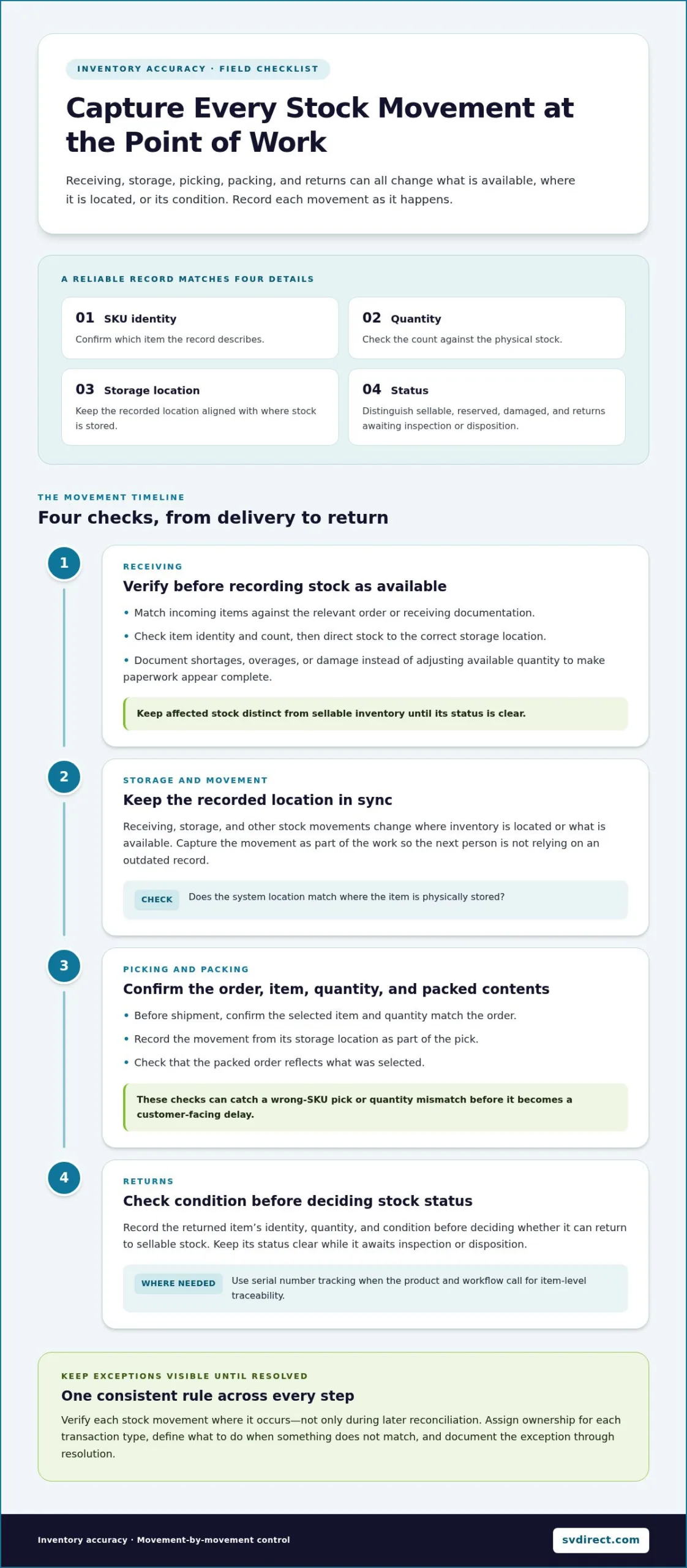
For each stock record, check four essentials: SKU identity, quantity, storage location, and status. Status should distinguish sellable goods from reserved stock, damaged items, and returns awaiting inspection or disposition. Otherwise, a system may show stock that exists physically but isn’t ready to fulfill an order.
For example, a shelf may hold ten units, and the system may also show ten. But if the units belong to SKU B and the record assigns them to SKU A, the quantity matches while the inventory record is still wrong. A consistent item-identification process helps prevent this mismatch from creating false availability.
How do inventory discrepancies affect fulfillment?
Incorrect availability can lead teams to accept orders for items they can’t locate or allocate. That can result in backorders, customer updates, and avoidable delays. If the system understates stock, teams may miss orders they could have fulfilled. Both situations make it harder to give customers reliable information.
Discrepancies can also distort replenishment decisions. An overstated quantity may postpone a needed reorder, while an understated quantity can prompt unnecessary replenishment. When records are unreliable, staff spend time checking shelves and tracing transactions instead of acting on clear information. Consistent definitions give teams a shared basis for investigating mismatches, planning replenishment, and making fulfillment decisions with greater confidence.
Inventory Accuracy Best Practices for Receiving, Picking, and Returns
Inventory records stay dependable when teams capture stock movements as part of the work, rather than leaving the updates for later. Receiving, storage, picking, packing, and returns all change what’s available, where it’s located, or what condition it’s in. A missed or delayed update at any step can leave the next person working from an outdated record.
Verify each stock movement where it occurs, not only during later reconciliation. Assign ownership for recording each type of transaction, define what to do when something doesn’t match, and keep the exception visible until it’s resolved. The discussion in Inventory Accuracy: Essential, but Often Overlooked reinforces why routine inventory checks matter. Strong day-to-day controls also help prevent discrepancies from accumulating between reviews.
What checks improve receiving accuracy?
At receiving, match incoming items against the relevant order or receiving documentation. Verify the item identity and count before recording the stock as available, then direct it to the correct storage location. If a delivery contains a shortage, overage, or damaged item, record the exception rather than adjusting available quantity to make the paperwork appear complete.
Document the difference with enough detail for follow-up. This helps the team resolve the immediate issue and spot recurring process gaps. Keep affected stock distinct from sellable inventory until its status is clear.
How can picking, packing, and returns controls reduce errors?
Before shipment, confirm that the selected item and quantity match the order. Record the movement from its storage location as part of the pick, then check that the packed order reflects what was selected. These steps help catch a wrong-SKU pick or quantity mismatch before it becomes a customer-facing delay.
Returns need the same care. Record the item identity, quantity, and condition before deciding whether it can return to sellable stock. Where the product and workflow call for item-level traceability, serial number tracking can connect a specific unit to its inventory record.
These inventory accuracy best practices work best when exception handling is documented and ownership is clear from one step to the next. For teams coordinating inventory management and eCommerce fulfillment, discussing a tailored fulfillment workflow can be a practical next step toward consistent transaction controls.
Why Inventory Software Alone Cannot Guarantee Inventory Accuracy
Inventory software can show recorded stock, organize transaction history, and make exceptions easier to spot. But it can’t record a movement that staff never enter or correct an item identified under the wrong SKU. The system reflects the information it receives. Reliable visibility therefore depends on accurate inputs, clear ownership, and consistent work practices alongside the technology.
Barcode and RFID workflows can support faster identification and transaction capture, but they aren’t substitutes for process discipline. If an item has the wrong identifier, a scan is skipped, or a movement is recorded against the wrong location, the resulting data can still be inaccurate. Strong inventory accuracy best practices pair useful tools with staff training, documented steps, and a defined way to resolve exceptions.
What causes inventory records to drift from physical stock?
Common causes include delayed transaction entry, selecting the wrong item, entering an incorrect quantity, and putting stock in a different location from the one recorded. Returns may be recorded without their condition, damaged goods may remain listed as sellable, and transfers or manual adjustments may be missed or entered incorrectly.
Not every mismatch points to a system-wide problem. A one-time counting mistake may be isolated. Repeated errors around the same task, item, or location suggest a process gap, such as unclear instructions or a step that’s routinely skipped. The distinction matters: correcting a single record fixes the immediate count, while correcting the recurring cause helps prevent the next discrepancy.
How should teams investigate a discrepancy?
Start with evidence, not an immediate system adjustment. Recount the affected item at the recorded location, then check nearby or designated storage locations if it isn’t there. Compare the verified physical quantity with the system record before making a correction.
Next, review relevant recent activity, including receipts, picks, returns, transfers, and manual adjustments. Look for a missed transaction, wrong item or location, or a status change that wasn’t recorded. Then document the confirmed cause and corrective action. This creates a useful record for future reviews and helps managers distinguish an isolated error from a pattern.
- Verify: Recount the stock and confirm its identity and location.
- Trace: Review the transactions that could explain the difference.
- Correct: Update the record only after confirming the cause.
- Prevent: Record the process change or follow-up that addresses repeat errors.
With clear investigation ownership, teams can use system visibility to guide timely checks while keeping people accountable for validating what happened on the floor.
A Repeatable Inventory Accuracy Checklist for Daily and Periodic Reviews
A reliable review routine doesn’t depend on one large count or a single person remembering every adjustment. Combine daily transaction checks, scheduled counts, and management review so teams catch issues early, verify the facts, and learn from recurring discrepancies. Keep the steps consistent, and set the schedule around your operation’s inventory volume and priorities.
What belongs in a daily inventory accuracy routine?
Review receipts, shipments, returns, transfers, and adjustments to confirm that completed movements appear in the system of record. Then check low-stock, backorder, and other exception alerts. Assign an owner and next action to each unresolved item so an alert leads to a decision rather than sitting in an inbox.
At the end of the review, carry open exceptions forward with a clear status, the last action taken, and the person who owns the next step. This gives the next shift or review a useful starting point. Timely online order and inventory visibility can help teams see current records and follow up on exceptions.
How should teams organize cycle counts and follow-up?
Cycle counting means checking selected inventory on a recurring schedule instead of relying only on a full physical count. Set a cadence that fits the operation, then prioritize items based on practical risk factors such as fulfillment importance, movement, and discrepancy history. Avoid applying a single threshold to every product if different items create different operational concerns.
For each count, compare the verified quantity with the system record. If they differ, investigate before adjusting the record: confirm the item and location, then review relevant transactions. Document the confirmed cause and correction. If the same issue appears again, discuss it with the responsible team and update the relevant process, not just the quantity.
Use management review to look beyond individual variances. Check whether open exceptions are being resolved, whether particular items or process steps recur in discrepancy records, and whether teams are following the agreed routines. Keep the review focused on useful follow-up, with clear ownership for any process changes.
- Daily: Check transaction updates, alerts, and unresolved exceptions.
- On schedule: Count selected inventory and investigate variances before correction.
- At review: Look for recurring causes and assign process improvements.
Count, compare, investigate, correct, document, and review. This sequence turns inventory accuracy best practices into a repeatable control. It helps teams make evidence-based corrections and strengthen the routine over time.
How Visibility and Managed Fulfillment Support Inventory Accuracy
Good inventory visibility helps teams move from noticing a mismatch to investigating it. Current stock information shows what the system records now, while order histories and reports can help trace activity around a discrepancy. Together, they give staff context for checking whether a receipt, order, or other transaction explains the difference. Visibility doesn’t replace physical verification, but it helps focus follow-up.
What should teams look for in inventory visibility?
Look for current inventory information, searchable order histories, and reports that help teams review activity and exceptions. Alerts can also prompt timely attention: low-inventory notices support replenishment follow-up, receipt alerts help staff confirm incoming stock is recorded, and backorder alerts can flag orders that need review.
Silicon Valley Direct’s Remote Control™ online system provides 24/7 access to real-time order and inventory information, order histories, and reports. It can generate over 120 standard reports, with automated email alerts for low inventory levels, receipts, and backorders. These capabilities give teams a clearer starting point for investigation and follow-up. Learn more about remote order management.
How can a fulfillment partner reinforce inventory controls?
Inventory management and fulfillment work best as coordinated operations. Consistent transaction routines help keep system records aligned as stock is received, stored, picked, and shipped. Clear exception handling and direct communication also help teams understand what needs attention instead of relying on a system alert alone.
Silicon Valley Direct provides inventory management and eCommerce fulfillment, supported by workflows tailored to operational needs. Product fulfillment can include serial number tracking when item-level traceability is relevant. The company combines online visibility with customer service to help teams follow inventory activity and manage exceptions.
For operations teams looking to align inventory controls with order fulfillment, a coordinated eCommerce fulfillment workflow can support more consistent transaction records. These practical inventory accuracy best practices connect visibility to accountable follow-up, helping teams make informed decisions about stock and orders.
Build Inventory Confidence Into Every Fulfillment Step
Inventory accuracy best practices start with clear records and consistent habits. Verify stock movements as they happen, distinguish sellable inventory from reserved or damaged goods, and give discrepancies a repeatable path from investigation to correction.
Daily transaction reviews and scheduled cycle counts help teams catch mismatches before they affect orders or replenishment. When a variance appears, check the physical stock and transaction history, document the cause, and address any process that could make the error recur. Software supports this work, but reliable records still depend on people following clear procedures.
Silicon Valley Direct’s Remote Control™ system provides 24/7 inventory visibility and order history access. Automated email alerts cover low inventory, receipts, and backorders, while more than 120 standard reports help teams review activity and exceptions. Clearer information gives your team a stronger starting point for timely follow-up.
With a steady routine and the right visibility, your team can make inventory decisions with greater confidence and keep fulfillment moving forward.
Frequently Asked Questions
What does inventory accuracy mean?
Inventory accuracy is how closely inventory records match the stock physically available. The match includes more than quantity: teams also need the correct item identity, storage location, and status. For example, a unit recorded under the wrong SKU is inaccurate even if the total count is right. Likewise, damaged or reserved stock shouldn’t appear as sellable inventory. Checking each detail gives teams a clearer basis for fulfillment and replenishment decisions.
How often should a business check inventory accuracy?
Set a schedule based on inventory risk, how actively items move, and patterns in past discrepancies. Cycle counts let teams verify selected items during regular operations, while periodic broader reviews provide a wider view of stock records. Items that are operationally important or have recurring mismatches may need closer attention. Review the schedule as activity and discrepancy trends change rather than relying on one universal frequency.
What causes inventory discrepancies?
Discrepancies can start during receiving, picking, returns, or transfers, particularly when an item or quantity is recorded incorrectly. Damage can also leave stock listed as sellable, while delayed data entry can make records lag behind physical movements. Misidentifying an item or placing it in an unrecorded location creates another mismatch. Before adjusting a record, recount and review relevant transactions to identify the cause. A correction without investigation may leave the underlying process problem in place.
Can inventory software improve inventory accuracy on its own?
Software improves visibility, organizes transaction records, and can alert teams to exceptions, but it can’t correct a movement that wasn’t entered or an item recorded under the wrong identity. Inventory accuracy best practices pair system tools with reliable source transactions, trained teams, clear ownership, and documented exception follow-up. For example, a barcode workflow only helps if the right item is identified and the scan is completed at the correct process step.
How do cycle counts improve inventory accuracy?
Cycle counts improve accuracy by checking selected items on a recurring schedule instead of relying only on a full physical count. Teams compare the verified quantity with the system record and investigate any variance before making a correction. Documenting what changed and why creates a useful record for future reviews. If counts reveal the same issue repeatedly, teams can review the related task or process and address the cause, not just the individual mismatch.
What should a team do when physical stock does not match the system?
Recount the item and verify its location before changing the system record. Then review relevant transaction history, including receipts, picks, returns, transfers, and adjustments, to find evidence of what happened. Investigate the likely cause, confirm the correct quantity and status, and follow the team’s authorization process for making a correction. Document the cause and action taken. This creates a clear record for follow-up and helps teams identify repeat discrepancies.
How can a fulfillment partner help maintain inventory accuracy?
A fulfillment partner can coordinate inventory management with order processing, apply consistent transaction routines, and give teams clearer information for investigating exceptions. Silicon Valley Direct’s Remote Control™ system provides 24/7 access to real-time inventory information and order histories. It can generate over 120 standard reports, and automated email alerts cover low inventory, receipts, and backorders. These tools support timely follow-up, while clear communication and consistent workflows help keep records useful for operational decisions.