Explanation of Benefits Printing and Mailing: A Practical Workflow
A file can pass a data check and still become a confusing statement if its details are difficult to follow on the page. Reliable explanation of benefits printing and mailing depends on more than sending files to a press: claim information must be organized, personalized content must appear in the right place, and each piece must be prepared for mailing according to the job instructions.
That coordination can put pressure on internal teams, especially when statement volumes, production schedules, and quality checks converge. The goal isn’t simply to print faster. It’s to produce readable EOBs that explain complex information clearly and move through production with consistent oversight.
This guide covers the main stages, from preparing EOB data and setting up variable content to reviewing layouts, printing, and coordinating mailing. You’ll find practical checkpoints for data accuracy, readability, recipient matching, and physical production, along with ways to prepare a clear production handoff. Silicon Valley Direct provides digital printing, variable data printing, and mailing services to support a coordinated workflow.
Key Takeaways
- Understand how an Explanation of Benefits communicates a health plan’s claim decision without serving as a provider invoice.
- See how approved claim data can become individualized statements through variable data printing.
- Use separate review steps to check data accuracy, readability, recipient matching, and physical production.
- Prepare recipient data, statement content, page variations, and mailing instructions before production begins.
- Learn how explanation of benefits printing and mailing can flow through connected digital printing and mailing stages.
What Is Explanation of Benefits Printing and Mailing?
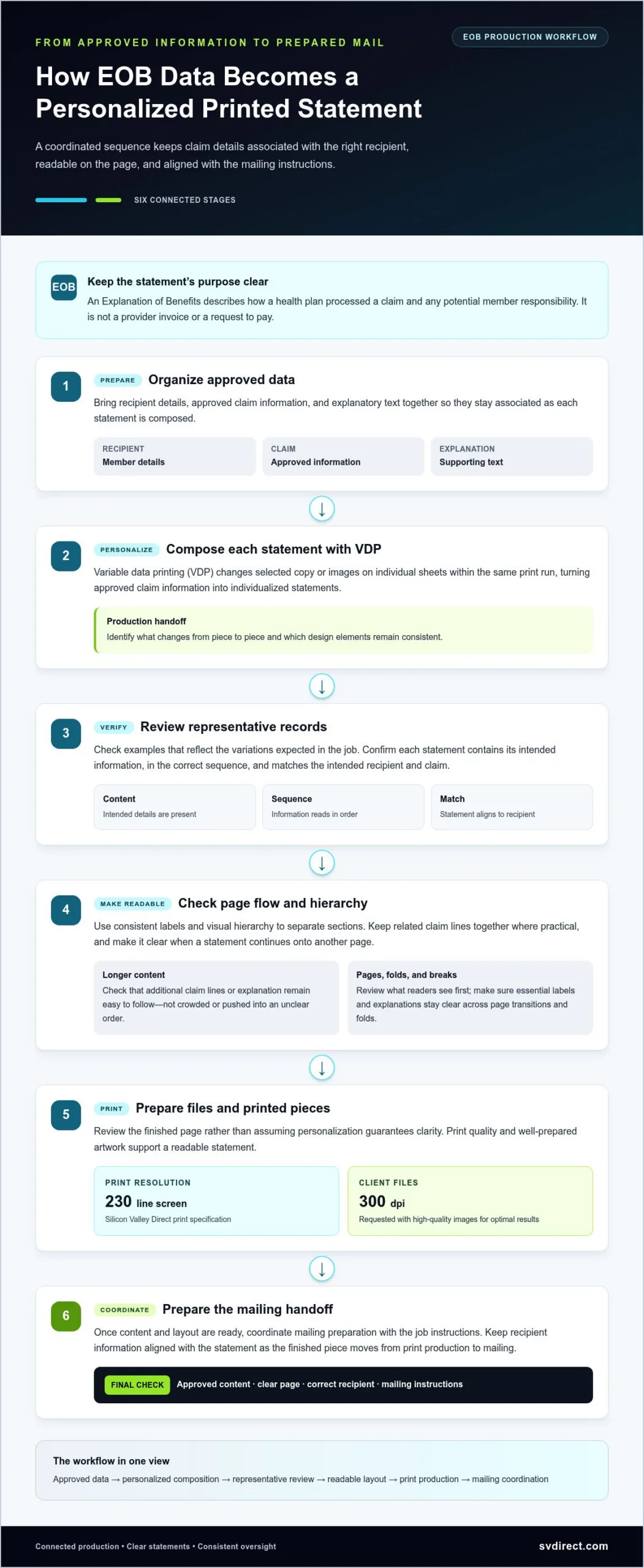
An Explanation of Benefits (EOB) is a health plan’s statement describing how it processed a healthcare claim. It reports the claim outcome and any potential member responsibility; it is not a provider invoice or a request to pay. A provider may send a separate bill for an amount owed. Because readers can mistake the two, an EOB should make its purpose clear. The Explanation of Benefits overview provides further background on the document and its role.
Explanation of benefits printing and mailing turns approved statement content into a physical communication prepared for delivery. The workflow connects claim information to a readable page, then moves the finished statement through print production and mailing. Each piece may contain different claim details, so the process needs to preserve the intended information while presenting it in a familiar, understandable structure.
What information does an EOB communicate?
An EOB may identify the member and provider, describe the claim or service, show how the plan processed it, and explain the plan payment and any potential member responsibility. Fields and wording can vary with the claim and plan. For example, a statement might identify a submitted service, show how the plan handled it, and explain whether any portion may be the member’s responsibility. The EOB explains the decision; it doesn’t replace the provider’s bill.
Why does EOB production need a dedicated workflow?
Claim statements contain individualized information, and their layouts need to accommodate differences in services, processing outcomes, and explanatory details. A consistent page structure can still support those variations, but variable sections must be placed and formatted so each statement remains coherent. That requires coordination between approved content, recipient information, and page design. Personalization alone does not complete the review.
Production accuracy also shapes the reader’s experience. A statement that is difficult to follow can leave a member unsure what the plan decided or what to do next. Clear hierarchy, legible text, and well-organized claim details help readers distinguish the plan’s explanation from a bill. Matching each statement to its intended recipient and checking the printed piece are practical quality controls.
From file preparation through mailing, a dedicated workflow gives teams defined points to review content and presentation before statements leave production. The next step is understanding how approved claim data becomes an individualized, print-ready document.
How EOB Data Becomes a Personalized Printed Statement
Once claim information is approved for statement production, it must be arranged, matched, and prepared for printing. Data and page design work together: the data provides each recipient’s claim details, while the design gives those details a consistent, readable structure. A print-ready statement should preserve approved content while accommodating differences in information and statement length.
Variable data printing (VDP) personalizes each printed EOB by changing selected copy or images on individual sheets within the same print run.
That flexibility supports individualized statements, but it doesn’t replace review. The information assigned to each statement still needs to correspond to the intended recipient and claim. A clear production handoff identifies which content changes from piece to piece and which design elements stay consistent.
Preparing variable EOB content for print
Organize approved statement content so recipient details, claim information, and explanatory text stay associated as each document is composed. Consider how records with different numbers of claim lines or amounts of explanation will appear. A layout that accommodates longer content helps prevent crowded text, awkward gaps, and information being pushed into an unclear order.
Before releasing files to print, review representative statements that reflect the variations expected in the job. Confirm that each example presents its intended content in the correct sequence and that longer statements remain easy to follow. Focus on the finished page rather than assuming personalization guarantees clarity.
Designing readable statements across multiple pages
Readers should be able to find claim details, plan payments, and potential member responsibility without having to decipher a dense block of text. Use consistent labels and visual hierarchy to distinguish sections, and keep related claim lines together where practical. If a statement continues onto another page, make the connection between pages clear.
Page breaks and folds also affect what readers see first. Review how the printed sheet will be folded or presented, and check that essential labels or explanations won’t land in an awkward position or become difficult to read. For multi-page statements, confirm that headings and claim details remain clear across page transitions.
Print quality supports readability. Silicon Valley Direct prints at 230 line screen resolution and requests client files at 300 dpi with high-quality images for optimal results. These specifications are useful when preparing artwork and visual elements for a statement.
Once statement content and layout are ready, printing can connect to mailing preparation. Silicon Valley Direct provides digital printing, variable data printing, and mailing services. To plan an EOB job, share your printing and mailing requirements and the team can discuss a solution tailored to the project.
How to Protect EOB Accuracy, Readability, and Sensitive Information
Personalization doesn’t remove the need for review. In explanation of benefits printing and mailing, accurate results depend on coordinated checks at distinct points: claim information must be correct, the statement must be understandable, each piece must match its intended recipient, and printed materials must follow the job instructions. Treating these as separate checks makes it easier to see what has been reviewed and where a problem needs attention.
Clear layouts and consistent review help turn complex claim details into statements readers can understand. A practical review can cover four areas:
- Data accuracy: Check that approved statement content is presented as intended. Claim decisions and their underlying details remain the responsibility of the organization that supplies and approves them.
- Readability: Review headings, labels, spacing, and information order so readers can follow the statement.
- Recipient matching: Confirm that each statement’s recipient information stays associated with the correct content throughout preparation.
- Physical production: Inspect printed pieces for missing pages, difficult-to-read text, or folds that interfere with essential information.
Reviewing statement content before production
Before a job moves forward, the client should approve the statement content, recipient data, and final proof materials. These approvals establish which information is authorized for production and who has reviewed it. A print partner can coordinate production details, but that work is separate from validating claim decisions or determining what the plan owes.
A representative proof shows how content and design work together on the page. Review a straightforward statement and versions with longer or differently structured claim details. Look for labels that are hard to find, crowded sections, and page transitions that disrupt the reading order. Resolve unclear elements before production proceeds.
Maintaining control through print and mail handoffs
Clear job instructions keep each handoff aligned. Document the approved content, expected statement variations, mailing data, and agreed review points. If an instruction changes, send the updated version to everyone who needs it before work continues. This reduces ambiguity between file preparation, printing, and mail processing.
Recipient and mailing data also deserve deliberate handling. Keep approved information organized, limit unnecessary copies, and use clear handoff procedures so the correct mailing details stay linked to each piece. These are workflow practices, not a guarantee of privacy or compliance. Teams should define responsibilities and safeguards appropriate to their own operations.
Before dispatch, compare completed pieces with the approved job instructions. Confirm that the intended content and mailing information align, and address any visible production issue through the agreed review process. Defined checkpoints make it easier to catch discrepancies before statements leave the workflow. Once statements enter the postal stream, resources from commercial print and communications providers like Linemark can help teams navigate postal tracking and delivery milestones.
A Practical EOB Printing and Mailing Preparation Checklist
A well-prepared job gives each stage a clear reference point, from defining the mailing to releasing print-ready files. Use this sequence to bring the scope, content, recipient information, and production instructions together before work begins. Requirements vary by job, so align schedules and instructions with the actual scope rather than assuming every mailing follows the same plan.
What to organize before submitting an EOB print job
Gather the materials and decisions that will shape the job. Keep approved content distinct from working drafts, and identify the statement versions expected in production. Organizing these inputs up front reduces ambiguity during preparation and review.
- Define the scope. Identify the mailing’s purpose, expected quantities, intended recipients, and planned statement variations.
- Gather approved content. Assemble the final statement copy and recipient records intended for production. Keep responsibility for claim-content approval clear within your organization.
- Organize page variations. Describe how statements may differ, such as by length, number of claim lines, or explanatory content. Specify how each variation should flow across pages.
- Prepare print assets. Include the visual elements needed for the statement. For optimal print results, provide high-quality image files at 300 dpi.
- Document mailing instructions. Provide mailing data and handling directions, along with project-specific requirements and schedule considerations.
What to review at proof and production handoff
Review the proof as a reader would, then compare it with the approved content and job instructions. The handoff should make clear what has been approved and what the production team should do next.
- Check representative versions. Review statements with different content or lengths. Confirm that personalized fields appear where intended and that text remains legible.
- Follow the page flow. Look for awkward breaks, misplaced headings, or details that become hard to follow across pages and folds.
- Confirm the release materials. Make sure the approved statement content, recipient data, and mailing instructions correspond to the job before production proceeds.
- Align on the next step. Silicon Valley Direct’s digital press sheets emerge dry and ready for the next production step, supporting a connected transition through the workflow.
Schedules and project requirements vary with the job. Clear instructions and agreed review points help the team coordinate the handoff without relying on assumptions.
Coordinating EOB Printing and Mailing with Silicon Valley Direct
EOB production involves more than preparing a file for a press. Content, individualized statement elements, print production, and mailing all need to connect in a clear sequence. Silicon Valley Direct provides digital printing, variable data printing, healthcare mailing services, and mailing support, giving teams a coordinated way to move an EOB job from print preparation toward mailing. Clear communication aligns the work with your content, schedule, and project requirements.
Connecting print and mailing can reduce the number of separate handoffs your team needs to coordinate. Instead of managing them as unrelated tasks, you can plan how statement design, variable content, and mailing instructions fit together. This doesn’t replace your internal review of claim content or recipient data. It gives the production process a shared set of instructions to follow.
What an integrated EOB production relationship can support
Variable data printing can change copy or images on individual sheets within a run, supporting individualized EOBs and related presentation materials. Silicon Valley Direct’s HP Indigo 5500 Digital Press produces short-run work, and press sheets emerge dry and ready for the next production step. Coordinating these capabilities with mailing services helps keep production stages aligned with the same job instructions.
Silicon Valley Direct emphasizes flexible solutions, proactive communication, and first-class customer service. Project planning can focus on your team’s needs: statement variations, print assets, mailing instructions, and review points. For broader information about healthcare mailing, explore the healthcare industries served as part of your planning.
Start a conversation about your EOB mailing project
A useful project discussion starts with the basics. Share the mailing’s purpose and scope, the content and statement versions you’re preparing, the print assets involved, and your mailing requirements. Include any target schedule so planning can account for the specific job. Clear details support a tailored production plan.
Whether you’re organizing a short-run job or coordinating variable statement content with mailing, Silicon Valley Direct can discuss how its printing and mailing services fit your needs. The goal is a practical plan shaped around your materials and requirements, with communication throughout the process.
Put Your EOB Workflow Into Motion
A dependable EOB mailing starts by bringing the people, materials, and decisions that shape the job into one planning conversation. Identify what your team wants recipients to understand, which statement variations are involved, and how print production should connect with mailing. This shared starting point can turn a complex process into a coordinated project with clear expectations at each handoff.
Silicon Valley Direct works with clients to develop flexible print and mailing solutions around project needs. If you’re preparing an explanation of benefits printing and mailing project, request a quote to share your goals and discuss a production approach for your materials.
With a clear plan and responsive collaboration, your team can keep the workflow organized and focus on statements that serve their readers well.
Frequently Asked Questions
Is an Explanation of Benefits the same as a medical bill?
No. An EOB explains how the health plan processed a claim, while a medical bill comes from a provider and requests payment for care. If a member receives both, they can compare the EOB’s explanation of potential member responsibility with the provider’s separate bill. The documents may relate to the same service, but they serve different purposes, so an EOB shouldn’t be treated as an invoice.
Can EOBs be personalized for each member?
Yes. Individual EOBs can include content tailored to each member and claim. For example, variable data printing can change copy or images across sheets in one print run. Before production, review examples that reflect different statement versions and check whether each version’s intended content appears in the right place. Personalization can vary while the statement’s overall structure remains familiar.
How many pages can an EOB statement include?
There isn’t one standard page count for every EOB. The number of pages depends on the claim information, amount of explanation, and statement design. A statement covering several claim lines may need more space than one with fewer details. During layout review, check that continuation pages are easy to follow and related details remain connected rather than appearing to be separate statements.
What image resolution should be supplied for EOB printing?
For optimal print results, supply high-quality image files at 300 dpi. This guidance applies to image assets used in the statement, such as a logo or other visual element. Review the proof at its intended printed size to see whether images look clear and compete with important claim information. Keep essential explanations in readable text rather than relying on images alone to communicate them.
Are digital EOB prints ready for mailing as soon as they leave the press?
Not necessarily. Silicon Valley Direct’s press sheets emerge dry and ready for the next production step, but that doesn’t mean each sheet is already a completed mailpiece. Depending on the job, further preparation such as addressing, folding, or inserting may be part of the mailing workflow. Plan the handoff around the remaining work, and distinguish press readiness from readiness for dispatch.
Can short-run digital printing be used for EOB mailings?
Yes. Silicon Valley Direct’s HP Indigo 5500 Digital Press produces short-run work, making short-run digital printing an option for EOB projects. The production plan depends on the job’s quantity, statement variations, and mailing needs. For example, a project with several versions benefits from coordinating proofing and content handoffs with the print run. Discussing the scope helps shape a practical approach.
How can a team make EOB statements easier to understand?
Use clear labels and visual hierarchy to help members locate the claim outcome, plan payment, and any potential responsibility. Group related claim details, keep terminology consistent, and avoid crowding the page. A useful proofing test is to ask someone unfamiliar with the layout to find these key details. If they have to guess where to look, adjust the design before approving production.
What should be included in an EOB printing and mailing project brief?
A useful explanation of benefits printing and mailing brief should describe the project scope, expected quantities, approved content, recipient data, statement variations, image assets, and mailing instructions. Include schedule considerations and identify who will approve the proof and release materials for production. Note how statements may differ in length or content so the team can plan for those versions in the layout and review process.