


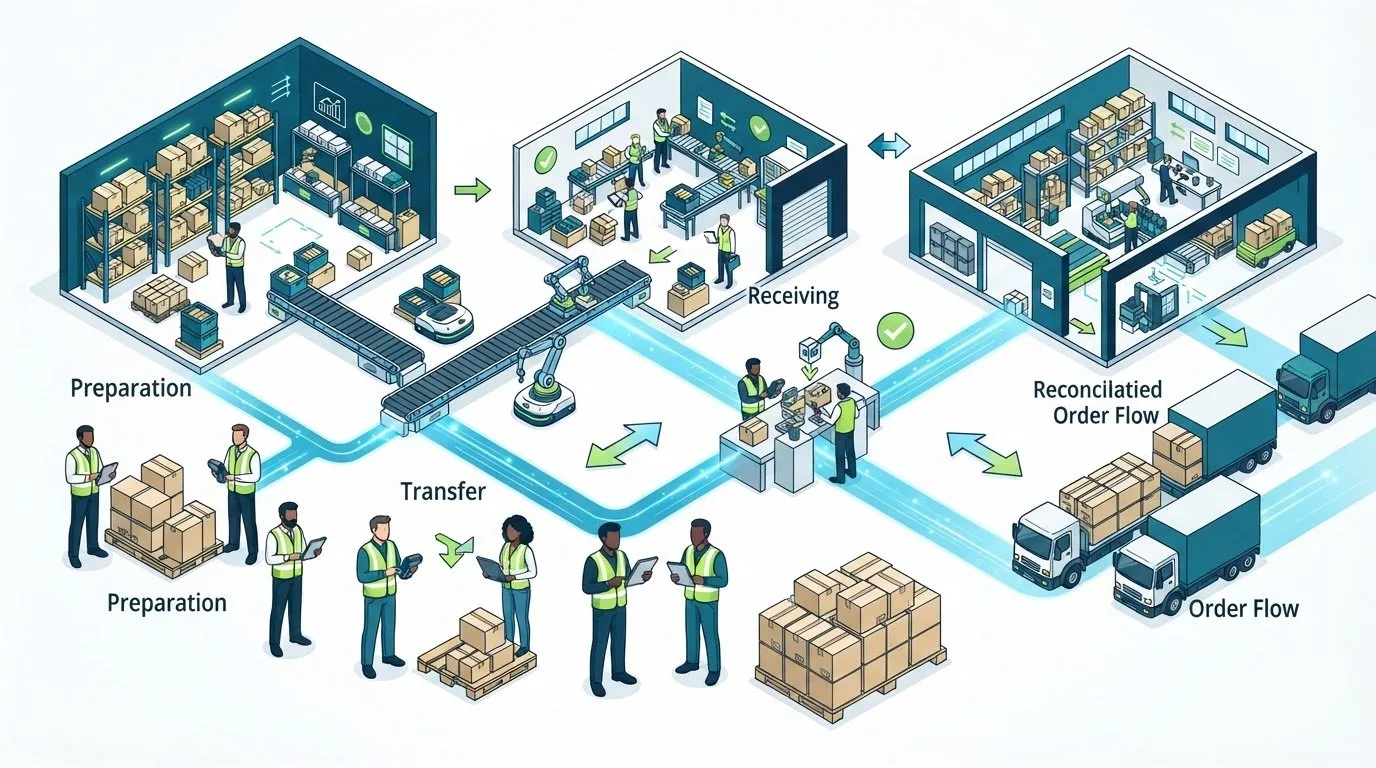
How to Migrate Inventory to a New 3PL Without Disruption
A safe 3PL transition depends less on a fast warehouse cutover than on clear checkpoints. A rushed move can leave SKU records out of sync, orders routed incorrectly, or inventory counts uncertain. Learning how to migrate inventory to a new 3pl means coordinating data, physical stock, integrations, and order flow, then verifying each handoff before it carries the full load.
Moving providers can disrupt customer orders if stock, systems, or responsibilities are unclear. A controlled migration reduces that risk by assigning owners and checking progress at each stage. This guide covers the sequence, from preparing SKU and inventory records to testing integrations, reconciling received stock, and managing launch. Silicon Valley Direct’s Remote Control system gives clients 24/7 access to order progress and real-time inventory, supported by more than 120 standard reports.
Key Takeaways
- Build a SKU-level inventory baseline and reconcile records with physical counts before approving transfer quantities.
- Choose a phased transfer or coordinated cutover based on SKU velocity, stock availability, order volume, and system readiness.
- Match received quantities and product identifiers against approved transfer records before routing orders from the new 3PL.
- Assign launch owners and define escalation paths so inventory or order discrepancies are investigated promptly.
- Use a step-by-step plan to prepare, transfer, verify, and stabilize fulfillment operations.
Why Migrate Inventory to a New 3PL Without Disrupting Fulfillment?
A 3PL transition involves more than moving cartons between warehouses. It also transfers stock records, workflows, system connections, and responsibility for processing orders. These pieces depend on one another. If a product arrives under an unclear SKU, for example, the receiving team may be unable to match it to the transfer file, leaving its available quantity uncertain.
That complexity does not make disruption inevitable. A move may make sense when a fulfillment setup no longer fits the business, order volumes have changed, or operational needs have evolved. The goal is to plan the handoff with the right people, information, and checks in place. For an overview of the broader logistics role, see Third-party logistics (3PL). The focus here is the operational handoff that keeps fulfillment information and responsibilities aligned.
What does a 3PL inventory migration involve?
The physical transfer is only one part of the work. A complete migration accounts for SKU records and product identifiers, inventory counts, relevant order data, system integrations, and procedures for checking incoming stock. Together, these records give both fulfillment teams a shared reference for what is moving and how each item should be identified and handled.
Define responsibilities on both sides. The outgoing team needs instructions for preparing and releasing stock. The incoming team needs agreed transfer records and a process for receiving and recording it. Your internal team coordinates decisions and keeps system and fulfillment owners aligned. Silicon Valley Direct provides eCommerce fulfillment and inventory management to support those connected workflows.
What makes a migration risky, and what reduces uncertainty?
Incomplete item records, inconsistent counts, unclear decision-making, or untested workflows can turn small discrepancies into launch-day obstacles. If the receiving team cannot match a carton’s product identifier to the transfer file, for example, that stock may need investigation before its available quantity can be trusted. A documented checkpoint surfaces the issue during receiving, before orders depend on the inventory record.
Before the move, agree on checkpoints for record readiness, transfer authorization, receipt, count reconciliation, system updates, and launch approval. Give each checkpoint an owner and define the evidence needed to close it, such as a matched quantity or a resolved discrepancy. Keep an issue log with the SKU, variance, assigned owner, and resolution status. These controls make progress visible and help teams investigate exceptions without losing sight of customer orders.
A controlled 3PL inventory handoff verifies stock, data, workflows, and ownership at each stage. That is the practical foundation for how to migrate inventory to a new 3pl: protect order flow by confirming readiness rather than assuming every record and process will carry over unchanged.
Prepare Inventory Data and Fulfillment Systems Before the Move
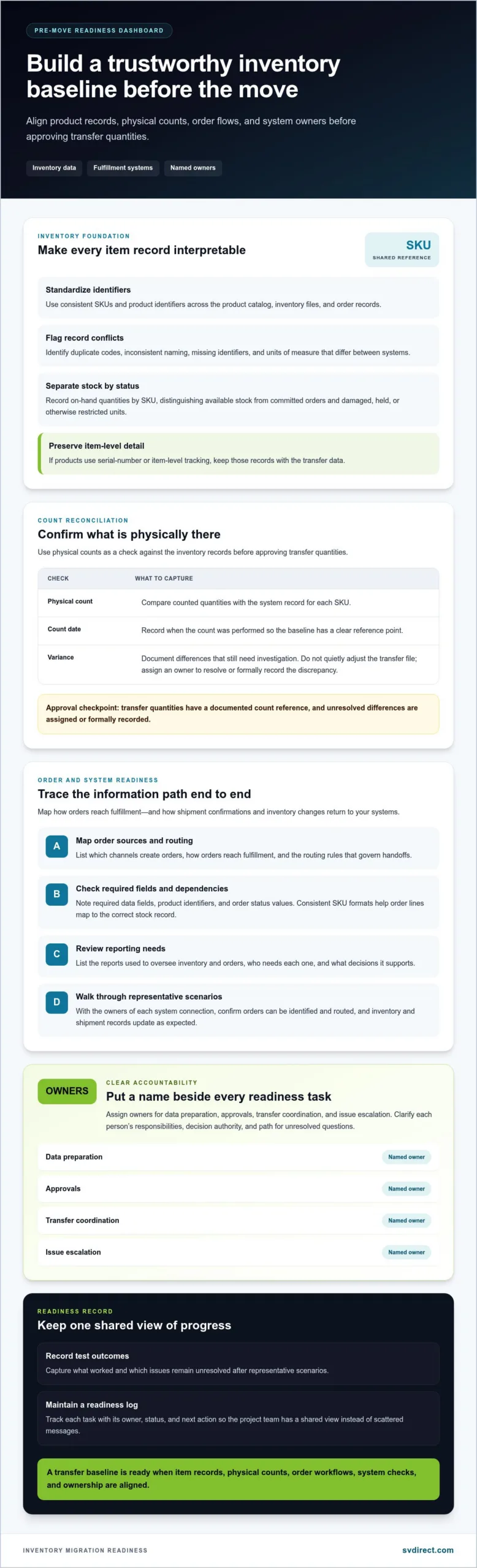
Before approving transfer quantities, create one dependable view of what the business owns and how each item is represented across its systems. The goal is not just to export a spreadsheet. Both fulfillment teams need to interpret the catalog, inventory records, and order data consistently. A clean baseline also gives you a reference for investigating differences later.
Review the current inventory workflow alongside practical inventory management best practices, such as consistent tracking and receiving records. Then assign named owners for data preparation, approvals, transfer coordination, and issue escalation. Each owner should know their responsibilities, which decisions they can make, and where unresolved questions go.
Create a reliable inventory and SKU baseline
Standardize each SKU and product identifier across the product catalog, inventory files, and order records. Flag duplicate codes, inconsistent naming, missing identifiers, and units of measure that differ between systems. Record on-hand quantities by SKU, separating available stock from committed orders and damaged, held, or otherwise restricted units where applicable. If products use serial-number or item-level tracking, preserve those records with the transfer data.
Compare records with physical counts before approving quantities to move. Document the count date and any variance that still needs investigation. If the system shows more units than the count, do not quietly adjust the transfer file. Assign someone to resolve or formally record the difference so the new inventory record has a clear starting point.
Prepare order flows, integrations, and reporting
Map the full information path: which channels create orders, how orders reach fulfillment, and how shipment confirmations and inventory changes return to your systems. Note routing rules, required data fields, and dependencies such as product identifiers or order status values. A consistent SKU format, for example, can determine whether an order line maps to the correct stock record.
List the reports your team relies on to oversee inventory and orders. Identify who needs each report and what decisions it supports. This makes it easier to assess whether the new workflow provides the visibility your operation needs. Silicon Valley Direct’s Remote Order Management provides access to real-time inventory and order progress.
Before setup is considered ready, walk through representative order scenarios with the people who own each system connection. Confirm that orders can be identified and routed, and that inventory and shipment records update as expected. Record test outcomes and unresolved issues. A readiness log with the task, owner, status, and next action gives the project team a shared view instead of scattered messages.
Good preparation turns how to migrate inventory to a new 3pl into a manageable sequence: align the records, confirm the data flow, and make ownership visible. For fulfillment planning that accounts for inventory and system needs, see Silicon Valley Direct’s fulfillment services.
Choose a 3PL Inventory Transfer Strategy That Fits Your Operation
Match the transfer approach to how your business sells and fulfills. A phased move shifts selected SKUs or inventory groups in stages. A coordinated cutover moves the operation to the new fulfillment setup as one planned transition. Either approach can work when its requirements are clear and the team has controls for stock, order routing, and exceptions.
Compare the options against SKU velocity, available stock, order volume, system readiness, and operational constraints. A fast-moving item with limited stock may need different treatment from a slow-moving product with ample inventory. Consider how long each SKU can remain available during the handoff, whether both operations can process orders, and how your team will keep inventory and order status clear. The right approach is the one your operation can execute and verify reliably.
When can a phased inventory transfer make sense?
A phased transfer limits the scope of each checkpoint by moving selected SKUs, product groups, or channels in stages. It may suit an operation that needs to keep fulfillment active while new processes come into use. But split stock adds coordination. Define which location fulfills each order, who owns each inventory record, and how available-to-sell quantities are calculated so units are not counted twice or overlooked.
Set routing rules before the first group moves. For example, orders for transferred SKUs can route to the new operation only after receipt and inventory updates are verified, while other products continue through the existing workflow. Assign one owner to monitor exceptions across both operations, and agree how stock availability changes will be communicated.
When might a coordinated cutover be appropriate?
A single coordinated cutover may fit when SKU and stock records are verified, system connections are ready, and the receiving plan is clear. It can simplify inventory ownership by concentrating the changeover around an agreed point. The team still needs to define when order routing changes, who controls inventory during the handoff, and how to handle orders already in progress.
Set timing according to the operation’s scope and readiness, not a standard calendar. If key records, receiving steps, or order-flow tests remain unresolved, adjust the plan rather than treating the scheduled cutover as proof of readiness.
Make the decision through explicit gates. At each gate, review the evidence and decide whether to proceed, pause, or adjust:
- Transfer scope: Are the SKUs and quantities included in this move clearly identified?
- Stock availability: Can customer orders continue without treating the same units as available in two places?
- Systems and routing: Do order, inventory, and shipment updates follow the intended path?
- Receiving readiness: Are responsibilities and discrepancy handling clear for incoming stock?
Record each decision, its owner, and any conditions that must be met before the next step. This turns how to migrate inventory to a new 3pl into a controlled choice: select a transfer method your team can monitor, then let verified readiness determine whether the plan proceeds or changes.
Move, Receive, and Verify Inventory Before Routing Orders
Once the transfer plan is approved, keep the handoff traceable from release through receipt. Authorize only the inventory included in the agreed transfer, then match shipment documentation to the approved SKU list and quantities. This gives the receiving team a clear reference and helps prevent undocumented stock from entering available inventory.
At receipt, compare product identifiers and received counts with the transfer record before marking stock as available. A shipment can arrive intact yet still contain an incorrect SKU, an unexpected quantity, or stock that needs investigation. Keep exceptions visible and assign an owner rather than allowing uncertain inventory to flow into order allocation.
Use a receiving and reconciliation checkpoint
Use a consistent receiving record for each SKU. Capture the expected quantity, received quantity, product identifier, and receipt status. Record shortages, overages, damaged units, and identifier mismatches as distinct discrepancies, with the shipment or transfer reference and enough detail to trace the affected stock.
Separate verified inventory from units awaiting investigation or system updates. Assign an owner to each discrepancy, record the next action, and keep affected quantities out of available-to-sell stock until they are resolved. This distinguishes what has arrived from what can reliably support an order.
Test fulfillment workflows before the cutover
Before changing routine routing, test representative workflows using the order channels and product types involved. Confirm that an order arrives with the expected SKU and details, inventory is allocated correctly, pick-and-pack instructions are followed, shipment confirmation returns to the right system, and stock updates reflect the transaction. Include expected exceptions, such as a partially fulfilled order or an item that is temporarily unavailable.
Capture each test result, who reviewed it, and what remains unresolved. Use this checklist to make the launch decision based on evidence:
- Order receipt: Does the test order appear with the correct items and customer-facing details?
- Allocation and handling: Is the intended stock selected, and are product-specific handling instructions visible?
- Shipment update: Does confirmation return with the correct order reference and status?
- Inventory update: Does the system reflect the change without duplicating or overlooking units?
If a test fails, pause the affected workflow, document the issue, and assign an owner before enabling that route for live orders. A clear test record also helps teams distinguish a system issue from a receiving discrepancy, without relying on memory or informal messages.
Route orders only after received quantities are reconciled, inventory records are updated, and representative workflows pass review. This checkpoint connects physical stock to digital records and fulfillment processes, giving the team better visibility and control during cutover.
Launch and Stabilize Your New 3PL Fulfillment Operation
Cutover is the start of the next phase, not the end of the migration project. Once routine orders begin flowing through the new operation, keep ownership and communication clear while confirming that daily activity matches expectations. Assign a launch lead to coordinate issues, name an owner for each operational area, and agree how urgent exceptions will be escalated and resolved.
Set regular operational checkpoints and maintain a shared record of open issues, owners, next steps, and resolution status. Investigate unexpected inventory adjustments, orders that remain in an unusual status, shipment records that do not match order activity, and recurring discrepancies. Clear escalation paths help the right people respond before an unresolved exception becomes a pattern.
Monitor the first orders and inventory updates
Review order progress from receipt through shipment, then compare the resulting inventory changes with expected transactions. Check whether adjustments have a clear reason, shipment activity matches order status, and discrepancies have owners. Track recurring exceptions by type and assign someone to investigate the cause. Informal updates can help a conversation, but a shared log gives the team a dependable record.
Use available reporting and inventory visibility to support these reviews. Remote Control gives clients access to order progress and inventory information, helping teams keep operational activity in view. Set checkpoints that fit the transition’s scope and continue them until workflows are stable, open issues have owners, and responsibilities are understood.
Build a clear working relationship with the new 3PL
Consistent communication makes it easier to surface small issues early and coordinate fixes. Agree which updates the teams share, who receives them, how exceptions are raised, and when decisions need joint review. A useful operating rhythm connects warehouse activity with your own order and inventory records, giving both teams a shared picture instead of relying on assumptions.
Strong fulfillment partnerships also depend on people who stay accountable and responsive as needs change. Silicon Valley Direct client testimonials describe long-term relationships and real-time visibility. Its eCommerce fulfillment services bring order processing, inventory management, and operational oversight together around business needs.
As you put into practice how to migrate inventory to a new 3pl, treat stabilization as a managed stage. Review performance, resolve exceptions with named owners, and refine the working rhythm as responsibilities settle. Accurate updates give your team a firmer basis for decisions and help protect the customer experience beyond cutover.
Make Your Next Fulfillment Move with Confidence
A 3PL transition is also an opportunity to build stronger operating habits for the next stage of your business. Keep ownership visible, make performance easy to review, and use what the team learns after launch to refine workflows as needs evolve. That discipline is part of how to migrate inventory to a new 3pl while building a more resilient fulfillment operation.
Choose a fulfillment relationship that pairs clear communication with practical inventory oversight. Silicon Valley Direct works with clients as a fulfillment partner, coordinating planning and day-to-day operations around their needs.
Plan your next fulfillment move with Silicon Valley Direct.
A thoughtful plan and a responsive team can help your next fulfillment chapter begin on a steady footing.
Frequently Asked Questions
How long does it take to migrate inventory to a new 3PL?
There is no single timeline for every migration. Catalog scope, inventory volume, system connections, transfer approach, and unresolved data issues all affect the schedule. Build the plan around readiness milestones, such as approved records, completed receiving checks, and tested order flows, rather than choosing a launch date first. Allow time to investigate exceptions, since unresolved discrepancies can affect when specific products are ready to fulfill.
Can I keep fulfilling orders while inventory is being transferred?
Often, yes, if the transition plan keeps order routing and available stock clear while inventory is in transit or split between operations. Decide which location handles each product or order, and update availability so the same units are not promised twice. For example, route a SKU to the new operation only after its stock is received and accurately recorded. The right setup depends on system readiness and how much overlap your operation can manage.
Should I move all SKUs to the new 3PL at the same time?
Not necessarily. A phased move may suit a catalog with distinct product groups or different demand patterns, while a coordinated cutover may fit when records, systems, and receiving plans are aligned. Consider which items are fast-moving, whether stock is sufficient during transit, and how routing will work if inventory is split. Choose an approach your team can monitor, and define the conditions that must be met before each stage proceeds.
What should I do if the new 3PL receives a different quantity than expected?
Keep the affected quantity out of available-to-sell stock until the difference is understood. Compare the receiving record with the approved transfer details, shipment documentation, and outgoing inventory record. Note the SKU, expected and received quantities, and relevant shipment reference, then assign an owner to investigate. If the variance affects only part of a shipment, distinguish verified units from those under review so confirmed stock can be managed accurately.
How do I handle returns during a 3PL inventory migration?
Set a clear return destination and processing rule for orders placed before and after cutover. Identify who receives each return, how the original order is located, and how returned items are classified before inventory is updated. A resellable item, for example, should not appear as available until its condition and record are reviewed. Share routing instructions with customer service and fulfillment teams so returned parcels do not fall between processes.
How should I tell customers about a change in fulfillment operations?
Communicate based on what customers need to know, not simply because warehouse operations have changed. If the transition does not affect ordering, delivery expectations, or support, a broad announcement may not be necessary. If an order could be affected, provide a clear update through the usual customer communication channel, explain the practical impact, and give the customer a way to follow the order. Keep internal support teams aligned so they can answer questions consistently.
What inventory information should be preserved for products tracked by serial number?
Preserve each serial number as an individual record linked to its correct SKU, along with the product’s current inventory status and any associated order or receipt reference already in your records. Check for missing or duplicate serial numbers before transferring the data, then reconcile the records against the physical units. This supports accurate item-level tracking after the move. Silicon Valley Direct’s product fulfillment includes serial number tracking capability for inventory management.